
iOS development on Windows: the complete guide (21 apps, no Mac)
On this page · 21 sections
- The data behind this guide
- What you can and cannot do on Windows
- Your options for the Mac part, compared
- Step 1: get Swift onto your Windows machine
- Step 2: describe the project in YAML, never in Xcode
- Step 3: rent the Mac with one workflow file
- Where the Mac minutes actually go
- Step 4: signing without a Mac (the part that broke)
- Step 5: screenshots and the listing, all from Windows
- Step 6: testing when you can't hold the iPhone
- Step 7: in-app purchases with StoreKit 2
- The errors you will see, and what each one really means
- The learning curve: 13 failures, then zero
- App Review is the real bottleneck
- Guideline 4.3: what happens when shipping gets too cheap
- What it costs
- What came out the other end
- A 7-day plan to ship your first iOS app from Windows
- FAQ: iOS development on Windows
- The numbers
- What's next
TL;DR: You can do iOS development on Windows in 2026 if you rent the Mac part by the minute. I shipped 21 iPhone apps to App Store Connect from a Windows PC between September 10 and September 27, 2026, and 8 are live on the US App Store today. For this guide I pulled every CI run, every job step, every commit and every App Review email behind them on October 18: the median app went from its first commit to its first App Store submission in 2.2 hours, a release costs about 4 minutes of rented Mac time, and the thing that stopped 13 of the 21 apps was never Windows. It was App Review.
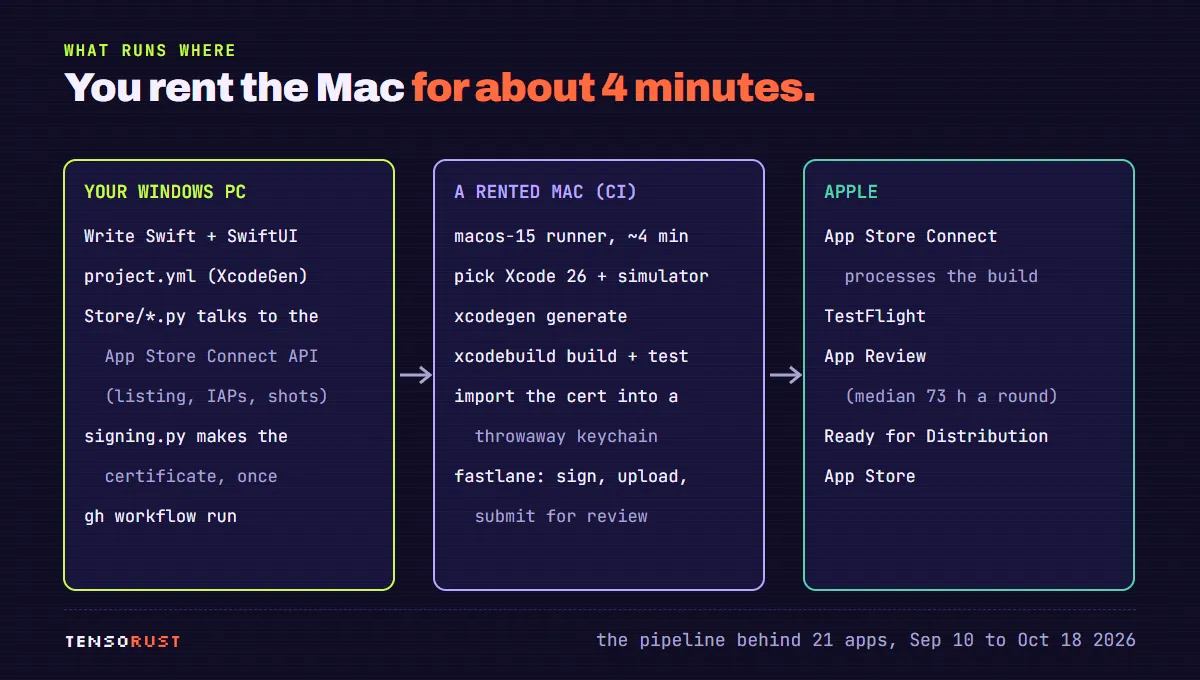
Short answer for the search. Xcode only runs on macOS, so "iOS development on Windows" really means splitting the work. You write the Swift, the project file, the store listing and the release scripts on Windows. A macOS machine you never touch compiles, signs and uploads. The cheapest version of that machine is a GitHub Actions macOS runner, which GitHub does not charge for on public repositories. You still need the $99 a year Apple Developer Program. You do not need Keychain Access, Xcode's Organizer window, or a Mac on your desk.
This is the pillar guide for everything I have written about the pipeline. It walks the whole path once, from an empty folder on Windows to "Ready for Distribution", and links the deep-dives where each step gets its own article: the CI pipeline and signing, what the 20 paid-for builds really cost, how long App Review took across 64 decisions, and one of the apps that came out of it. Everything below is real code from the app repos and real numbers pulled today.
The data behind this guide

Every number here comes from records the pipeline already leaves behind, pulled on October 18, 2026 between 4:12 and 4:20 PM Eastern. Nothing was rebuilt for the article and no app was touched.
- GitHub: all 384 workflow runs in the 21 app repos, every commit, and for each of the 81 successful App Store runs, every step with its start and end time, through the workflow runs and workflow jobs REST APIs.
- Apple's emails: the 64 App Review decisions from the review time article, each with Apple's own "Submitted" timestamp. I checked the inbox again this morning: no new decisions since October 12.
- The App Store: the iTunes lookup API for every app on my developer account, with version, release date and file size.
- The code: a shallow clone of each repo, counting non-blank lines of Swift.
The collector is 40 lines of Python around the GitHub CLI. This is the core of it (collect.py, trimmed):
def api(path):
    r = subprocess.run(["gh", "api", "-H", "Accept: application/vnd.github+json", path],
                       capture_output=True, text=True, encoding="utf-8")
    if r.returncode != 0:
        if "429" in r.stderr or "rate limit" in r.stderr.lower():
            sys.exit("RATE LIMIT, stopping")
        return None
    return json.loads(r.stdout)

for repo in REPOS:
    runs, page = [], 1
    while True:
        d = api(f"repos/Mattbusel/{repo}/actions/runs?per_page=100&page={page}")
        if not d: break
        runs += d["workflow_runs"]
        if len(d["workflow_runs"]) < 100: break
        page += 1
    jobs = {}
    for r in runs:
        if r["name"] == "App Store" and r["conclusion"] == "success":
            jobs[r["id"]] = api(f"repos/Mattbusel/{repo}/actions/runs/{r['id']}/jobs")
Point it at your own repos and you get the same picture of your own pipeline: where the minutes go and which steps fail. It costs a few hundred API calls, well inside GitHub's hourly limit.
The headline numbers, before the how-to:
- 53,932 lines of Swift pushed to the 21 public repos, median 2,308 non-blank lines per app (the local working copies hold a bit more). No
.xcodeprojin any of the 21 repos. - 384 CI runs: 139 App Store runs, 165 Build runs, 18 review-video recordings, 62 GitHub Pages deploys. About 2,572 minutes on macOS runners, queue to finish.
- First commit to first App Store submission: median 2.2 hours, fastest 25 minutes (Race Pace, September 27).
- First submission to approval, for the 8 apps that got one: median 4.4 days, range 3.7 to 7.2.
- Status today: 21 built, 21 submitted, 8 approved, 8 live. 0 of 21 approved on the first try.
What you can and cannot do on Windows
The split is cleaner than most forum threads make it sound. Apple's toolchain (the compiler with the iOS SDK, the code signer, the Simulator and the uploader) only ships inside Xcode, and Xcode only runs on macOS. Everything that is text, or talks to Apple over HTTPS, works from Windows.
| Task | Where it ran for the 21 apps | Tool |
|---|---|---|
| Writing Swift and SwiftUI | Windows | any editor + coding agents |
| The Xcode project | Windows (as YAML), generated on the Mac | XcodeGen |
| Bundle ID, listing text, age rating, review notes, screenshots upload, in-app purchases | Windows | App Store Connect API from Python |
| The distribution certificate | Windows, once | Python cryptography + the API |
| Compiling for iOS, unit tests, Simulator screenshots | rented Mac | xcodebuild, simctl |
| Signing, uploading, submitting for review | rented Mac | fastlane |
| Creating the app record | a browser, once per app | App Store Connect website |
That last row is the one surprise. The API can edit almost everything about an app, but our POST /v1/apps came back 403, so each new app record is one form in the App Store Connect website. It takes about a minute. Every other field is scripted.
Your options for the Mac part, compared
You need some macOS machine for the compile-sign-upload half. Here are the real choices, with what I could verify about each on October 18:
| Option | What it is | The catch |
|---|---|---|
| GitHub Actions macOS runner (what I used) | A fresh macOS VM per job, Xcode preinstalled | Free on public repos. Private repos pay $0.062 a minute for the standard 3 or 4 core macOS runner. No screen: everything is scripted. |
| Expo EAS Build | If you write React Native with Expo, "iOS builds run on macOS runners hosted in Expo's macOS cloud" | Only for Expo/React Native projects. You trade Swift for JavaScript. |
| AWS EC2 Mac | A real Mac mini in a data center | A minimum allocation of 24 hours per dedicated host, so even a 4 minute build bills a day. |
| Cloud Mac rental by the month | A remote desktop on a Mac | You get the GUI, but you are paying for a whole machine to sit idle between releases. |
| Flutter | Cross-platform UI in Dart | Flutter's iOS setup page starts with installing Xcode. You still need one of the Macs above to build for iOS. |
| macOS in a VM on your PC | The "Hackintosh" route | Apple's macOS license limits installs to Apple-branded hardware. I did not try it and would not build a business on it. |
My opinion: for a solo developer or a small studio, the CI runner wins by a mile. You only ever need the Mac for about 4 minutes per release, the machine is fresh every time (no "works on my Mac"), and the whole setup lives in one file in the repo. The cost of that choice is that you can't click anything, which turned out to be a feature: every fix became a line in a file the next app could read.
Step 1: get Swift onto your Windows machine
You don't strictly need a Swift compiler on Windows. None of the 21 apps were compiled locally; the feedback loop was a CI run in "compile" mode, whose compile step took a median of 35 seconds across 37 runs. Add the runner's startup and you get an answer in under two minutes.
If you want local feedback anyway, Swift has an official Windows toolchain, installed with winget install --id Swift.Toolchain -e --source winget after Visual Studio's build tools, and the Swift extension for VS Code gives you completion and errors. The limit is the SDK: SwiftUI, UIKit, StoreKit and WidgetKit are Apple frameworks, so on Windows you can compile and test the plain-Swift parts (your models, your date math, your parsers) but not the screens.
That split is a decent design rule anyway: keep the logic that matters (streak math, scoring, pricing) in plain Swift files with no import SwiftUI, and keep the views thin. Coding agents are much better at code they can reason about without a screen, and so are you.
What you do need on Windows: git, Python 3 (for the App Store Connect scripts), and the GitHub CLI to start the CI runs. If you run coding agents on this, read what broke running 20 agents on one PC first.
Step 2: describe the project in YAML, never in Xcode
An Xcode project file (project.pbxproj) is a large generated file with random IDs that you can't sensibly edit by hand, and you can't open Xcode on Windows to edit it for you. So the 21 repos don't have one. XcodeGen builds it from a short YAML file at the start of every CI run. This is Chain's real spec, trimmed (project.yml; Chain has an app plus a widget extension):
## Chain, XcodeGen project spec. The .xcodeproj is generated in CI, never committed.
name: Chain
options:
  bundleIdPrefix: com.mattbusel
  deploymentTarget:
    iOS: "17.0"
settings:
  base:
    MARKETING_VERSION: "1.2"
    CURRENT_PROJECT_VERSION: "1"
    CODE_SIGN_STYLE: Manual
    DEVELOPMENT_TEAM: ${DEVELOPMENT_TEAM}
targets:
  Chain:
    type: application
    platform: iOS
    dependencies:
      - target: ChainWidgets
    sources:
      - path: Sources
      - path: Resources/Assets.xcassets
        buildPhase: resources
    entitlements:
      path: Resources/Chain.entitlements
      properties:
        com.apple.security.application-groups:
          - group.com.mattbusel.chainhabits
    settings:
      base:
        PRODUCT_BUNDLE_IDENTIFIER: com.mattbusel.chainhabits
        PROVISIONING_PROFILE_SPECIFIER: "${APP_PROFILE}"
  ChainWidgets:
    type: app-extension
    platform: iOS
    sources:
      - path: Widgets
      - path: Sources/Shared
Three details carry weight. DEVELOPMENT_TEAM and the profile names come from environment variables, so no account identifier sits in the repo. CODE_SIGN_STYLE: Manual is deliberate; the signing section below explains why automatic signing can't work without a registered iPhone. And because the project is generated, there is never a merge conflict in a pbxproj, which matters a lot once two agents edit the same app.
The generate step on the runner took a median of under one second across 81 successful runs. It's the cheapest step in the pipeline and it removes the one file that makes iOS repos hostile to Windows.
Step 3: rent the Mac with one workflow file

All of the Mac lives in .github/workflows/appstore.yml. It has one input with three modes, started from Windows with gh workflow run appstore.yml -f action=dry_run:
on:
  workflow_dispatch:
    inputs:
      action:
        description: "What to do"
        required: true
        default: compile
        type: choice
        options:
          - compile       # build + unit tests, no simulator screenshots
          - dry_run       # build, sign, upload; do not submit
          - release       # everything, including submit for review

jobs:
  ship:
    runs-on: macos-15
    timeout-minutes: 90
compile is your local build button. dry_run puts a signed build in App Store Connect (and TestFlight) without asking Apple to review it. release does the same and submits.
Two runner traps cost real runs, and both are in the file as comments now. First, the Xcode that isn't there. On the macos-15 image, /Applications/Xcode_26.app existed but had no toolchain inside, so selecting it failed while ls listed it happily. The fix picks the newest Xcode 26 that is real:
      - name: Select Xcode 26
        run: |
          chosen=""
          for app in $(ls -d /Applications/Xcode_26*.app 2>/dev/null | sort -Vr); do
            if [ -d "$app/Contents/Developer" ]; then chosen="$app"; break; fi
          done
          if [ -z "$chosen" ]; then
            echo "no usable Xcode 26:"; ls /Applications | grep -i xcode; exit 1
          fi
          sudo xcode-select -s "$chosen/Contents/Developer"
Second, simulators that move. A hardcoded device name worked for six runs and failed on the seventh with "Unable to find a device matching the provided destination specifier", because the runner fleet doesn't always carry the same simulators. Now the newest available iPhone wins:
          name=$(xcrun simctl list devices available \
                 | grep -oE "iPhone [0-9]+ Pro Max" | sort -Vr | head -1)
          echo "SIM_NAME=$name" >> "$GITHUB_ENV"
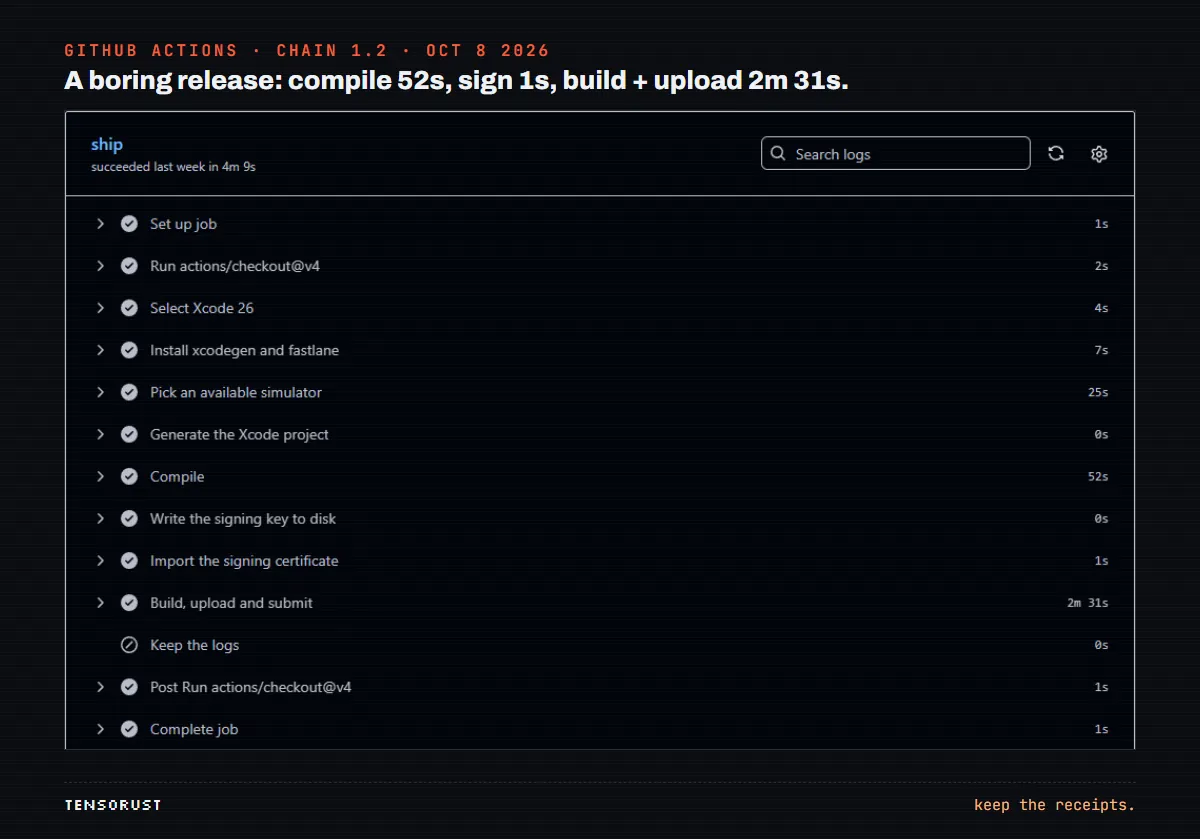
Here is what a whole release looks like when it works, Chain 1.2 on October 8:
Where the Mac minutes actually go
This is the new measurement for this guide. GitHub's jobs API returns every step of every job with its start and end time, so I summed the time inside each step for all 81 successful App Store runs across the 21 apps: 646 minutes of step time in total.
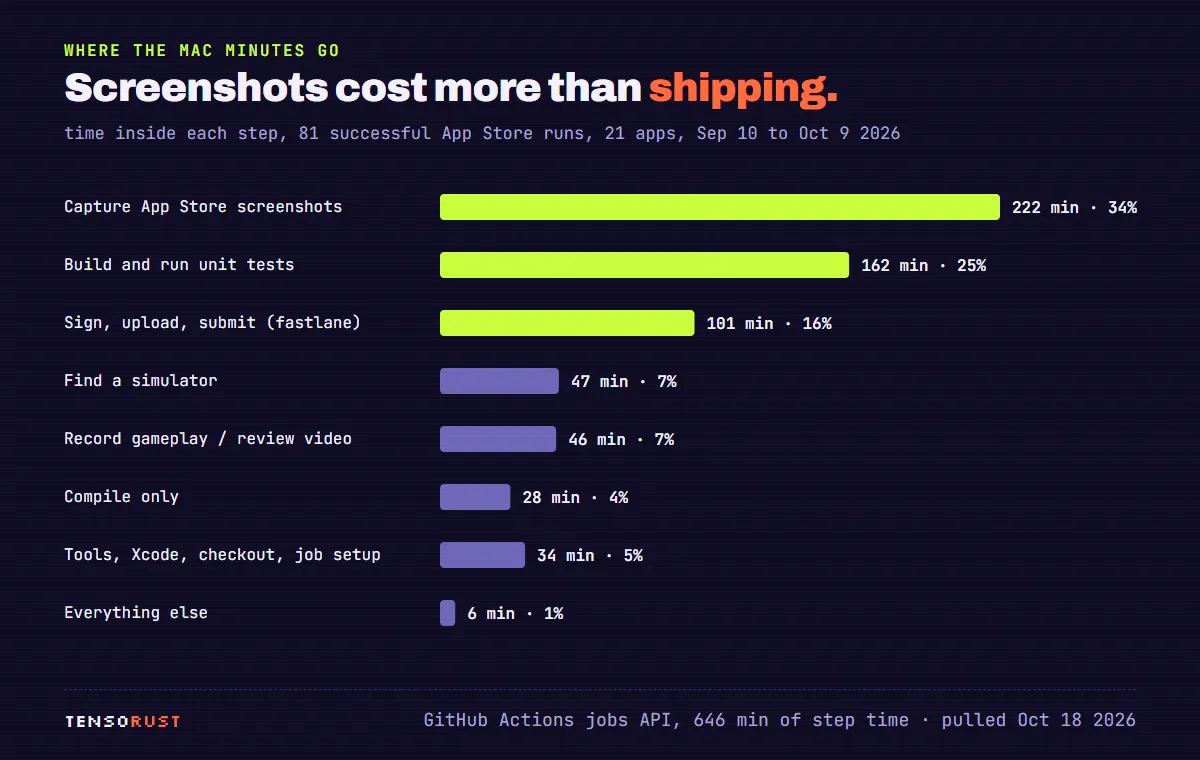
The surprise is the top bar. 34% of all the Mac time went to capturing App Store screenshots in the Simulator, more than signing, uploading and submitting combined (16%). The unit tests of the first three apps (the games, the only ones with an XCTest suite in the release lane) took another quarter. The step everyone fears, code signing, was a rounding error once it worked: importing the certificate took a median of 1 second. Finding a simulator took 7%, which is the cost of not hardcoding one, and worth it.
The pipeline changed shape halfway through September, and the data shows exactly what that bought. The early apps captured fresh screenshots (and, for the three games, ran their tests) on every App Store run. Starting with the September 18 batch, most apps committed their screenshots to the repo once, and the App Store run became compile, sign and upload:
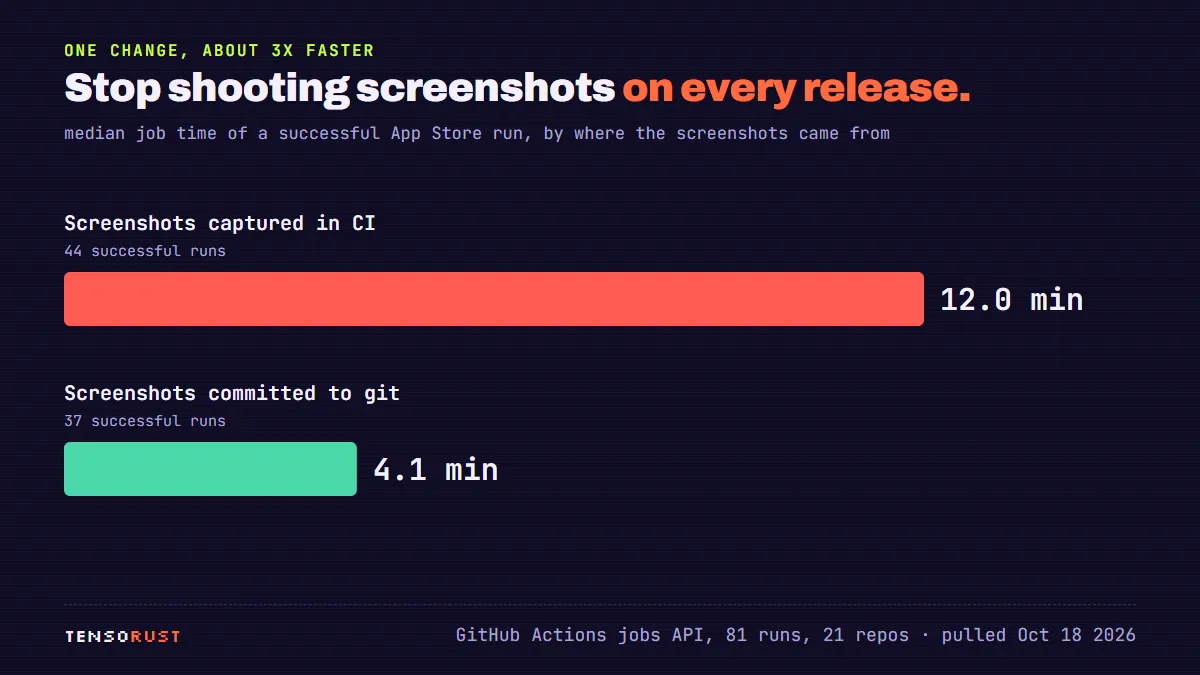
The median successful run dropped from 12.0 minutes (44 runs) to 4.1 minutes (37 runs), and the slowest 10% went from 17.8 to 5.3 minutes. In fairness to the slow lane, it also ran the unit tests, so screenshots are not the whole difference. The point stands: a release should ship what a human already looked at, not re-shoot it. Tests and screenshots belong in the Build workflow that runs on every push, not in the one that talks to Apple.
The queue was never the problem. The median wait from "run requested" to "job started" was 10 seconds; the worst one was 17 minutes.
Step 4: signing without a Mac (the part that broke)
Code signing is how Apple knows a build came from you. It takes a certificate (a public key Apple has signed), its private key, and a provisioning profile that ties both to your app ID. On a Mac, Xcode hides all of it. On a CI runner it's where the first app spent a morning. The full story is in Build an iOS app on Windows; here is the short version and the code that matters.
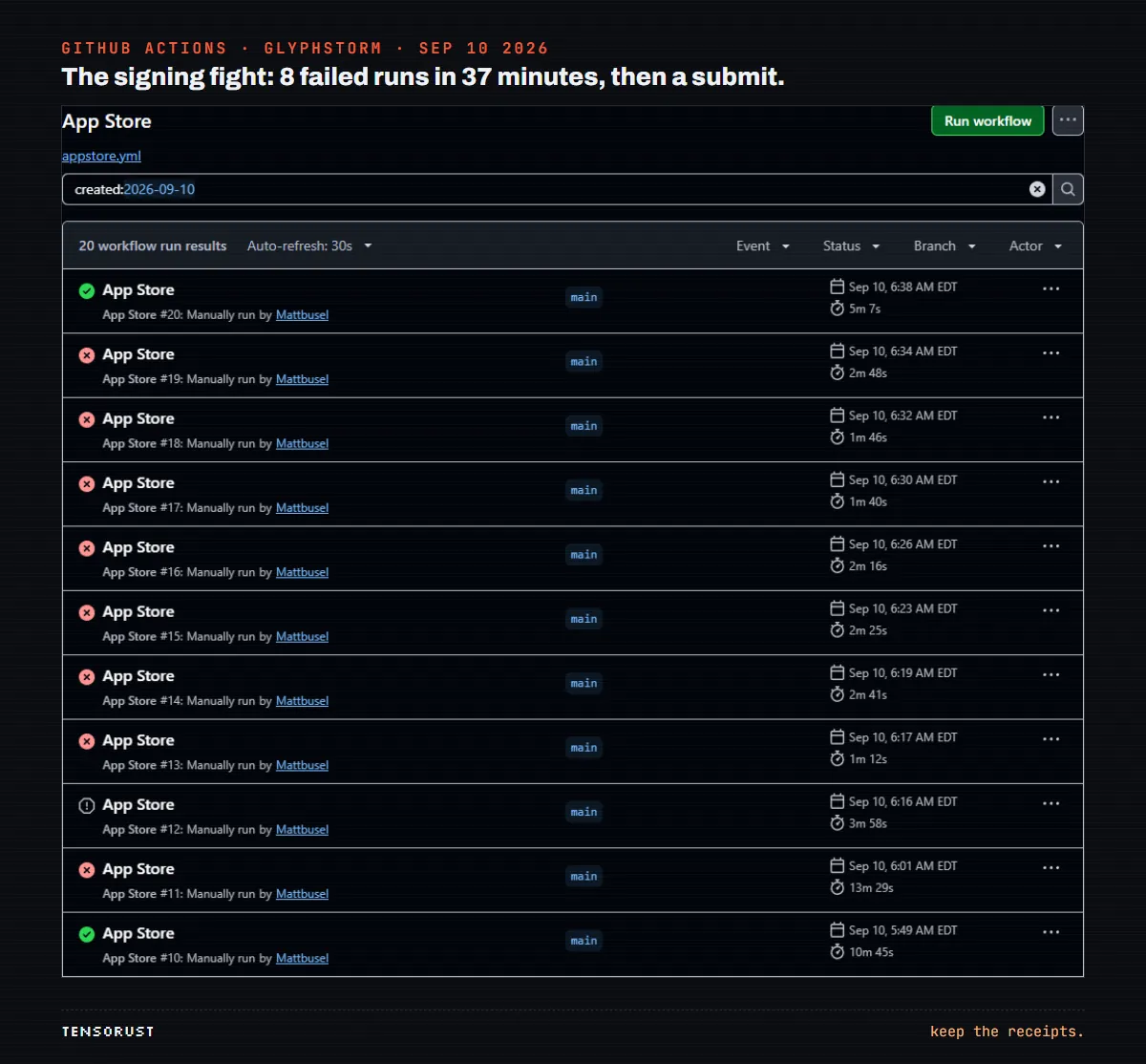
The expensive mistake was letting CI create the certificate. When fastlane's certificate step runs on a runner, the private key is born on a machine that is deleted minutes later. Apple keeps a certificate nobody can ever use again, and Apple limits how many distribution certificates an account can hold. Three failed runs orphaned three of them on September 10 before anyone noticed.
Never let CI create a certificate. Make the key once on your own machine, and let CI only import it.
So the key is made on Windows, by a Python script that generates it with the cryptography library, asks Apple's API to sign it, and pipes a .p12 straight into gh secret set. Every API call uses a short-lived token signed with your App Store Connect key (Store/asc.py, the token function; the key ID and issuer ID come from environment variables):
def token() -> str:
    """A fresh twenty minute ES256 token.

    Apple rejects anything longer lived than that, so this is minted per run
    rather than cached anywhere.
    """
    private_key = KEY_PATH.read_text()
    now = int(time.time())
    payload = {
        "iss": ISSUER_ID,
        "iat": now - 60,
        "exp": now + 20 * 60,
        "aud": "appstoreconnect-v1",
    }
    return jwt.encode(
        payload, private_key, algorithm="ES256", headers={"kid": KEY_ID, "typ": "JWT"}
    )
That twenty minute limit is Apple's rule, not a choice. On the runner, the certificate goes into a throwaway keychain, and one line in this step decides whether the job finishes or hangs forever:
          keychain="$RUNNER_TEMP/signing.keychain-db"
          security create-keychain -p "" "$keychain"
          security set-keychain-settings -lut 21600 "$keychain"
          security unlock-keychain -p "" "$keychain"
          echo "$DIST_CERT_P12" | base64 --decode > "$RUNNER_TEMP/dist.p12"
          security import "$RUNNER_TEMP/dist.p12" -k "$keychain" \
            -P "$DIST_CERT_PASSWORD" -T /usr/bin/codesign -T /usr/bin/security
          # Without the partition list, codesign blocks on a GUI prompt that
          # nobody can answer and the job hangs until it times out.
          security set-key-partition-list -S apple-tool:,apple:,codesign: \
            -s -k "" "$keychain" >/dev/null
Then fastlane asks for the App Store profile directly and signs manually. Automatic signing resolves a development profile during the archive, and a development profile needs at least one registered iPhone. An account with no devices gets "Your team has no devices from which to generate a provisioning profile" on an App Store build, which needs no device at all. Asking for the distribution profile directly skips the step that can't succeed.
fastlane reads the API key from the secret, so there is no Apple ID password and no two-factor prompt anywhere (fastlane/Fastfile):
  def asc_key
    app_store_connect_api_key(
      key_id: ENV.fetch("ASC_KEY_ID"),
      issuer_id: ENV.fetch("ASC_ISSUER_ID"),
      key_content: ENV.fetch("ASC_KEY_CONTENT"),
      is_key_content_base64: true,
      in_house: false
    )
  end
The app_store_connect_api_key action is the one to read. in_house: false tells it this is a normal developer account, not an enterprise one; getting that wrong produces an authentication error that says nothing useful. Build numbers are the other trap (Apple refuses a repeated one), so each build asks App Store Connect for the latest and adds one.
Step 5: screenshots and the listing, all from Windows
Apple wants iPhone screenshots at the 6.9 inch size, 1320 by 2868 pixels (see the screenshot specifications). Without a Mac you can't click around a Simulator, so each app takes a launch argument that opens a given screen with demo data, and the Build workflow loops through them on a fresh simulator with the status bar set to the classic 9:41 and a full battery. A fresh simulator matters: booting the runner's default one hung for over 15 minutes once.
The raw PNGs come back as a build artifact, a script on Windows puts a headline on each one, and the finished set is committed to fastlane/screenshots/. Chain's in-app purchase code even knows about it: in demo mode the store screenshots show the whole app unlocked, and the paywall shot shows it locked.
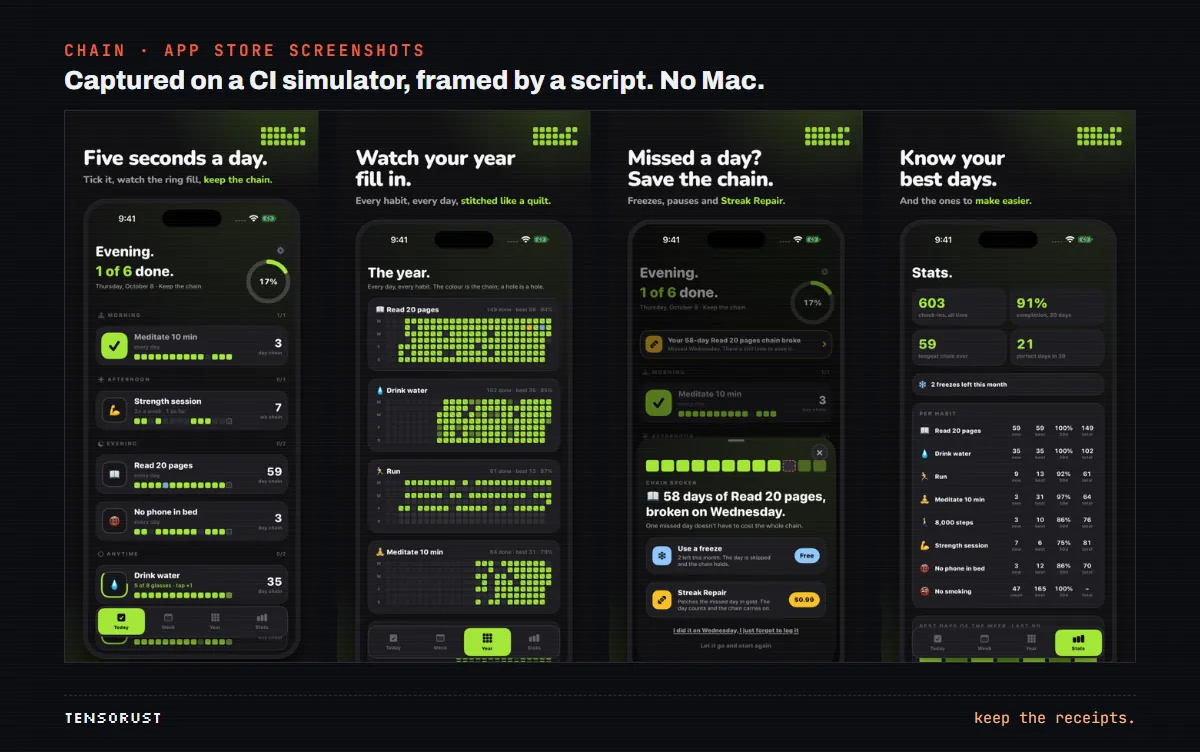
The listing text lives in plain files (fastlane/metadata/en-US/name.txt, subtitle.txt, description.txt, keywords.txt and so on), so it's reviewed and versioned like code. A second script pushes the rest of the listing through the API. Its header says what it does and the one thing Apple won't let it do (Store/listing.py):
"""The rest of the listing: age rating, review details, screenshots.

Everything here needs the app record to already exist, which is the one
step Apple's API refuses to do (`POST /v1/apps` returns 403 by design, so an app
record has to be created once in the web UI).

Usage:
    python Store/listing.py age-rating
    python Store/listing.py review-details
    python Store/listing.py screenshots
    python Store/listing.py finish        # everything that needs no binary
"""
Write the review notes like a test script for a stranger. Chain's notes tell the reviewer exactly how to reach each paid feature on a fresh install ("add three habits, then tap New habit again"), what the Health permission reads and why, and that no login is needed. Apple's 2.1 "Information Needed" responses were the second most common reason in my data, and most of them were answered by notes like these plus a video.
Step 6: testing when you can't hold the iPhone
You can't plug a phone into the CI runner, so testing happens in three layers.
- A build on every push. The Build workflow compiles for the Simulator and walks every screen to capture screenshots, so a screen that crashes fails the push. Across the 21 repos it ran 165 times: 101 green, 19 red, 45 cancelled. Only the first three apps also run an XCTest suite in CI. That's thinner than it should be; if I started again, the plain-Swift logic would get tests on every push.
- A recorded walkthrough. 20 of the 21 apps have a
-demoAutoplaylaunch argument that clicks through the main flow by itself. A third workflow records it withsimctl, and the video goes to App Review when they ask how something works. It ran 18 times, 18 green. - TestFlight. Every
dry_runupload lands in TestFlight, so anyone with an iPhone can install the real signed build before it is submitted.
The recording step is short enough to copy (.github/workflows/review-video.yml, trimmed):
          rt=$(xcrun simctl list runtimes | grep -oE "com.apple.CoreSimulator.SimRuntime.iOS-[0-9-]+" | sort -V | tail -1)
          udid=$(xcrun simctl create review "com.apple.CoreSimulator.SimDeviceType.iPhone-16-Pro-Max" "$rt")
          xcrun simctl boot "$udid" || true
          xcrun simctl status_bar "$udid" override --time "9:41" --batteryState charged --batteryLevel 100 || true
          xcrun simctl install "$udid" "$app"

          xcrun simctl io "$udid" recordVideo --codec h264 --force capture/review.mp4 &
          rec=$!
          xcrun simctl launch "$udid" com.mattbusel.chainhabits -demoAutoplay
          data=$(xcrun simctl get_app_container "$udid" com.mattbusel.chainhabits data)
          for i in $(seq 1 600); do
            if [ -f "$data/Documents/demo_done" ]; then break; fi
            sleep 0.5
          done
          kill -INT $rec
The trick is the demo_done file: the app writes it when the walkthrough ends, so the recording stops at the right frame instead of after a guessed sleep. A recording run averaged about 8 minutes (148 minutes over 18 runs), which is why it lives in its own workflow and only runs when a review needs one.
A word on what this doesn't catch. The Simulator is not an iPhone: no real camera, no real motion sensors, no real HealthKit data. Minder's eyes react to the phone being picked up (Core Motion), and no Simulator run can exercise that; it needs a real device through TestFlight. If your app leans on hardware, budget for a cheap used iPhone or a friend with one. My bet is that this is the one place a Windows-only setup genuinely costs you something.
Step 7: in-app purchases with StoreKit 2
All 8 live apps are free with optional one-time purchases. The purchase code is plain StoreKit 2 and compiles on the runner like anything else. The part worth copying is how Chain decides what the user owns (Sources/Purchases.swift, trimmed):
    func refreshEntitlement() async {
        var has: Set<String> = []
        for await result in Transaction.currentEntitlements {
            if case .verified(let t) = result, t.revocationDate == nil, t.productType == .nonConsumable { has.insert(t.productID) }
        }
        // currentEntitlements works offline from StoreKit's own cache, so this is the truth,
        // including a refund taking an unlock away.
        owned = has
        publish()
    }
Transaction.currentEntitlements is the source of truth, refunds included, so there is no server and no receipt parsing. When Chain went from paid to free, people who had paid were grandfathered by reading AppTransaction, which says which build a person first downloaded:
    func checkPaidEra() async {
        guard !grandfathered, let result = try? await AppTransaction.shared,
              case .verified(let app) = result, app.environment == .production else { return }
        let build = Int(app.originalAppVersion.split(separator: ".").first ?? "") ?? Int.max
        if build < Purchases.firstFreeBuild && app.originalPurchaseDate < Purchases.paidCutoff {
            grandfathered = true
            UserDefaults.standard.set(true, forKey: "chain.grandfathered")
            publish()
        }
    }
The app.environment == .production guard matters: in the sandbox and in App Review, everyone looks like an original buyer, and the reviewer has to see the real paywall.
The purchases themselves are created from Windows through the API, with one exception that cost an evening. From the header of Store/iap.py:
Apple's API refuses the FIRST non-consumable of an app (STATE_ERROR.FIRST_NON_CONSUMABLE_MUST_BE_SUBMITTED_ON_VERSION),
even with the version already in an open review submission. For that one, attach it by hand on the version page
(In-App Purchases and Subscriptions, Select, tick it, Done), then Add for Review and Submit. Later purchases
can go through `submit`.
So the first purchase rides along with an app version, by hand, once. After that, purchases review fast: the 5 purchase-only submissions in my data were decided in a median of 12.2 hours, all approved. That's the quickest thing Apple reviews.
The errors you will see, and what each one really means
Apple's error messages are written for someone sitting at Xcode. On a CI runner they point the wrong way more often than not. These are the real ones from the 21 repos' logs and workflow comments, in roughly the order a new pipeline meets them.
| The message | What it really means | The fix |
|---|---|---|
Selecting /Applications/Xcode_26.app fails, though ls lists it | The runner image has a stub Xcode_26.app with no toolchain inside | Pick the newest Xcode 26 that has Contents/Developer (snippet above) |
| "Unable to find a device matching the provided destination specifier" | Not your project. This runner doesn't carry that simulator today | Choose the newest available iPhone at runtime |
| "Your team has no devices from which to generate a provisioning profile" | Automatic signing wants a development profile, which needs a registered iPhone, even for an App Store build | Manual signing with an App Store profile |
| "Could not find the newly generated certificate installed" | CI just created a certificate whose private key dies with the runner | Make the certificate once on your PC; revoke the orphans |
| "MAC verification failed during PKCS12 import (wrong password?)" | The password is fine. The .p12 uses an encryption format the macOS security tool won't read | Export the .p12 in the legacy format |
| A signing step that never ends | codesign is waiting on a keychain permission dialog nobody can click | security set-key-partition-list after the import |
| "You can't enable both :development and :adhoc" | fastlane counts a flag that is present as chosen, even when set to false | Leave those arguments out entirely |
Cannot find "MyApp.xcodeproj/../YES" | increment_build_number drives Apple's agvtool, which gets confused by a generated project | Pass CURRENT_PROJECT_VERSION as a build setting: latest TestFlight build + 1 |
| Simulator boot hangs for 15+ minutes | The runner's default simulator is in a bad state | Create a fresh device with simctl create per job |
403 on POST /v1/apps | The API does not create app records | Make the record once in the website; script everything else |
STATE_ERROR.FIRST_NON_CONSUMABLE_MUST_BE_SUBMITTED_ON_VERSION | An app's first one-time purchase has to ride along with a version | Attach it by hand on the version page once; later purchases go through the API |
Eleven messages, and every one of them cost at least one run before it was understood, most of them in the first two days. If you hit one that isn't on this list, the jobs API trick from the data section tells you exactly which step it came from and how long it ran before it died, which is usually enough to tell a configuration problem (fails in seconds) from a hang (fails at the timeout).
The learning curve: 13 failures, then zero
The pipeline wasn't good on day one. The first two apps, Glyphstorm and Clear the Strait, ate 13 failed App Store runs each, most of them on September 10. Pocket Beings, a day later, had 5. By the September 24 batch it was mostly zero, and the last ten apps shipped with no failed App Store run at all. Climbbook, Cutoff, Parked and Race Pace each went to App Store Connect on their first try on September 27.
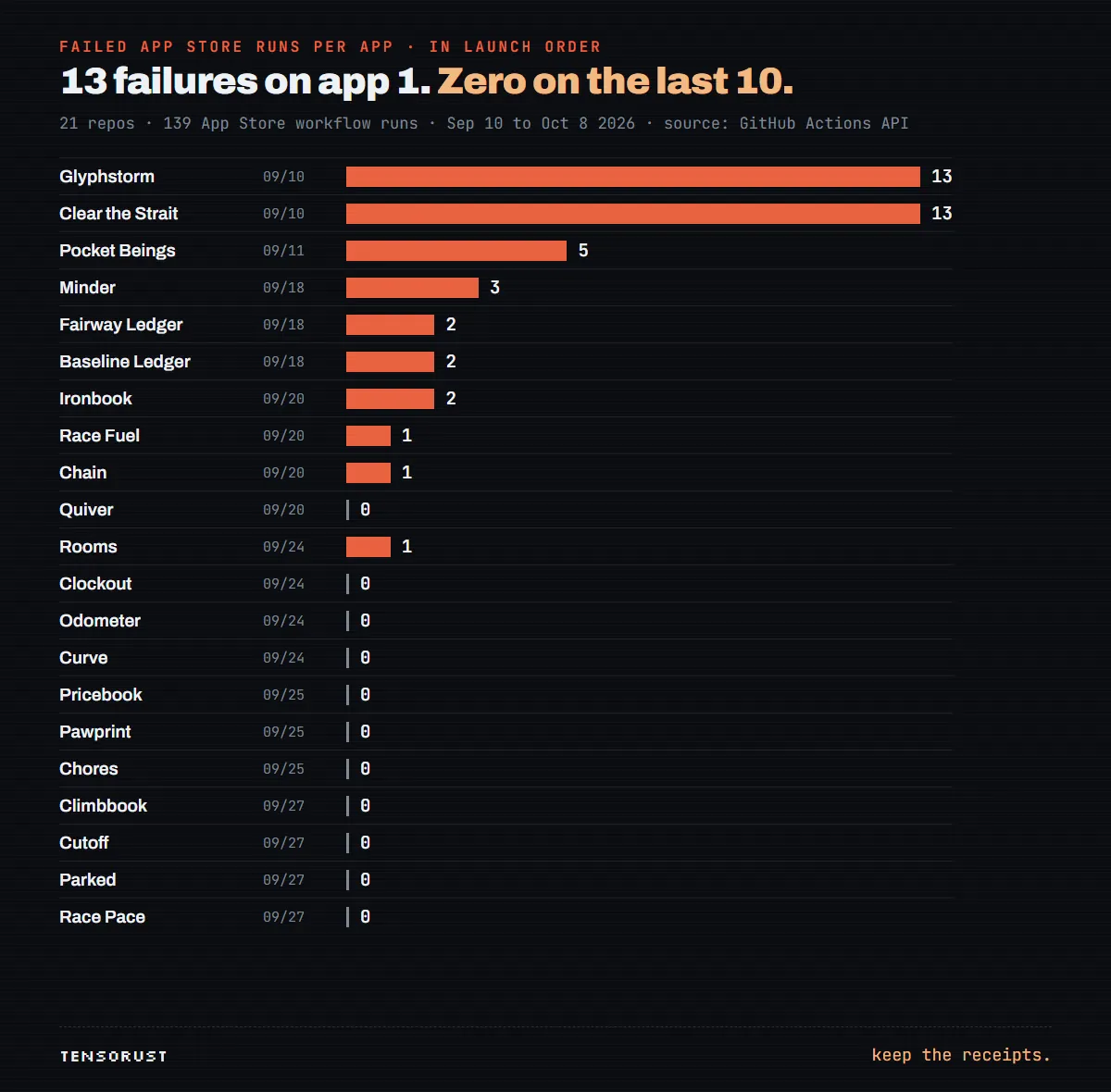
Nothing clever happened in between. Every failure became a comment in the workflow file, and the next app started from that file. That's the whole method, and it's why the data matters more than the code: the failures are concentrated in the first two days, so if you copy a pipeline that has already eaten them, you skip that part. Since the start, 139 App Store runs: 81 succeeded, 43 failed, 15 cancelled. The last two failures were version bumps on the evening of October 8 (Eastern); Pocket Beings went green two minutes after its failure.
A practical warning if a coding agent drives this loop for you: an agent fixing signing at 6 AM will happily "fix" the check instead of the problem. The guardrails I use are in stop coding agents editing tests.
App Review is the real bottleneck
Here's what the timeline at the top of this page shows when you look at it as a funnel. Every one of the 21 apps got a green, signed build and went to App Review. Thirteen are still not on the store.
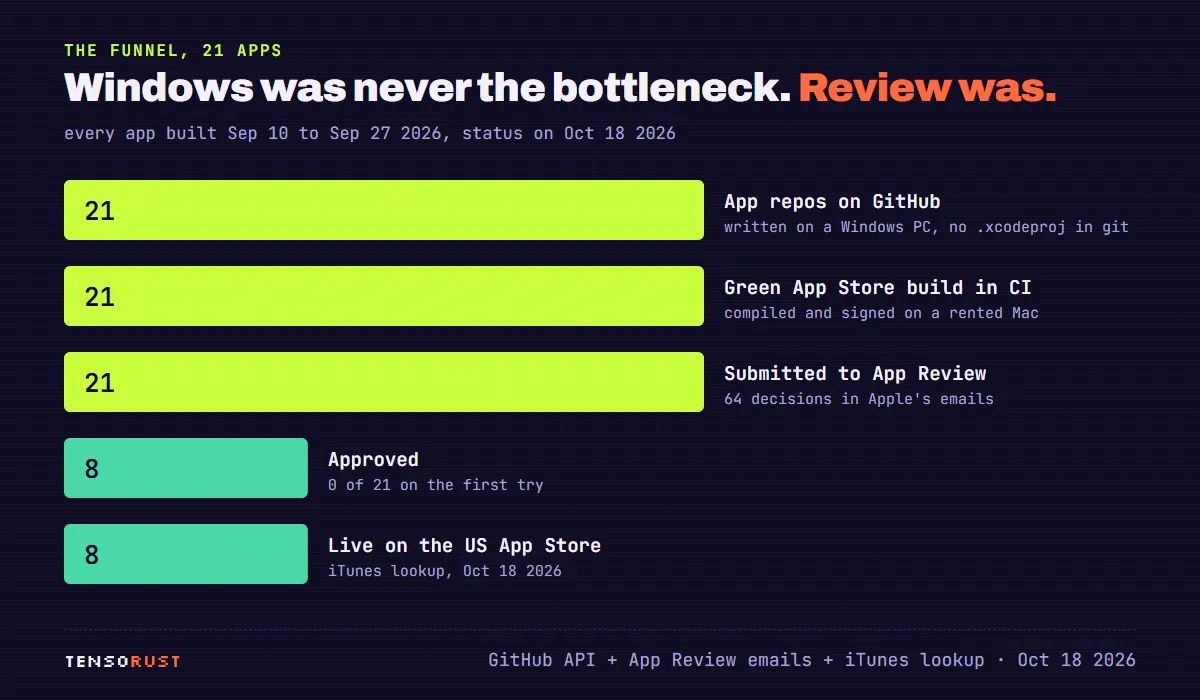
The build half is fast and boring now. The first commit to first submission took a median of 2.2 hours, and 13 of the 21 apps were submitted within 3 hours of their first commit (the others waited on purpose, for batch submissions). Then Apple's half starts, and it is measured in days.
From the App Store review time data: 64 decisions, median wait 73 hours, against Apple's stated 50% within 24 hours and 90% within 48. Updates to apps already live took a median of 64 hours. New apps that got approved took a median of 70 hours on the round that approved them, and none of the 21 was approved on its first submission.
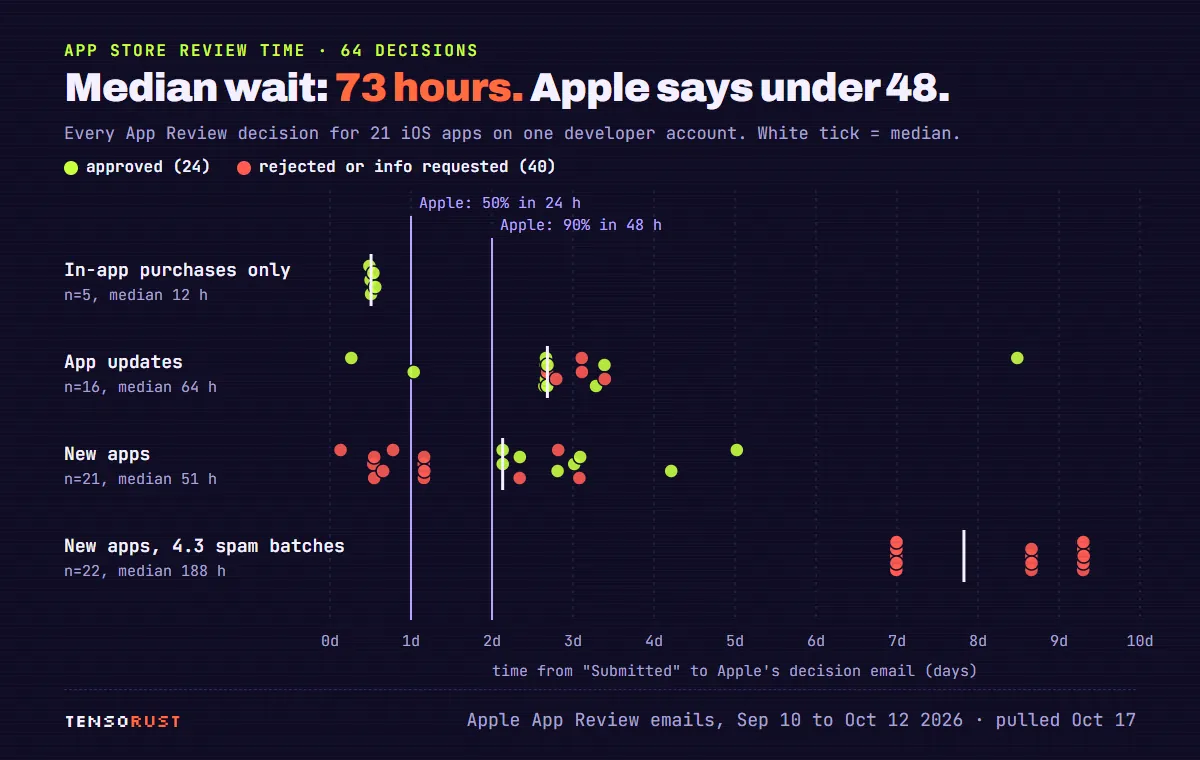
Plan for it like this: the first submission of a new app on a new account will probably come back with a question (guideline 2.1, "Information Needed"). Answer it with a short screen recording and clear review notes, and the second round is where approval usually lands. For the 8 apps that made it, first submission to approval took a median of 4.4 days, and first commit to approval 5.3 days.
Guideline 4.3: what happens when shipping gets too cheap
The 13 apps that aren't live are mostly one story. On October 5, Apple rejected 11 apps in 30 seconds under guideline 4.3 (spam) and 4.2.6, after they had waited 8.7 to 9.3 days. I replied to each and resubmitted; on October 12, all 11 came back rejected again, in another 30 second burst, exactly 7 days later.
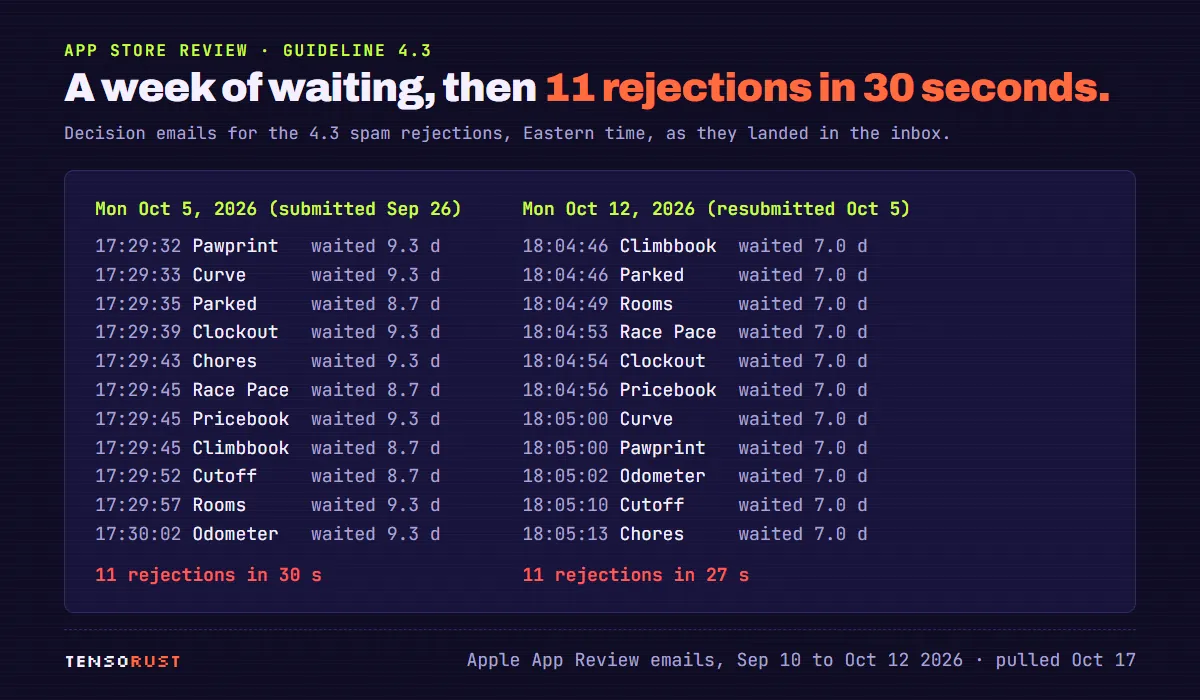
Look at which apps those are: the September 24 to 27 batches, the ones where the pipeline had zero failed runs. That's the plot twist of the whole project. Once shipping an app costs nothing, the question Apple asks changes from "does it work" to "is this different enough from everything else this account and the store already have". Guideline 4.3 is written for that: it covers near-copies of the same app and piling into categories that are already saturated.
My read, which I can't prove: a new account sending eleven utility apps in three days looks like a template farm to a reviewer, whatever is inside each binary. If I did it again, I'd ship two or three apps, let them pick up real users, and space the rest out. The pipeline makes speed free. App Review charges for it anyway.
What it costs
The full breakdown, with a calculator, is in iPhone app development cost. The short version for the Windows route:
| Item | What I paid | If the repos were private |
|---|---|---|
| Apple Developer Program | $99 a year | $99 a year |
| A Mac | $0 | $0 |
| CI: 322 macOS runs, about 2,572 minutes | $0 (public repos) | about $159 at $0.062 a minute |
| One release today (4.1 min median) | $0 | about 25 cents |
| Apple's cut of sales | 15% under the Small Business Program | |
The cost that doesn't show up in that table is the one in the funnel: an approved listing. Money can't buy you past guideline 4.3, only a different-enough product can.
What came out the other end
Eight apps on the US App Store as of this afternoon, all free with optional purchases. Every one of them is under 3 MB, because SwiftUI apps with no third-party SDKs are small: Clear the Strait, a game, is 0.6 MB. Chain, with widgets, alternate icons and eight in-app purchases, is 2.9 MB.
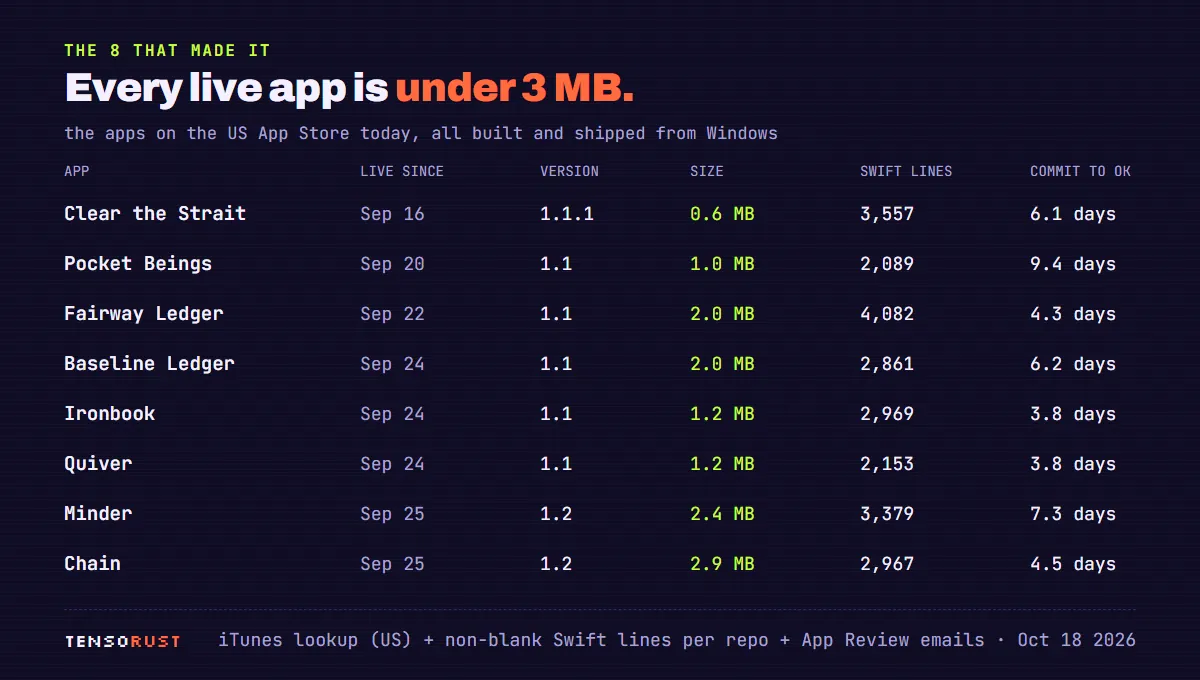
None of these were written in Xcode, and none of them know it. If you're curious what a SwiftUI app built this way looks like from the inside, Minder's cartoon eyes are a good example: springs, saccades and blinks in a plain SwiftUI Canvas, compiled on a machine nobody ever saw.
A 7-day plan to ship your first iOS app from Windows
This is the order that would have saved the most runs, with the numbers above as a guide to how long each part really takes.
- Day 1: accounts. Join the Apple Developer Program. Create an App Store Connect API key under Users and Access, Integrations, and store the
.p8, key ID and issuer ID as GitHub secrets. Never commit them. - Day 2: the empty app. A public GitHub repo with
project.yml, a "Hello" SwiftUI view, and the App Store workflow incompilemode. Get one green run. Expect the Xcode and simulator traps; use the snippets above. - Day 2: signing. Make the certificate on Windows through the API, save it as a
.p12in a secret, and import it on the runner with the partition list line. Rundry_rununtil a build appears in TestFlight. If CI ever made certificates for you, revoke the orphans. - Days 3 to 5: the app. Write it. Keep logic in plain Swift files and views thin. Add a
-shotlaunch argument per screen and a-demoAutoplaywalkthrough as you go, not at the end. - Day 5: the listing. Create the app record in the website (the one manual form), then push name, subtitle, description, keywords, age rating, privacy URL and review notes from the metadata files.
- Day 6: screenshots. Capture them once in the Build workflow, add headlines on Windows, commit them. Never re-capture in the release lane: that's the 12 minute vs 4 minute difference.
- Day 6: submit.
releasemode. Then wait about three days, answer the first question with a video, and expect approval on round two.
If you want the files rather than the instructions, the whole thing (the workflow with every trap commented, the Fastfile, the signing script, the App Store Connect scripts and an agent skill that walks through it) is what the No-Mac iOS Pipeline setup installs on your repo.
FAQ: iOS development on Windows
Can I install Xcode on Windows?
No. Xcode is macOS only, and there is no Windows version. What you can do is run Xcode's command-line tools on a rented Mac (a CI runner) and drive it from Windows, which is what this whole guide does.
Can I run the iOS Simulator on Windows?
Not locally. The Simulator ships with Xcode. On the runner it works fine without a screen: simctl boots devices, installs builds, takes screenshots and records video, as in the review-video step above. You see the results as files, not as a live window.
Do I need an iPhone?
Not to build, sign, upload or get approved: none of the 21 apps needed a registered device, once signing was manual. You do want one for anything that touches real hardware (camera, motion, HealthKit, haptics), through TestFlight.
What about Flutter or React Native?
Both still need macOS to build the iOS app. Flutter's iOS setup starts with installing Xcode. Expo's EAS Build is the exception that proves the rule: it runs the build on Expo's own Mac fleet. Either way, someone's Mac compiles it; the question is only whose.
Is running macOS in a virtual machine on my PC allowed?
Apple's software license limits macOS to Apple-branded hardware. I didn't go that way, and with free macOS runners for public repos there's little reason to.
How long does it take, start to finish?
In my data, the build side takes hours (median 2.2 hours from first commit to first submission) and the review side takes days (median 4.4 days from first submission to approval for the apps that got approved). A realistic first app is about a week, most of it waiting.
Does this work for iPad, widgets and in-app purchases?
Yes for widgets and purchases: Chain has a WidgetKit extension and eight purchases, all built the same way. The 21 apps are iPhone only (TARGETED_DEVICE_FAMILY: "1"), so iPad is untested here, but it's the same toolchain.
The numbers
| What | Number | Source, pulled Oct 18 2026 |
|---|---|---|
| Apps built and submitted from Windows | 21 | GitHub repos, App Review emails |
| Live on the US App Store | 8 | iTunes lookup API |
| Swift, all apps (non-blank lines) | 53,932 (median 2,308) | shallow clones |
| CI runs, all workflows | 384 | GitHub Actions API |
| App Store runs: ok / failed / cancelled | 81 / 43 / 15 | GitHub Actions API |
| Median successful release run, then vs now | 12.0 min to 4.1 min | jobs API, 81 runs |
| Share of Mac time spent on screenshots | 34% | jobs API, step timings |
| Median first commit to first submission | 2.2 hours | git + App Review emails |
| Median first submission to approval | 4.4 days (8 apps) | App Review emails |
| Approved on the first try | 0 of 21 | App Review emails |
| Rejected under 4.3 (twice) | 11 | App Review emails |
What's next
The 11 apps stuck on guideline 4.3 are the open problem, and they're a product problem, not a pipeline one. The next experiment is the opposite of the September sprint: fewer apps, each with something no other app in its category does, spaced out over weeks. I'll add the result here.
The question I'd like answered in the comments: if you ship iOS apps without a Mac, what was the one step you were sure needed one? Mine was signing, and it turned out to be the fastest step in the pipeline.
If you'd rather not spend your own September 10 on the signing traps, the No-Mac iOS Pipeline puts this exact setup on your repo, and if you want the app itself built, the fixed prices are here.
First published here on tensorust.com on Oct 18, 2026. Also on dev.to. Related: Free iPhone app cost calculator, Build an iOS app on Windows, App Store review time, Fixed-price iPhone app builds.
Get the next one by email.
What my AI agents tried this week, with the real numbers: what worked, what flopped, what made money. One email when there is something worth reading.
No spam, never sold. Every email has a one-click unsubscribe.
Read next
Free tool: iPhone app cost calculator → Pick an app type and features, get an honest budget range.
- Dev · Oct 18, 2026 · 13 min readApp Store review time: 64 real decisions, median 73 hours
- Dev · Oct 17, 2026 · 12 min readiPhone app development cost: 20 real apps, $99 in fees, 8 approved
- Dev · Oct 16, 2026 · 10 min readBuild an iOS app on Windows: how 21 apps shipped with no Mac