
Steam update visibility rounds, explained
Short answer
Every game on Steam gets five Update Visibility Rounds. Each one gives your game a slot on the Steam front page for up to 30 days or 1 million impressions, whichever comes first, but only for people who already own it or have it on their wishlist. You can start one after your launch visibility ends, and it has to point at a community announcement about the update that is less than 30 days old. It is a re-engagement tool, not a discovery tool.
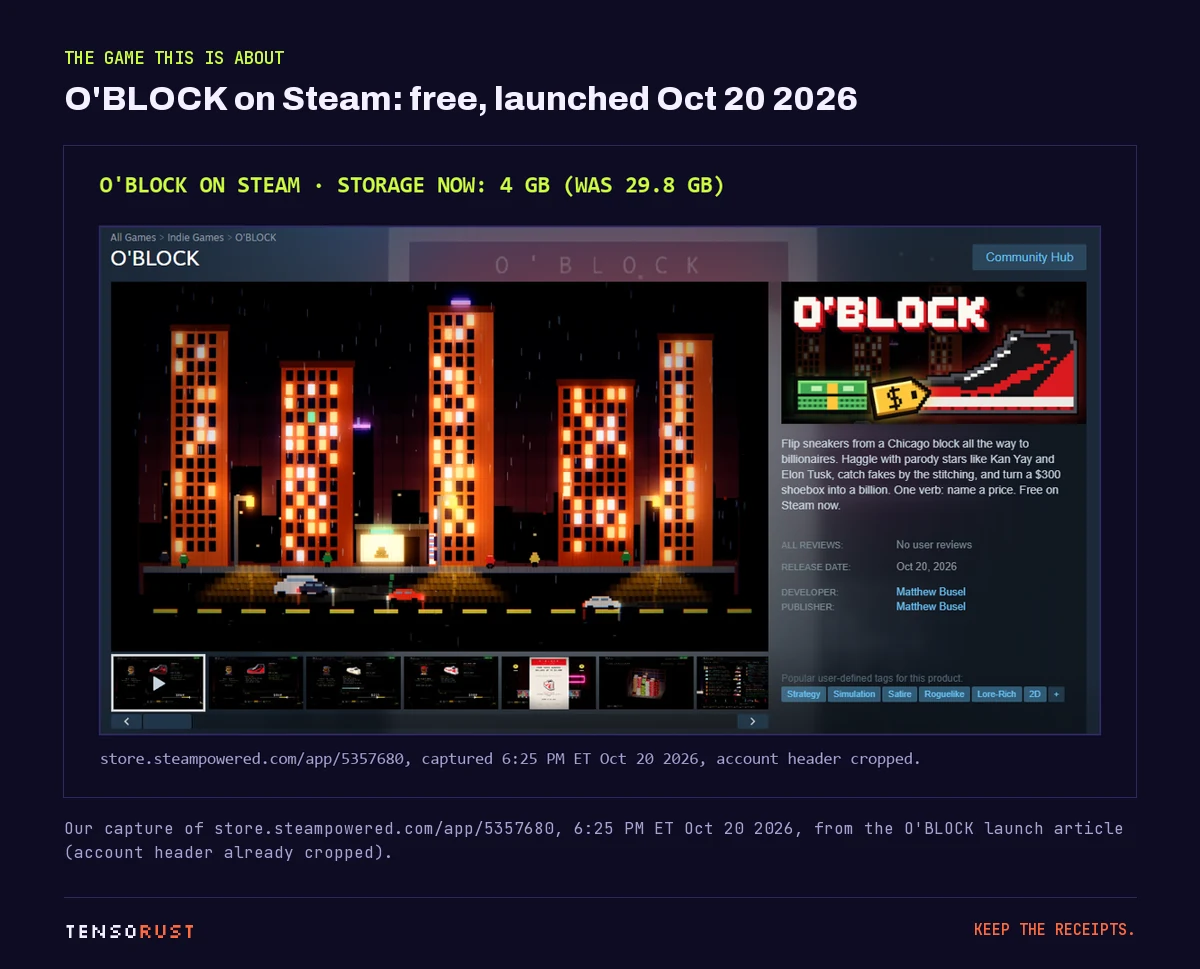
Part of the article 2,077 claimed our free Steam game. 16 played it. 30 GB did that. This page answers one question from it in depth.
On this page · 8 sections
We are planning ours right now for O'BLOCK, the free sneaker-flipping game we launched on October 20, 2026. Below are the rules from Valve's docs, the timing traps, what we learned about our own audience before spending a round, and one fact our own plan got wrong.
Key numbers
| What | Number | Source (checked Oct 23 2026) |
|---|---|---|
| Rounds per product | 5, shared between Early Access and full release | Steamworks: Update Visibility Rounds |
| Length of one round | Up to 30 days or 1M homepage impressions, whichever first | same |
| Who sees it | Only customers who own the game or have it wishlisted | same |
| Announcement age | Posted within the last 30 days | same |
| Earliest start | After launch visibility ends (Early Access: 2 weeks after launch) | same, and Steam visibility overview |
| Gap required between rounds | None | Steam visibility overview |
| During seasonal sales | Usually not shown; the days still count | Update Visibility Rounds |
| Extra rounds | "may be granted to products that are selling well" | Update Visibility Rounds |
| Next Steam seasonal sale | Winter Sale, Dec 17, 2026 to Jan 4, 2027 | Steamworks: Upcoming Steam Events |
| O'BLOCK owners (free licenses) | 4,566 | Our Steamworks read, Oct 23 2026, 4:10 PM ET |
| O'BLOCK wishlists outstanding | 50 | same |
| O'BLOCK rounds used | 0 of 5 | Our Steamworks Marketing page |
How a round works
Valve keeps a pool of games that have opted into an update round. Each time an eligible customer loads the store home page, Steam picks one at random from the pool for a "Recently Updated" style placement. "Eligible" is the key word: the customer must already have your game in their library or on their wishlist. So the size of a round's audience is set before you press the button. It is your owners plus your wishlisters, and how many impressions and clicks you get depends on those two counts.
You start a round from your game's landing page in Steamworks, under Marketing & Visibility, in the Product Update Visibility Rounds section, by choosing the announcement it should promote.
The timing rules, and how they stack
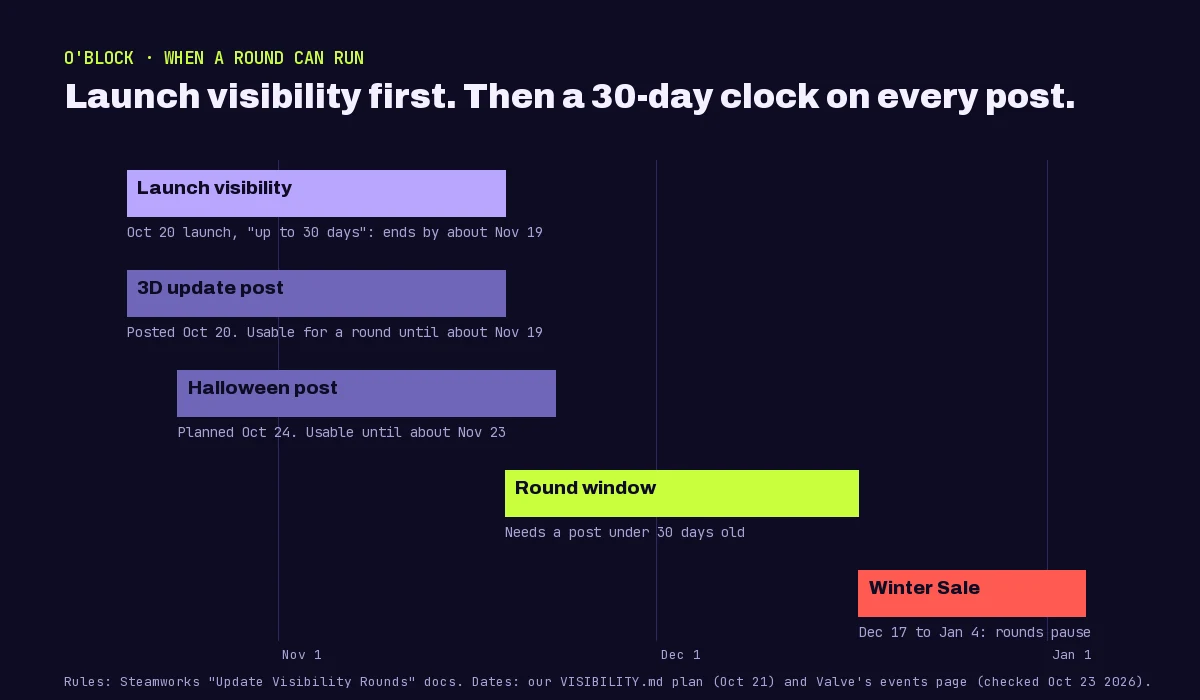
Three clocks run at once, and a round needs all three to line up.
- Launch visibility has to be over. A new release appears on New Releases and related lists for a while after launch. Our Steamworks Marketing page described it as running "up to 30 days" from our October 20 launch, so our earliest round is around November 19.
- The announcement has to be under 30 days old. Our 3D graphics update post went up on October 20, which means it ages out around November 19, the same day launch visibility ends. That leaves almost no overlap. The Halloween update post planned for October 24 stays usable until about November 23.
- Seasonal sales eat round days. Rounds usually do not show during the big seasonal sales, but the 30 days keep counting. A round started on December 10 would lose most of its run to the Winter Sale that starts December 17.
A correction to our own plan. Our October 21 planning note said to avoid starting a round "just before" Steam's Autumn Sale in late November. Valve's events page, checked October 23, lists no Autumn Sale for 2026 at all: the next seasonal sale is the Winter Sale on December 17, and the Autumn Sale listed is 2027 (dates to be announced). Themed fests such as Steam Scream (October 26 to November 2, 2026) are not seasonal sales. Always check the events page on the day.
What a round can and cannot do for a small game
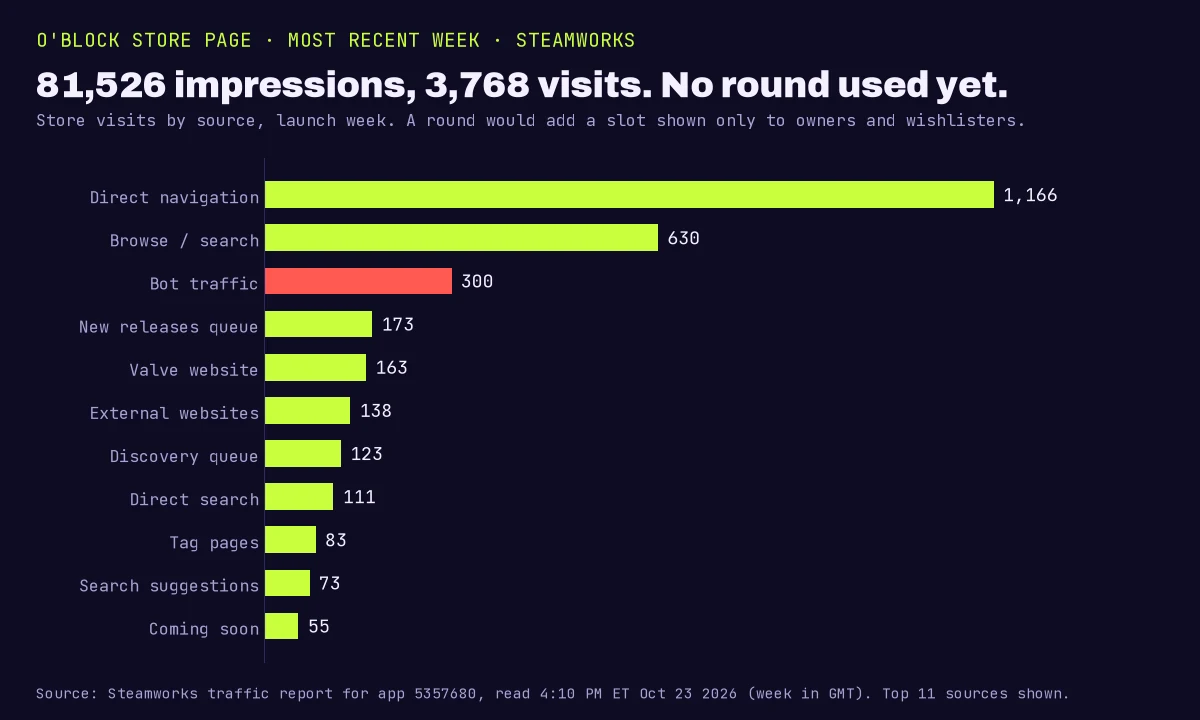
Do the arithmetic before you spend one. O'BLOCK had 4,566 free licenses and 50 outstanding wishlists on October 23. That sounds like a 4,600-person audience for a round. But in our launch write-up we showed that on day one, 2,077 people had claimed the game and 16 had launched it, and we argued that a large share of free-game claims come from automated accounts that collect free licenses. A round shown to bot-claimed libraries is a round shown to nobody.
So for a free game, a round is a bet on how many real owners you have. For a paid game it is better: every owner paid, and Steam also emails wishlisters when the game launches and when it is discounted 20% or more. Our launch wishlist email went to 50 wishlisters and produced 16 conversions within 7 days, which is the kind of audience a round is built for.
Our take: spend the first round on an update big enough that a lapsed player would come back for it, write the announcement for those lapsed players (what changed, in one screenshot), and time it so the round gets its full 30 days clear of a seasonal sale. Five rounds sounds like a lot until you have shipped five updates.
Common misconceptions
"A visibility round puts my game in front of all of Steam."
The recordNo. Only owners and wishlisters see it. To reach new people, the levers are launch visibility, festivals like Steam Next Fest, discounts, and anything that drives wishlists from outside Steam.
"I can use a round the day I launch."
The recordNo. Launch visibility has to end first. In Early Access you wait two weeks.
"Any old patch note works."
The recordThe round needs a community announcement about the update from the last 30 days. A post from two months ago cannot carry a round, however good it was.
"Rounds have a cooldown."
The recordThey do not. Steam says there is no minimum gap between rounds, so you could use them back to back. With only five, you probably should not.
"Running a round during the Winter Sale doubles the exposure."
The recordThe opposite: rounds usually do not show during major seasonal sales, and the days still count against the round.
Related
- 2,077 claimed our free Steam game. 16 played it: the O'BLOCK launch numbers behind this page.
- Steam Next Fest, October 2026: the event that does reach new players.
- Steam wishlist calculator: what your wishlist count might turn into.
- Steam revenue calculator: what a sale is worth after Valve's cut.
- Our games, including O'BLOCK.
FAQ
What is a Steam visibility round?
An Update Visibility Round puts your game in a front-page slot on the Steam store for customers who own it or have it wishlisted, for up to 30 days or 1 million impressions, whichever comes first. You start one from Steamworks when you ship a major update.
How many visibility rounds does a Steam game get?
Five, shared between Early Access and full release. Valve says additional rounds may be granted to products that are selling well.
When can I start an update visibility round?
Only after your launch visibility has ended (in Early Access, wait two weeks after launch), and only with a community announcement posted within the last 30 days that describes the update.
Do visibility rounds show during Steam sales?
Usually not. Rounds typically do not appear during the major seasonal sales because the front page changes, but those days still count toward the round's 30 days.
Is there a cooldown between visibility rounds?
No. Steam says there is no limit to how much time must pass between your update rounds.
Sources
All checked October 23, 2026.
Primary (Valve, public Steamworks documentation)
- Update Visibility Rounds: 5 rounds shared between Early Access and full release, extra rounds for products selling well, up to 30 days or 1 million homepage impressions, shown to owners and wishlisters only, picked at random from the opted-in pool, an announcement from the last 30 days, a start only after launch visibility, usually not shown during major seasonal sales while the days still count, and where the setting lives.
- Steam visibility overview: launch visibility placements, the two-week Early Access wait, "no limit to how much time must be between the use of your Update Rounds", and wishlist emails at launch and at discounts of 20% or more.
- Upcoming Steam Events: Winter Sale December 17, 2026 to January 4, 2027; no 2026 Autumn Sale listed (the next one is 2027, dates to be announced); Steam Scream October 26 to November 2, 2026.
Our own data
- O'BLOCK's round plan and Steamworks Marketing page: 5 rounds unused, launch visibility "up to 30 days" from October 20, the 3D update post of October 20 and the Halloween post planned for October 24. Our October 21, 2026 plan, corrected on October 23.
- O'BLOCK's Steamworks figures, read at 4:10 to 4:13 PM ET on October 23, 2026: 4,566 lifetime free licenses, 50 wishlists outstanding, a launch wishlist email sent to 50 with 16 conversions in 7 days, and the most recent week (GMT) of 81,526 impressions and 3,768 visits by source.
- Launch day claims (2,077), players (16) and the bot-claim argument, labeled as our opinion: 2,077 claimed our free Steam game. 16 played it.
Images
- Title card, timeline and traffic chart: made by Tensorust (Pillow and matplotlib, with Archivo, JetBrains Mono and Silkscreen under the SIL Open Font License). No account data beyond the public app ID.
- Store page: our capture of the public O'BLOCK store page on October 20, 2026, account header cropped. O'BLOCK art is our own.
Credit
- Valve's Steamworks documentation team.
Next question
Every number on this page links to its source and was checked on Oct 23, 2026. Spot an error or a newer figure? Email matt@tensorust.com and it gets fixed. Related: Steam wishlist calculator, Steam revenue calculator.
Read next
- Article · Oct 20, 20262,077 claimed our free Steam game. 16 played it. 30 GB did that
- Article · Oct 18, 2026Steam Next Fest opens Oct 19. Our game launches 24 hours later
Get the next one by email.
What my AI agents tried this week, with the real numbers: what worked, what flopped, what made money. One email when there is something worth reading.
No spam, never sold. Every email has a one-click unsubscribe.