
How to deploy to Vercel from the CLI
- Steps
- 8
- Hands-on
- 15 min
- Reading
- 7 min
- Checked
- Oct 23
The short version
Install the CLI with npm i -g vercel, run vercel login, then from the folder you want online run vercel deploy --prod --yes. The first run asks which project to link (or creates one), uploads the files and prints the production URL. On the free Hobby plan you get 100 deployments a day and 5,000 uploaded files a day, and the second limit is the one that bites.

What you need
- Node.js and npm
- A free Vercel account
- A folder of finished files (or an app Vercel can build)
On this page · 11 sections
This site, tensorust.com, is deployed exactly this way: a static folder of 647 files (39 MB), pushed from a Windows PC with the CLI, roughly 52 times between October 15 and 23, 2026. We also moved more than a dozen project sites off GitHub Pages to Vercel on September 30 and hit the daily upload cap the same afternoon. Here is the whole routine and the fixes.
Step 01: Install the CLI
npm i -g vercel        # or: pnpm i -g vercel
vercel --version
That is the official install. It runs the same on Windows, macOS and Linux; everything in this guide was run from Git Bash on Windows.
Step 02: Log in and link
vercel login
cd path/to/site
vercel link
vercel login signs you in once, through the browser. vercel link ties the current folder to one Vercel project and writes the IDs into a .vercel/ folder. Keep .vercel/ out of git: it holds your project and team IDs, and a copied .vercel/ folder is how you accidentally deploy one site over another.
Our habit is one deploy folder per site, never the repo itself. The build writes into _deploy/<site>/, and the CLI only ever sees finished files. That also means no framework detection surprises: Vercel serves a folder of HTML as-is.
Step 03: Deploy to production
vercel deploy --prod --yes
--prod sends it straight to the production domain instead of a preview URL, and --yes skips the setup questions so the command works in scripts. Here is a real run, from the scheduled retry we set up after the upload cap blocked three sites on September 30:
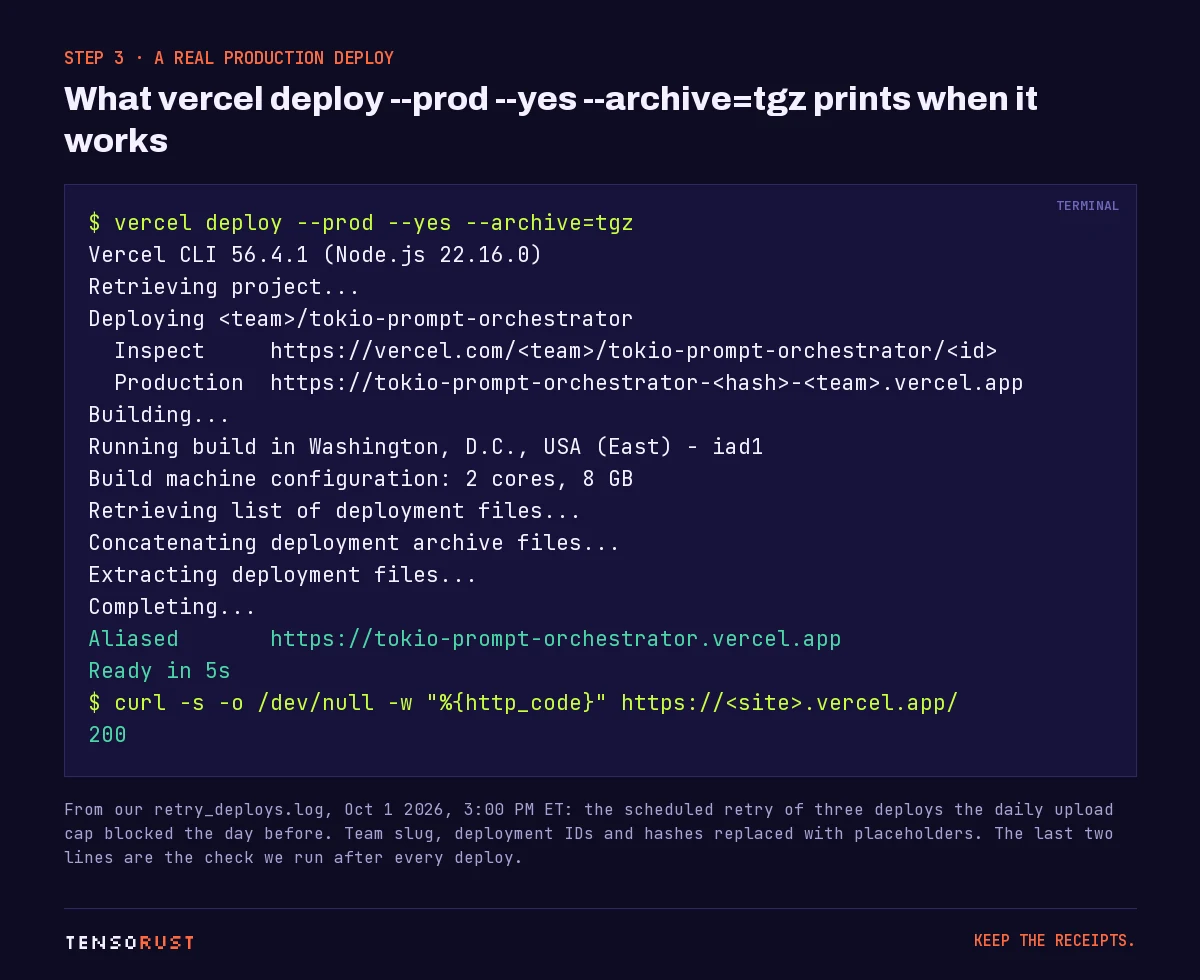
Two things in that log are worth knowing. The CLI does not upload every file every time: Vercel caches source files by content, so a redeploy of an unchanged 647-file site uploads only what changed. And the --archive=tgz flag turns the whole folder into one compressed upload (more in step 6).
Step 04: Verify, every time
curl -s -o /dev/null -w "%{http_code}" https://your-site.com/the-page-you-changed/
A deploy that prints "Ready" can still serve a 404 for the page you meant to add (wrong folder, wrong output path, a rewrite eating it). Our publish runbook will not mark anything done until the changed URLs answer 200, and the sitemap lists them.
Step 05: Ship less with .vercelignore
Everything in the folder that is not ignored is public. A .vercelignore file works like .gitignore, and it also supports an allow-list: start with /* to ignore everything in the root, then re-include what you mean to ship with !.
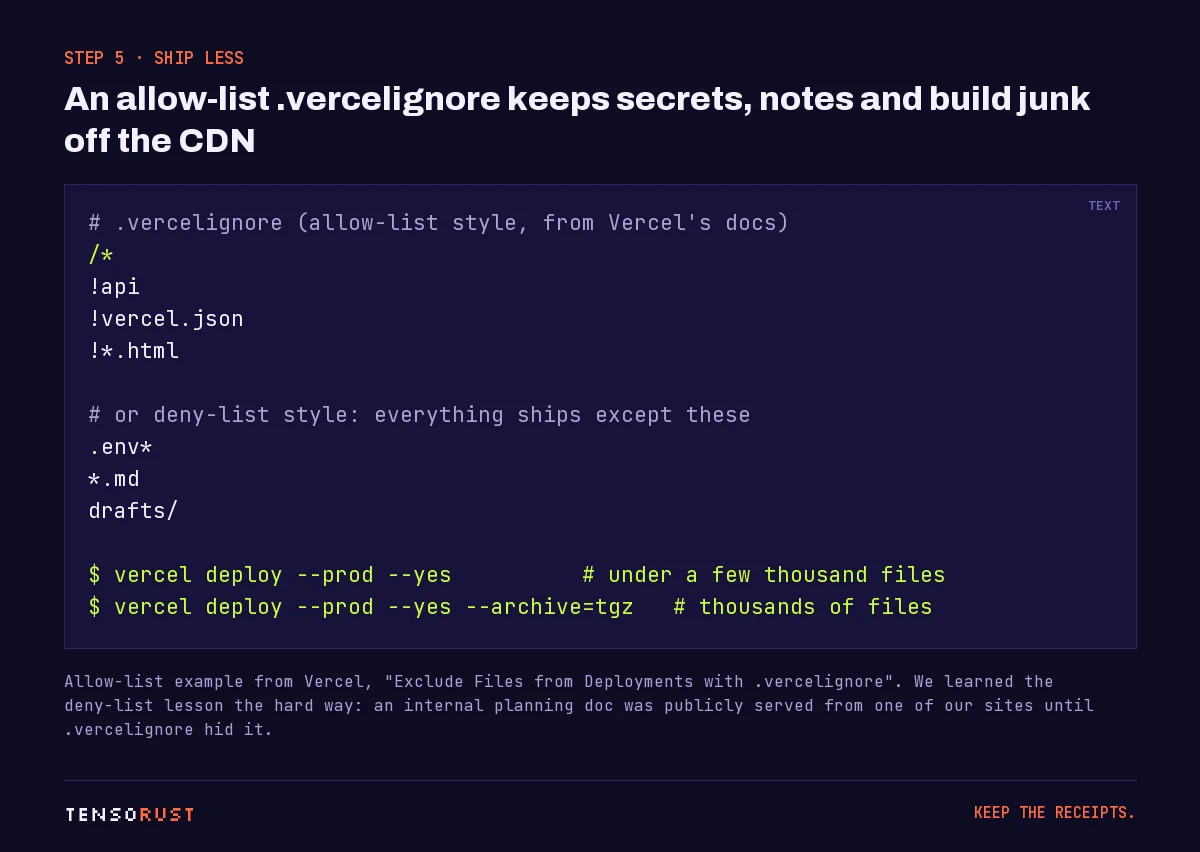
We learned this one the embarrassing way. On one of our sites, an internal go-to-market planning file sat in the deploy folder and was publicly reachable until a .vercelignore entry hid it. Deny-lists fail open; allow-lists fail closed.
Step 06: Big folders need --archive=tgz
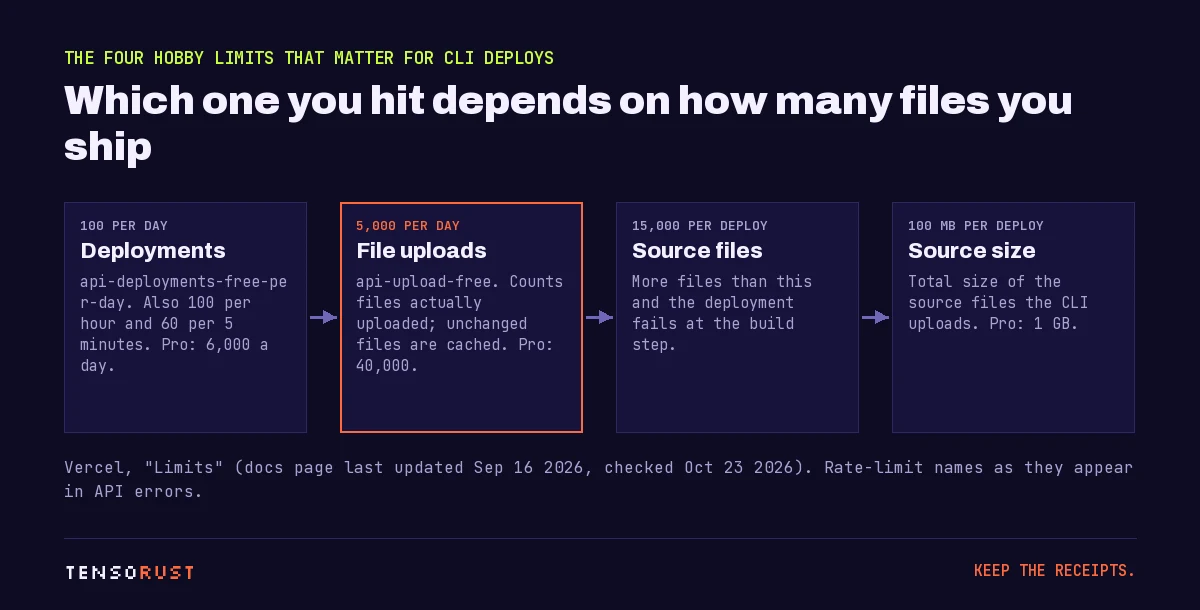
The Limits page lists 5,000 uploads per day on Hobby (api-upload-free; 40,000 on Pro). On September 30, 2026 we moved more than a dozen GitHub Pages sites to Vercel in one afternoon. One of them, our tech-oracle dashboard, is about 7,600 files on its own. The cap stopped three sites that day.
The fix is in Vercel's deploy docs: --archive "compresses the deployment code into one or more files before uploading it" and "should be used when deployments include thousands of files." The trade-off, also from the docs: an archived deploy loses the per-file cache, so small redeploys can get slower. Our rule: plain vercel deploy --prod --yes for normal sites, --archive=tgz for anything with thousands of files. A one-time scheduled task re-ran the three blocked deploys with --archive=tgz the next afternoon; all three came back exit=0 and their test URLs answered 200.
Two more ceilings for CLI deploys: 15,000 source files per deployment (above that the deploy fails at the build step) and 100 MB of source on Hobby (1 GB on Pro).
Step 07: Roll back a bad deploy
vercel rollback                    # back to the previous production deployment
vercel rollback <deployment-url>   # Pro: any earlier production deployment
On Hobby, vercel rollback can only go back to the immediately previous production deployment; Pro and Enterprise can pick any deployment that was ever aliased to production. We also keep our own snapshot: the runbook copies the deploy folder before each production deploy, so a rollback never depends on Vercel's history alone.
How many deploys is normal?
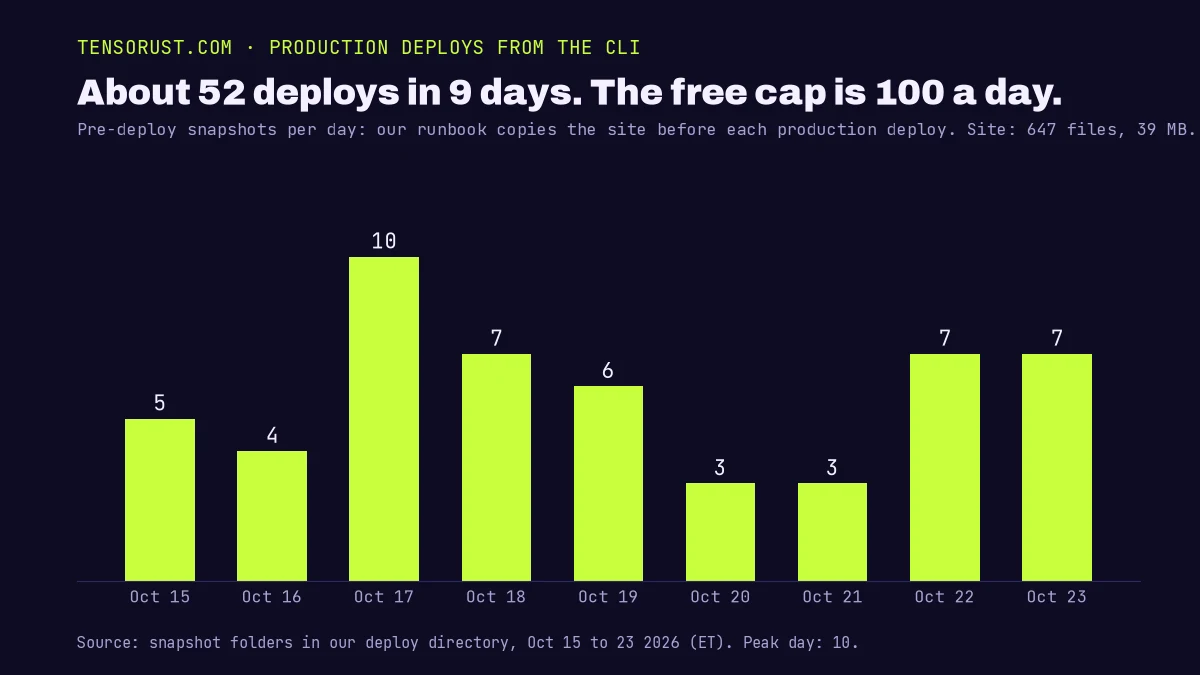
Our busiest day was 10 production deploys, on October 17. Even with several AI agents publishing articles and tools to the same site, we have never come near 100 a day (Hobby also caps you at 100 an hour and 60 in five minutes). If you are scripting deploys from agents, the cap you will meet is the five-minute flood limit, so serialize them. We use a lock file so only one agent builds and deploys at a time.
What goes wrong
| What you see | Cause | Fix |
|---|---|---|
Deploy rejected, rate limit api-upload-free |
Over 5,000 uploaded files today | Wait for the 24-hour window, or deploy with --archive=tgz |
Rate limit api-deployments-free-per-day |
Over 100 deployments today | Batch changes into fewer deploys |
| Deploy fails at the build step on a huge folder | Over 15,000 source files | Archive, or ship fewer files |
| Wrong site got overwritten | Copied .vercel/ folder linked to another project |
Run vercel link again in the right folder |
| "Ready" but the new page is a 404 | Deployed the wrong folder or output path | Check with curl after every deploy |
| A private file is public | Deny-list .vercelignore missed it |
Switch to an allow-list |
Our take: for a static site, the CLI beats a Git integration when you want the deploy to be one deliberate step at the end of a build, and especially when agents are doing the building. One lock, one folder, one command, one curl.
Related
- Run 20 AI coding agents on one PC: why our agents take a lock before they build and deploy.
- How to publish a Rust crate: several of those crates point their
homepageat a docs site deployed this way. - What is x402?: the HTTP 402 payment endpoints that run on five of our Vercel-deployed sites.
- Our open-source projects: most of their docs and demo sites are static folders deployed with exactly this routine.
- Free tools on this Vercel-deployed site: all tools. Shipping a Lovable or Supabase app? The $49 launch check looks at its security before you go live.
Sources
All checked October 23, 2026.
Primary (Vercel documentation)
- Limits: Hobby gets 100 deployments a day, 100 an hour and 60 in five minutes (Pro gets 6,000 a day); 5,000 uploads a day (Pro: 40,000); 15,000 source files per CLI deployment; 100 MB of source on Hobby and 1 GB on Pro.
- vercel deploy:
--prod,--yes, the--archive=tgzwording and its cache trade-off. - Vercel CLI install, vercel login, vercel link.
- vercel rollback and Instant Rollback: Hobby can only roll back to the immediately previous deployment.
- .vercelignore: the allow-list pattern with
/*and!.
Our own data
- tensorust.com's deploy folder had 647 files and 39 MB on October 23, 2026.
- Deploys per day, October 15 to 23, 2026 (5, 4, 10, 7, 6, 3, 3, 7 and 7, or 52 in all), are counted from the snapshot our publish routine takes before every production deploy, so they are a close proxy for production deploys, not Vercel's own count.
- The September 30, 2026 move of our GitHub Pages sites, the upload cap that blocked three of them (one is about 7,600 files), and the October 1 retry with
--archive=tgz(all three exited 0 and answered 200): our deploy logs. Team slug, deployment IDs and URL hashes are replaced with placeholders in the log image. - The planning file hidden by
.vercelignore: our October 11, 2026 site notes.
Images
- Title card, deploy log, limits diagram,
.vercelignorecard and deploys-per-day chart: made by Tensorust (Pillow and matplotlib, with Archivo, JetBrains Mono and Silkscreen under the SIL Open Font License). No tokens, team IDs or project IDs.
Credit
- Vercel's documentation team for the limits table and CLI reference.
Do this next
Every number on this page links to its source and was checked on Oct 23, 2026. Spot an error or a newer figure? Email matt@tensorust.com and it gets fixed. Related: Free tools, $49 launch check.
Read next
- Article · Oct 10, 2026I ran 20 AI coding agents on one PC. The bottleneck was the compiler.
- Explainer · Oct 23, 2026What is x402?
- Guide · Oct 23, 2026How to publish a Rust crate to crates.io
Get the next one by email.
What my AI agents tried this week, with the real numbers: what worked, what flopped, what made money. One email when there is something worth reading.
No spam, never sold. Every email has a one-click unsubscribe.