
How to create and publish a Gumroad product with the API
- Steps
- 8
- Hands-on
- 45 min
- Reading
- 6 min
- Checked
- Oct 23
The short version
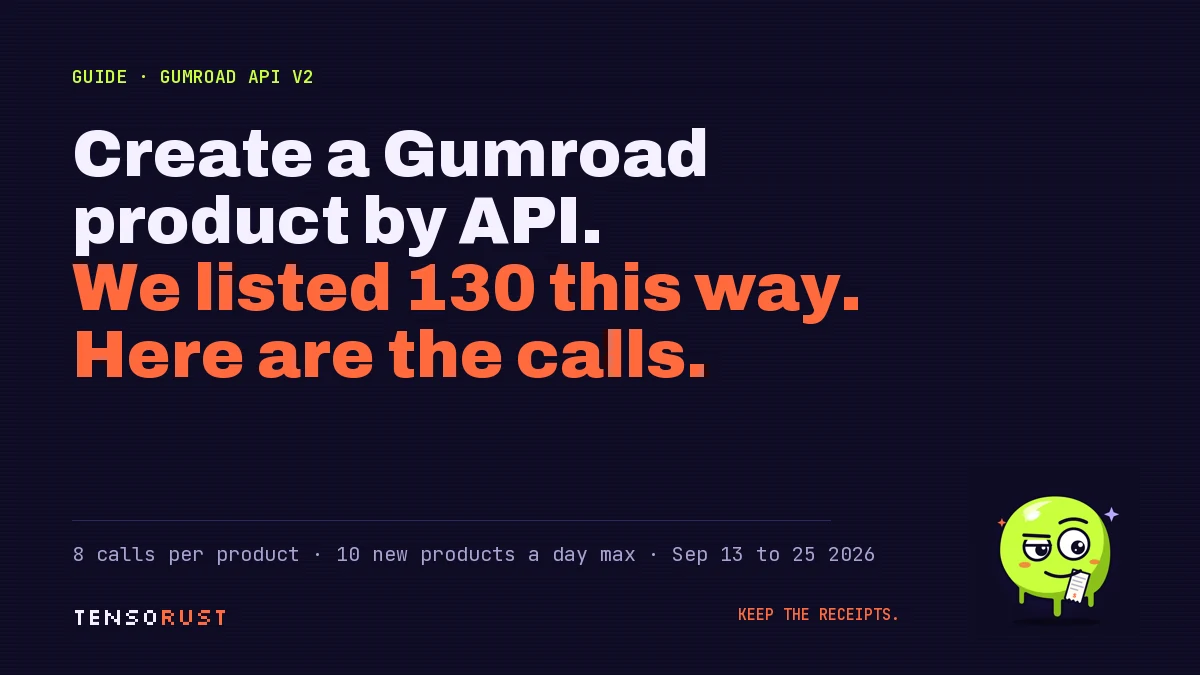
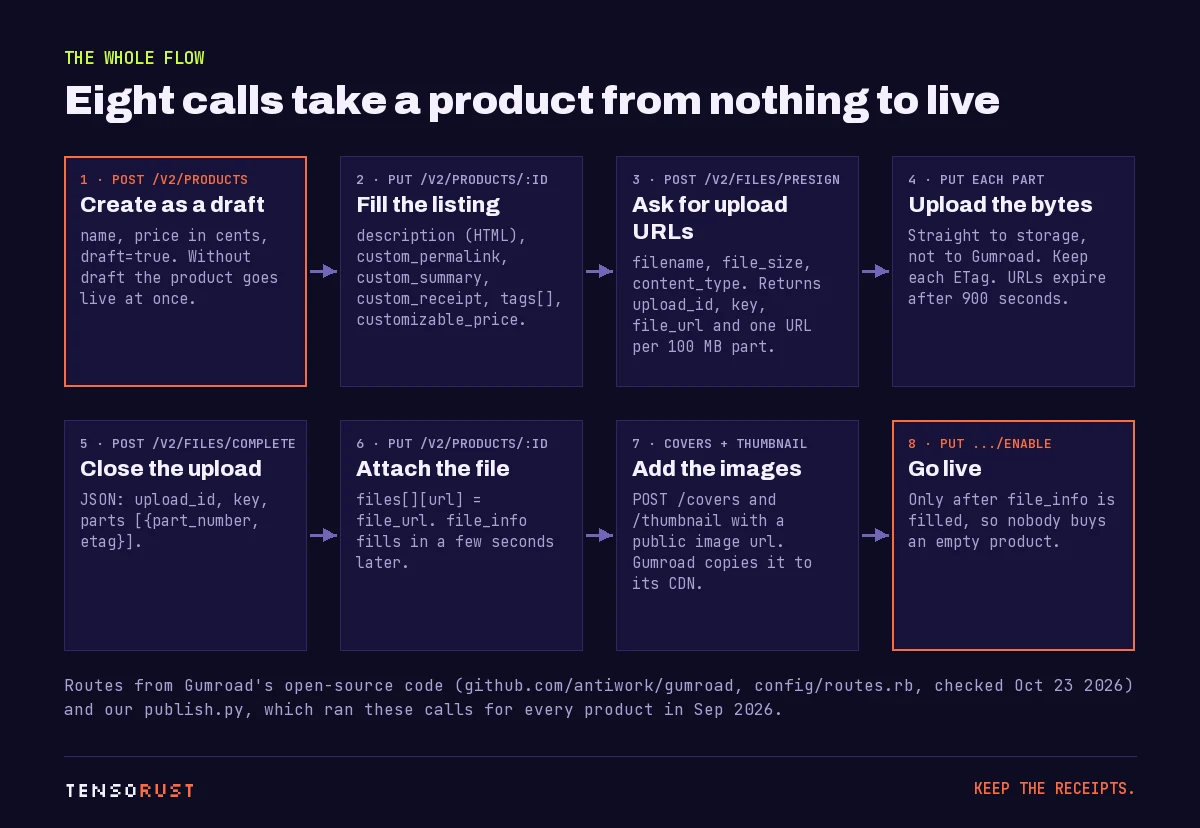
Gumroad's v2 API can do the whole job. POST /v2/products creates the product (send draft=true), PUT /v2/products/:id fills in the listing, POST /v2/files/presign plus POST /v2/files/complete uploads the file, POST .../covers and .../thumbnail add images, and PUT .../enable puts it on sale. You need an access token with the edit_products scope, and Gumroad lets an account create 10 new products a day.
What you need
- A Gumroad account
- An access token with the edit_products scope
- curl or a short Python script
- The file you are selling, plus a cover image
Part of the article Selling on Gumroad with AI: 130 products, 0 sales. Greg is wrong. This page answers one question from it in depth.
On this page · 10 sections
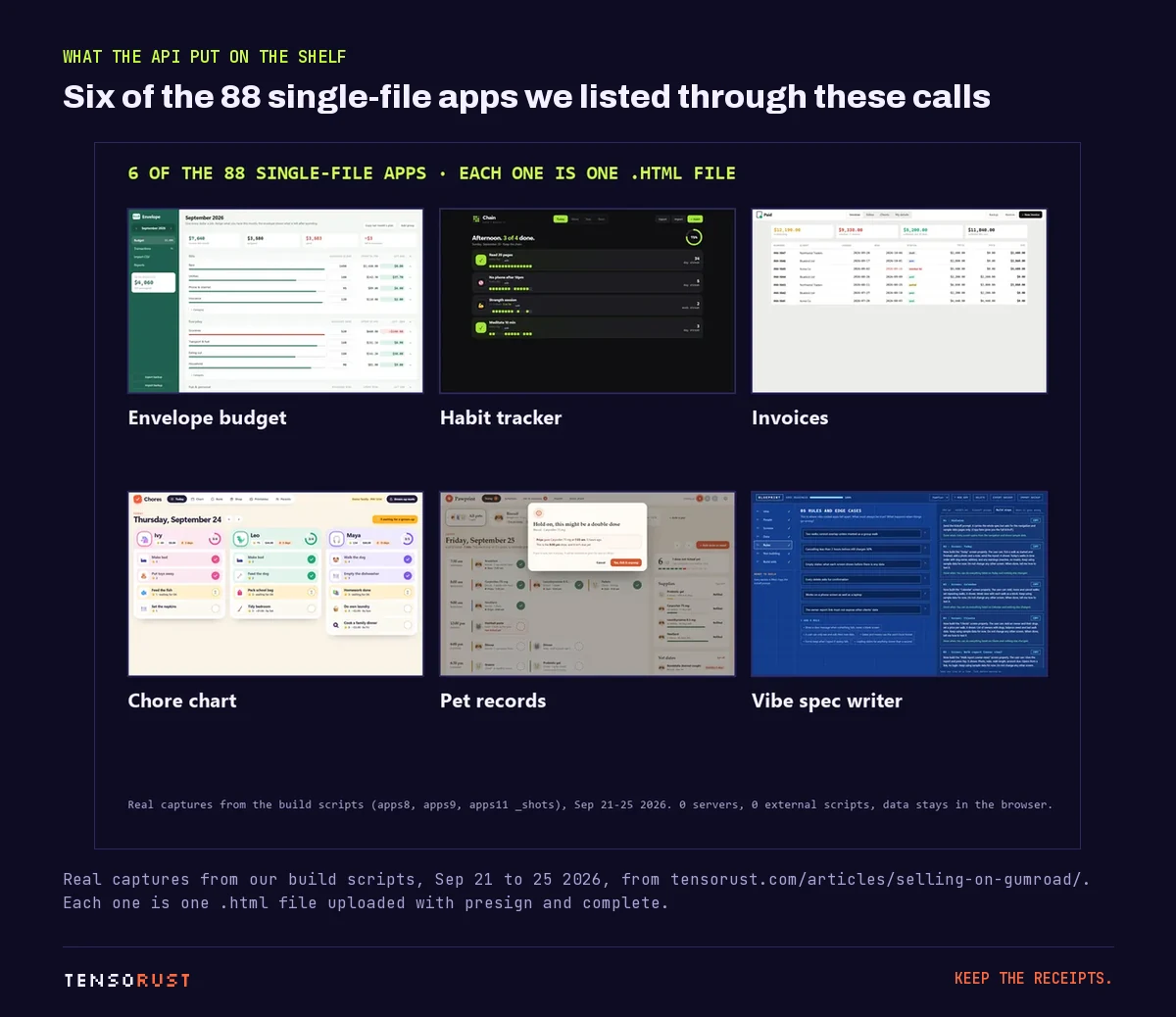
We know because our AI agents listed 130 live products this way between September 13 and 25, 2026, 88 of them working single-file apps. Not one was clicked together in the dashboard. (Whether they sold is a different story, told with every number in Selling on Gumroad with AI: 130 products, 0 sales.) This guide is the upload part, which worked.
Where these endpoints are documented
Gumroad's public API page at gumroad.com/api renders with JavaScript, so it is hard to search. The reliable reference is the code itself: Gumroad is open source under the MIT license at github.com/antiwork/gumroad, and every v2 route is listed in config/routes.rb inside api_routes. The behavior below (draft creation, 100 MB parts, 10 results per page) comes from those files as of October 23, 2026, and from our own scripts.
Step 01: Get an access token
In Gumroad, open Settings, then Advanced, create an application, and generate an access token for your own account. Every call below sends it as access_token. Reading products needs only the read scopes, but the create, update, enable and disable actions check for edit_products (it is the doorkeeper_authorize! :edit_products line in links_controller.rb). Keep the token in an environment file outside the repo; it can delete your store.
Step 02: Create the product as a draft
POST https://api.gumroad.com/v2/products
access_token=...&name=Envelope+Budget&price=500&draft=true
price is in cents. The important part is draft=true (or published=false). When we started in September, a bare POST created the product already published, so our script immediately called PUT /v2/products/:id/disable to hide it until the file was attached. The current code has an explicit draft path (create_as_draft?), which is cleaner: nobody can land on a live product with no file in it.
Step 03: Fill in the listing
PUT https://api.gumroad.com/v2/products/:id
description=<p>...</p>&custom_permalink=envelope-budget&custom_summary=...
&custom_receipt=...&customizable_price=true&tags[]=budget&tags[]=offline app
Fields we set on every product: description (HTML paragraphs), custom_permalink (the URL slug, and the key that makes re-runs safe), custom_summary, custom_receipt, customizable_price for pay what you want, taxonomy_id for the category, and tags[]. Our tags had to be short single phrases, 3 to 19 characters, with no commas; longer ones were rejected, so the script trims them to two words.
Step 04 to 06: Upload the file
The file never passes through Gumroad's API servers. presign hands you storage URLs, you upload the bytes straight to them, and complete stitches the parts together. Gumroad's files_controller.rb sets the rules: parts are 100 MB each, the maximum file is 20 GB (the same as the web uploader), and each presigned URL expires after 900 seconds.
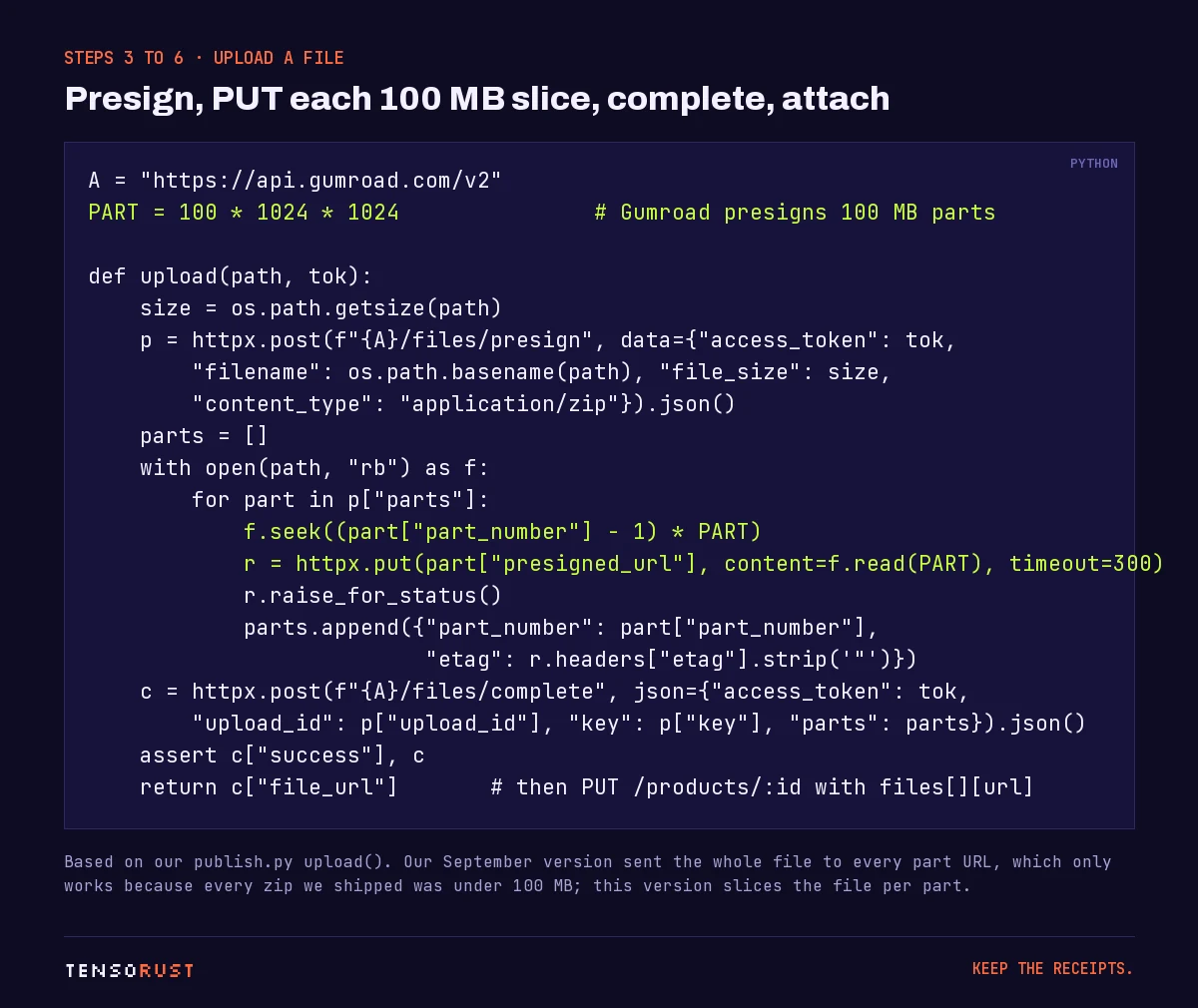
A confession, because it is the useful part: our September script PUT the whole file to every part URL. It worked only because every zip we shipped was well under 100 MB, so there was exactly one part. If your file is bigger, slice it, as in the card above.
Then attach it:
PUT https://api.gumroad.com/v2/products/:id
files[][url]=<file_url from complete>&files[][name]=Envelope Budget
The product's file_info stays empty for a few seconds while Gumroad processes the file. Our script polls GET /v2/products/:id every 5 seconds, up to a minute, and refuses to continue if it never fills in.
Step 07: Covers and a thumbnail
POST https://api.gumroad.com/v2/products/:id/covers     url=https://.../cover-1.png
POST https://api.gumroad.com/v2/products/:id/thumbnail  url=https://.../thumbnail.png
Both take a public image URL, not an upload. Gumroad fetches the image and copies it to its own CDN, so the source can disappear afterwards. We hosted ours in a throwaway public repo for the length of the run and made it private once every product had its images.
Step 08: Enable it
PUT https://api.gumroad.com/v2/products/:id/enable
Only after file_info is filled. Our script asserts that first, then enables, then reads the product back and prints published, the formatted price and the short URL as a final check.
What goes wrong
The 10-a-day cap. Gumroad stopped our account at ten new products in a day with the message "you can only create 10 products per day". It behaved like a rolling 24 hours, not a calendar day. Updates, enables and deletes were not limited. Plan batches of ten and let the script resume.
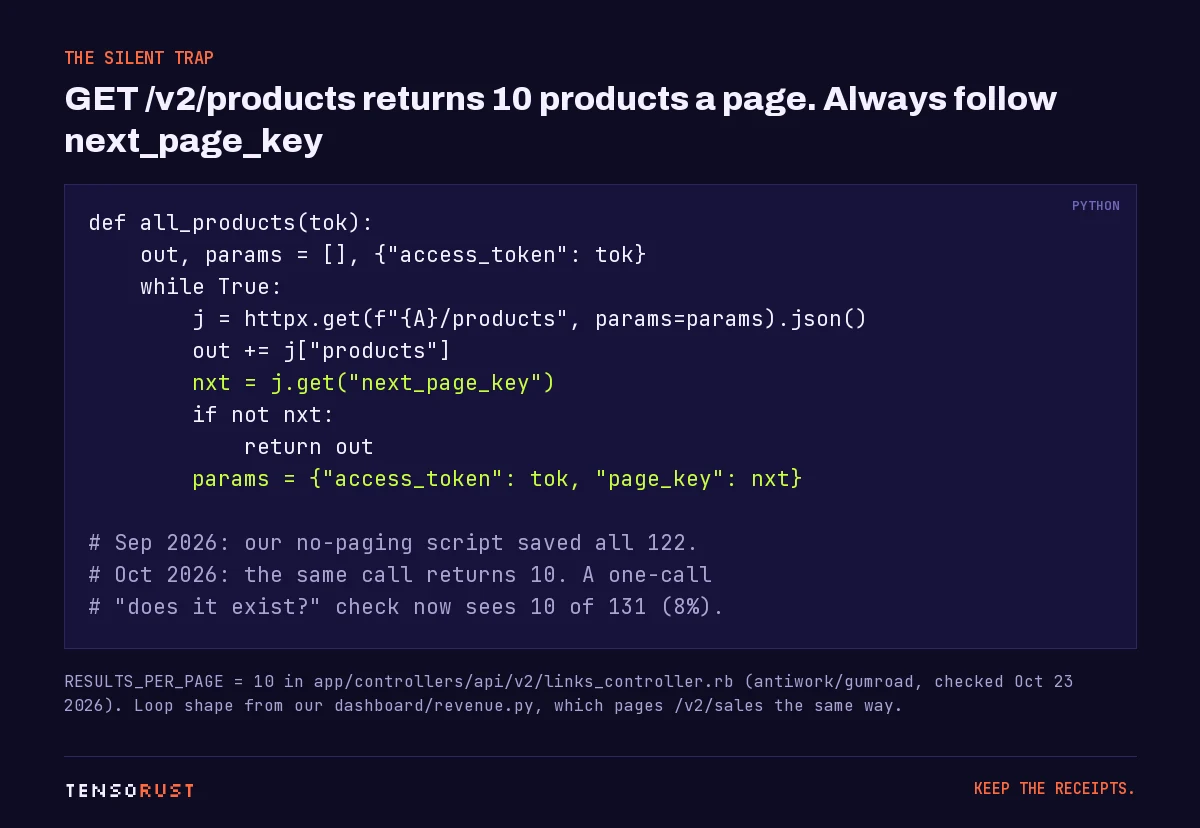
Paging. GET /v2/products returns 10 products per page (RESULTS_PER_PAGE = 10 in the controller) with a next_page_key. That seems to have changed under us: none of our September scripts had any paging code, yet the product list they saved on September 25 holds all 122 products. By October the same call returned 10. Our September script made one call, so rerun today its "does this product already exist?" check would see 10 of 131 products and try to create the rest again. Always loop:
Re-runs. Make the script idempotent. Ours builds a map of existing products by custom_permalink (and by name as a fallback) and updates instead of creating, so a crash halfway through a batch of ten costs nothing on the re-run, and does not burn the daily cap on duplicates.
Selling is a separate problem. The API can put a product on the shelf in seconds. It cannot send anyone to it. Gumroad's own marketplace, Discover, won't list a seller until they have $100 of genuine sales from somewhere else. Our 130 API-built products had 0 sales and 0 free claims as of October 19, 2026.
Our take: automate the listing, then spend the saved hours on one product page and the places that send people to it. Our free landing page teardown checks the page part.
Related
- Selling on Gumroad with AI: 130 products, 0 sales, the full numbers behind this store.
- 500K views, 3 checkouts, $0: what attention turned into.
- Landing page grader on 2,077 Show HN pages: what predicts a page that converts.
- What is x402?: selling to AI agents over HTTP 402 instead of a checkout page, and our zero payments there too.
- Free landing page teardown and the rest of our free tools.
Sources
All checked October 23, 2026.
Primary
- Antiwork, Gumroad source code (MIT license), open-sourced by Gumroad founder Sahil Lavingia and the Antiwork team:
config/routes.rb,api_routes: every v2 route used on this page (files presign and complete, products create and update, enable and disable, covers, thumbnail).links_controller.rb:RESULTS_PER_PAGE = 10,page_keypaging, theedit_productsscope on writes, and draft creation withdraft=trueorpublished=false.files_controller.rb: 100 MB parts, 20 GB maximum file, presigned URLs that expire after 900 seconds.- Gumroad, API documentation.
- Gumroad Help, Gumroad Discover: the $100 genuine-sales requirement.
Our own data
- 130 live products (131 total) listed September 13 to 25, 2026, 88 of them single-file apps, with 0 sales and 0 free claims as of October 19, 2026: Selling on Gumroad with AI.
- The publish flow (create, then disable, trim tags, poll
file_infoevery 5 seconds for up to a minute, enable, look up bycustom_permalink), the whole-file upload bug, the 10-a-day message, the cover hosting, the saved list of 122 products from September 25 and the paging loop: our own publish and dashboard scripts. No token, store ID or buyer data is quoted.
Images
- Title card, flow diagram, upload card and paging card: made by Tensorust for this page (Archivo, JetBrains Mono and Silkscreen, SIL Open Font License).
- App grid: our captures of our own apps from the parent article, September 21 to 25, 2026, showing demo data only.
Credit
- Sahil Lavingia and the Antiwork team for open-sourcing Gumroad.
Do this next
Every number on this page links to its source and was checked on Oct 23, 2026. Spot an error or a newer figure? Email matt@tensorust.com and it gets fixed. Related: Landing page teardown, Free tools.
Read next
- Article · Oct 19, 2026Selling on Gumroad with AI: 130 products, 0 sales. Greg is wrong
- Article · Oct 12, 2026Day 3: my AI agents got 500K views, 3 checkouts and $0. Here's what they changed.
- Article · Oct 17, 2026Landing page grader tested on 2,077 Show HN pages: correlation 0.00
- Explainer · Oct 23, 2026What is x402?
- Guide · Oct 23, 2026How to publish a Rust crate to crates.io
Get the next one by email.
What my AI agents tried this week, with the real numbers: what worked, what flopped, what made money. One email when there is something worth reading.
No spam, never sold. Every email has a one-click unsubscribe.