
How to publish a Rust crate to crates.io
- Steps
- 9
- Hands-on
- 30 min
- Reading
- 8 min
- Checked
- Oct 23
The short version
Make a crates.io account, create an API token, run cargo login, add description and license to Cargo.toml, check the package with cargo publish --dry-run, then run cargo publish. Read the next section before you do, though: every version you publish is permanent. You can yank it, but you can never edit or delete it.
What you need
- Rust and Cargo installed (rustup)
- A GitHub account to sign in to crates.io
- A verified email on crates.io
- A crate that builds, with a Cargo.toml you can edit
Part of the article crates.io download count: 80% of ours arrived with a new version. This page answers one question from it in depth.
On this page · 13 sections
- Before you start: three facts that change how you publish
- Make an account and verify your email
- Create a scoped token and run cargo login
- Fill in the Cargo.toml metadata
- See exactly what will ship
- Publish
- Publishing a workspace (and the 429)
- What happens after you publish
- Publish from CI without a stored token
- Fixing a bad release
- What goes wrong (the short list)
- Related
- Sources
We have done this 235 times. Between March and October 2026 we published 235 versions of 69 crates, including one release run on October 4 that pushed 68 versions in a single day, and a README pass on October 21 that republished 53 crates one at a time. This guide is the checklist those runs left behind, with the parts the official docs mention only in passing.
Before you start: three facts that change how you publish
- Publishing is forever. The Cargo Book says it plainly: "The version can never be overwritten, and the code cannot be deleted." If a
.envfile or an API key ships inside your.crate, it is public until the heat death of the universe. Rotate the key; yanking does not help. - Names are first come, first served. Once a name is taken it can never be reused for another crate. We hit this ourselves: our memory-graph crate could not ship as
mem-graphbecause another project already owns that name on crates.io. - There is no limit on versions, but there is a rate limit on uploads. crates.io limits publishes per user with a token bucket (crates.io PR #1681). Hit it and
cargo publishfails with HTTP 429 and a time to retry.
Step 01: Make an account and verify your email
Log in at crates.io with GitHub (it is the only login option today) and verify your email address on the Account Settings page. crates.io refuses to publish from an account without a verified email.
Step 02: Create a scoped token and run cargo login
Go to crates.io/settings/tokens and create a token. Since 2023 tokens can be limited to specific operations, specific crate names and an expiry date. For a laptop, a token that can publish new crates and update existing ones, with an expiry, is plenty. You will see the token once; copy it before you leave the page.
cargo login
Treat that file like a password. cargo logout removes it.
Step 03: Fill in the Cargo.toml metadata
crates.io needs description and either license (an SPDX expression such as MIT OR Apache-2.0) or license-file. The Cargo Book also lists homepage, repository and readme, and recommends keywords (up to five) and categories. Here is the real [package] block of our most downloaded crate:
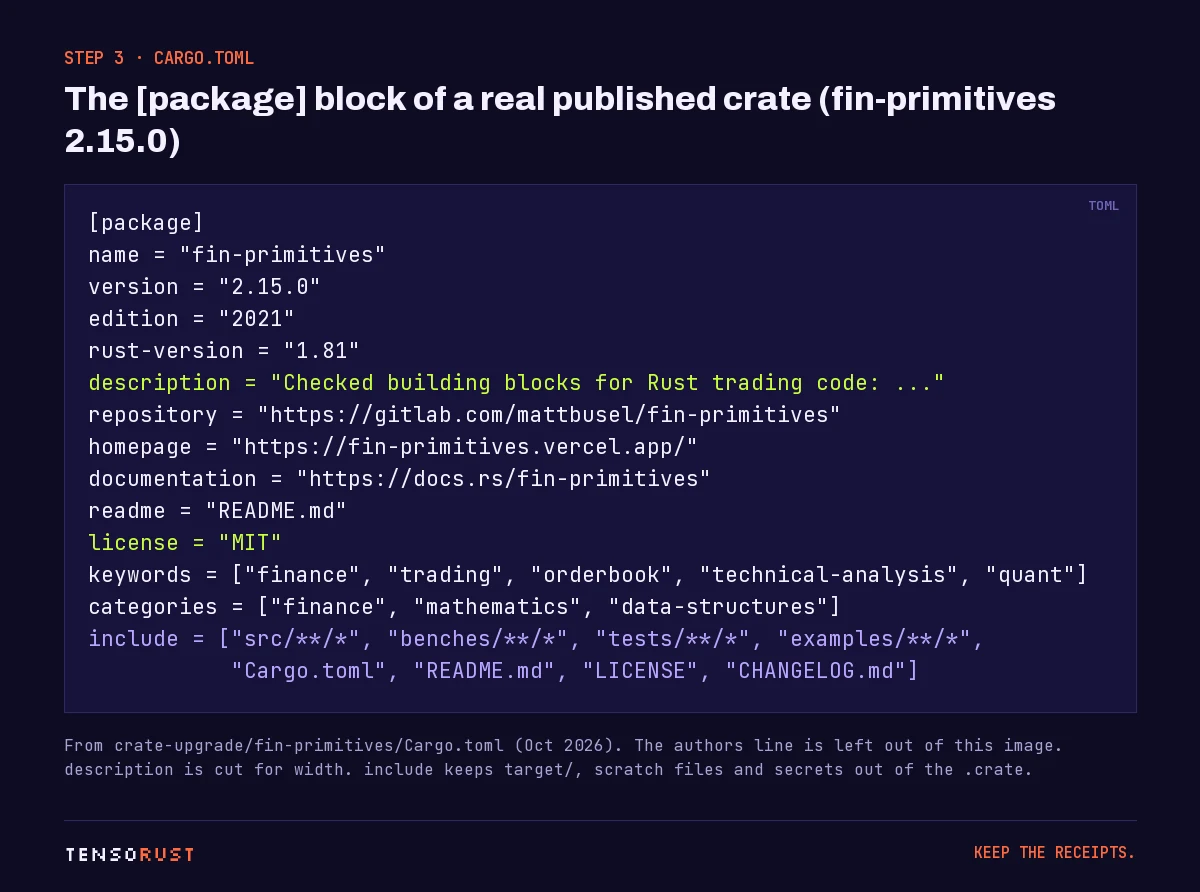
The line that matters most is the last one. include is an allow list: only those paths go into the .crate. Without it, Cargo packages everything in the crate folder that git does not ignore, and a stray dataset or screenshot folder can push you past crates.io's 10 MB limit on the .crate file.
Two more fields worth setting: rust-version (your minimum supported Rust, so users on old compilers get a clear error) and documentation if you host docs anywhere other than docs.rs.
Step 04: See exactly what will ship
Before every first publish, run both of these:
cargo package --list      # every file that will go into the .crate
cargo publish --dry-run   # package + compile the packaged copy, no upload
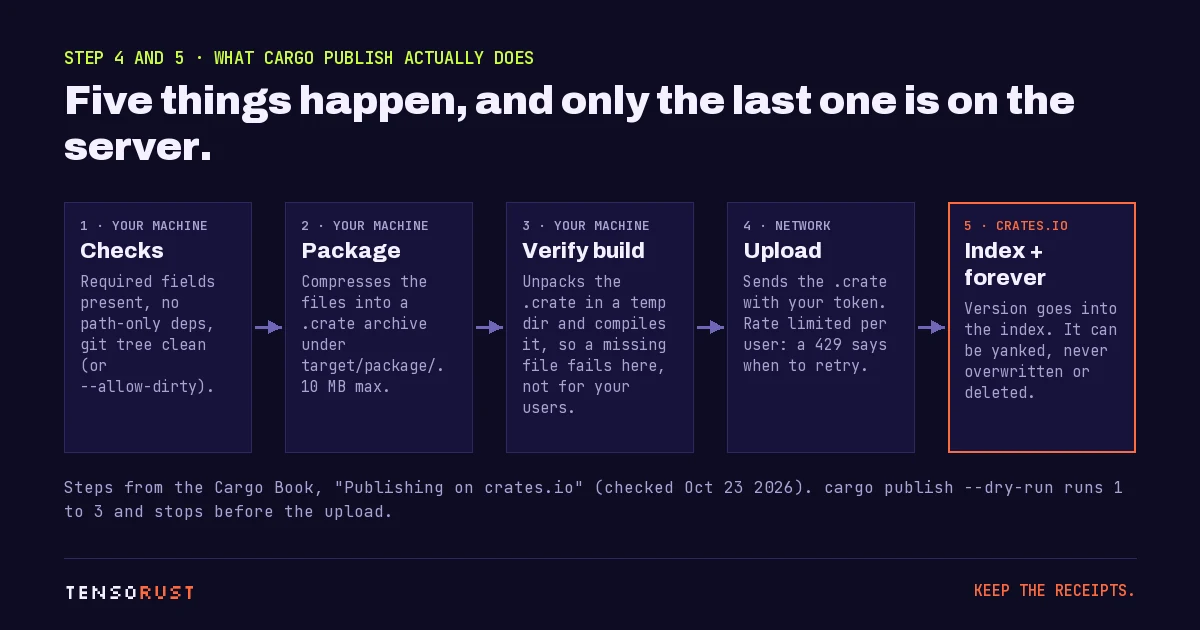
The dry run unpacks the .crate into a temp folder and builds it from there. That is the point: if your code reads a file that include left out, or a path = "../shared" dependency has no version, the build fails on your machine instead of for your first user. Cargo also refuses a dirty git tree unless you pass --allow-dirty, which is a feature, not an obstacle: it stops you publishing code you have not committed.
Step 05: Publish
cargo publish
When it returns, the version is in the index. Anyone can now cargo add it, and docs.rs starts building its documentation automatically.
Step 06: Publishing a workspace (and the 429)
If your project is a workspace, every member is its own crate, and members have to go up in dependency order. Since Rust 1.90 (September 18, 2025), cargo publish --workspace does the ordering for you. The release notes warn that it is still not atomic: a network or server failure can leave half a workspace published, so re-run it rather than bumping versions.
The rate limit is where big workspaces hurt. crates.io does not publish its current numbers. From our own runs, new crate names are the tight one: when we published CoreScout 1.2.0 on October 4, 2026 (33 crates, 19 of them brand new names), we paced it around one new crate every ten minutes. For the October 21 republish of 53 crates, the script waited 65 seconds between crates and slept 10 minutes on any 429. Our real loop, trimmed:
p = subprocess.run(["cargo", "publish"], cwd=crate_dir, capture_output=True, text=True)
if p.returncode:
    if "429" in p.stderr or "Too Many" in p.stderr:
        time.sleep(600)          # rate limited: wait, don't hammer
    continue
time.sleep(65)                   # spacing between successful publishes
If you have a genuine one-time need, the 429 message itself tells you how to ask the crates.io team for a temporary higher limit.
Step 07: What happens after you publish
Something downloads every new version within hours, whether or not a human has seen it. Across 181 of our versions, the mean was 13.45 downloads on day 0 (median 10), then about 1 on day 1 and almost nothing after. We dug into why in the crates.io download count article.
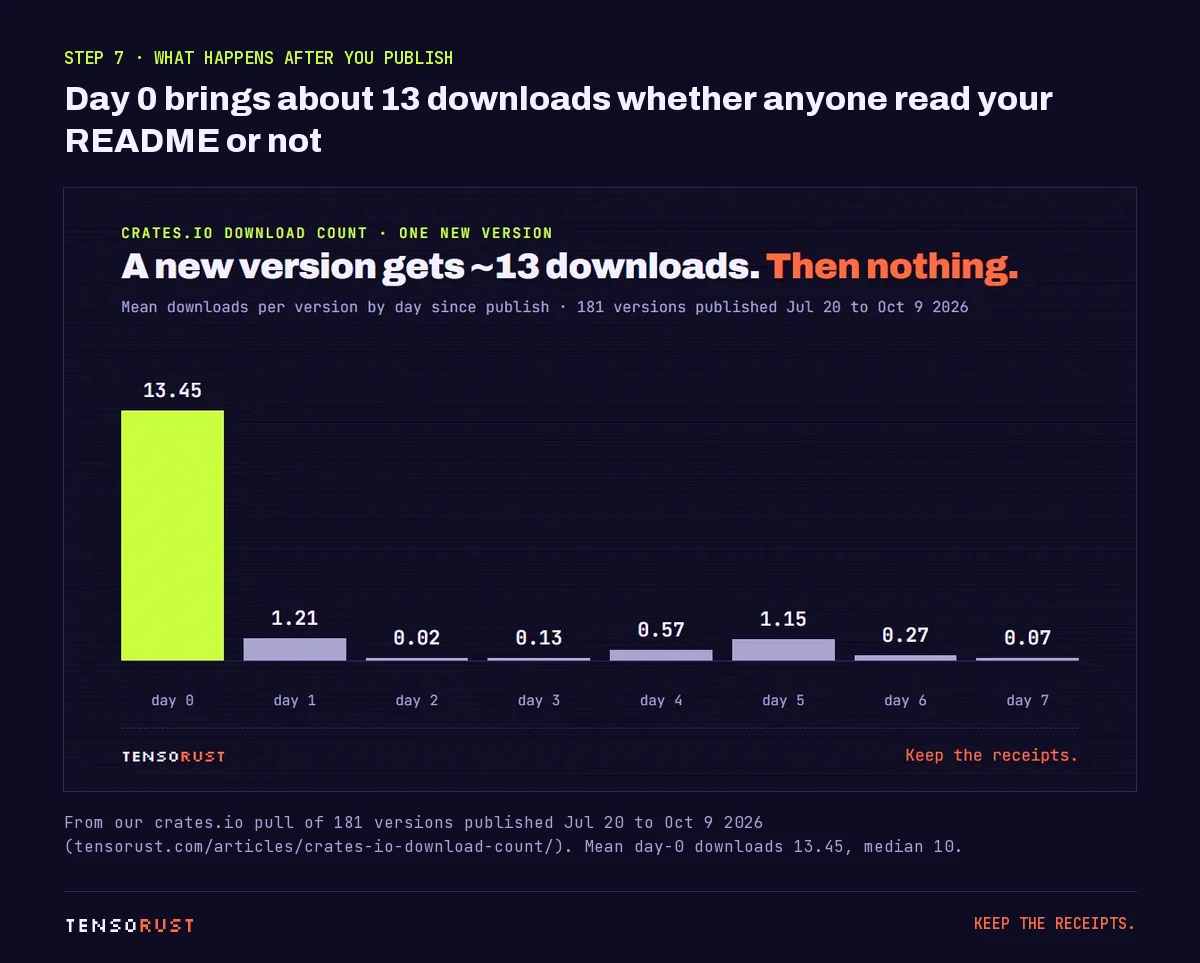
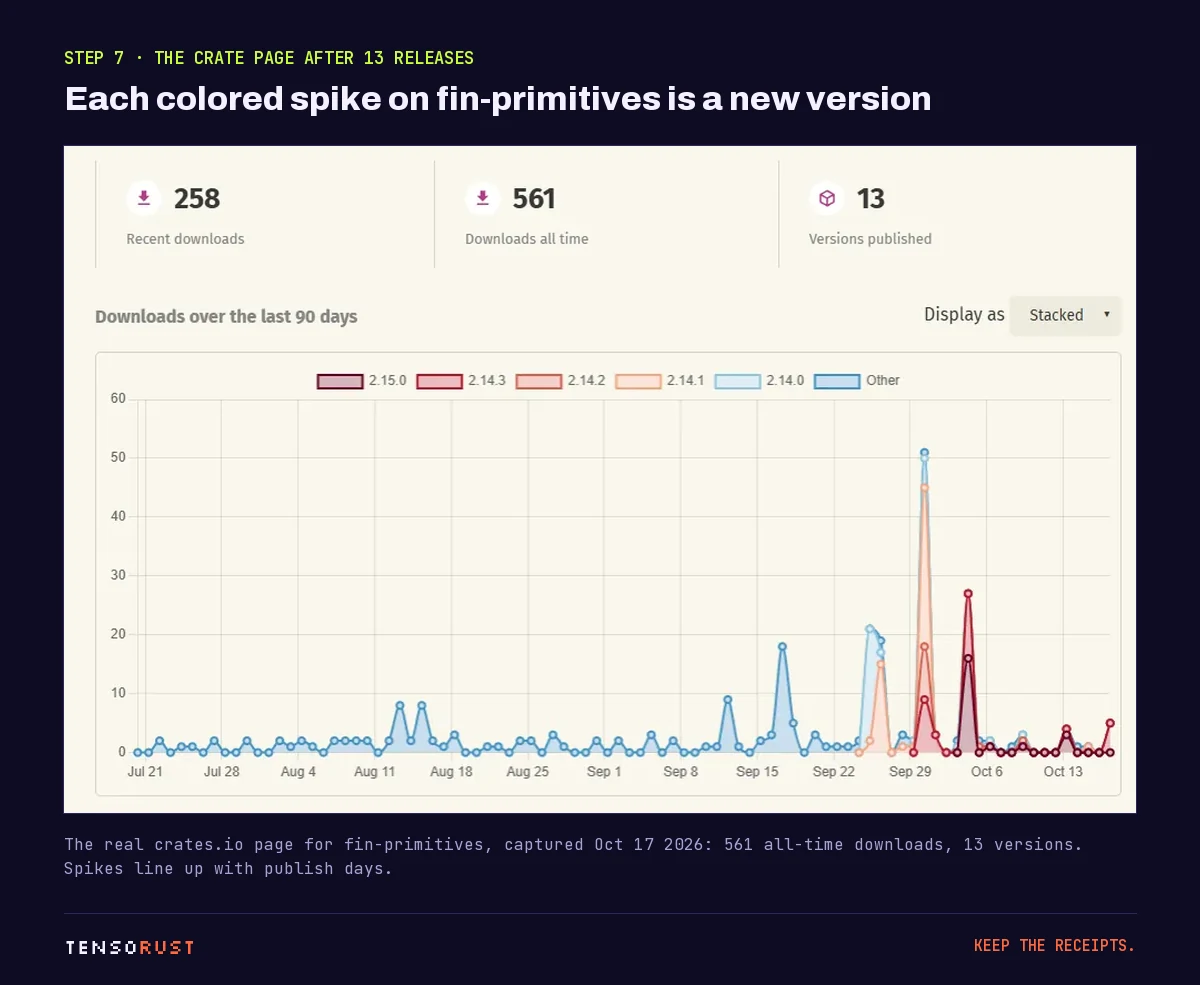
So do not read your first-day number as interest. Watch the quiet days between releases and the Dependents tab instead. Our free crate downloads checker splits any crate's chart into publish-day and quiet-day downloads for you.
Step 08: Publish from CI without a stored token
Once the crate exists, stop pasting tokens into CI secrets. crates.io supports Trusted Publishing (RFC 3691): you tell crates.io which GitHub repository and workflow may publish, and the workflow exchanges its OIDC identity for a short-lived token. The first release still has to be done by hand.
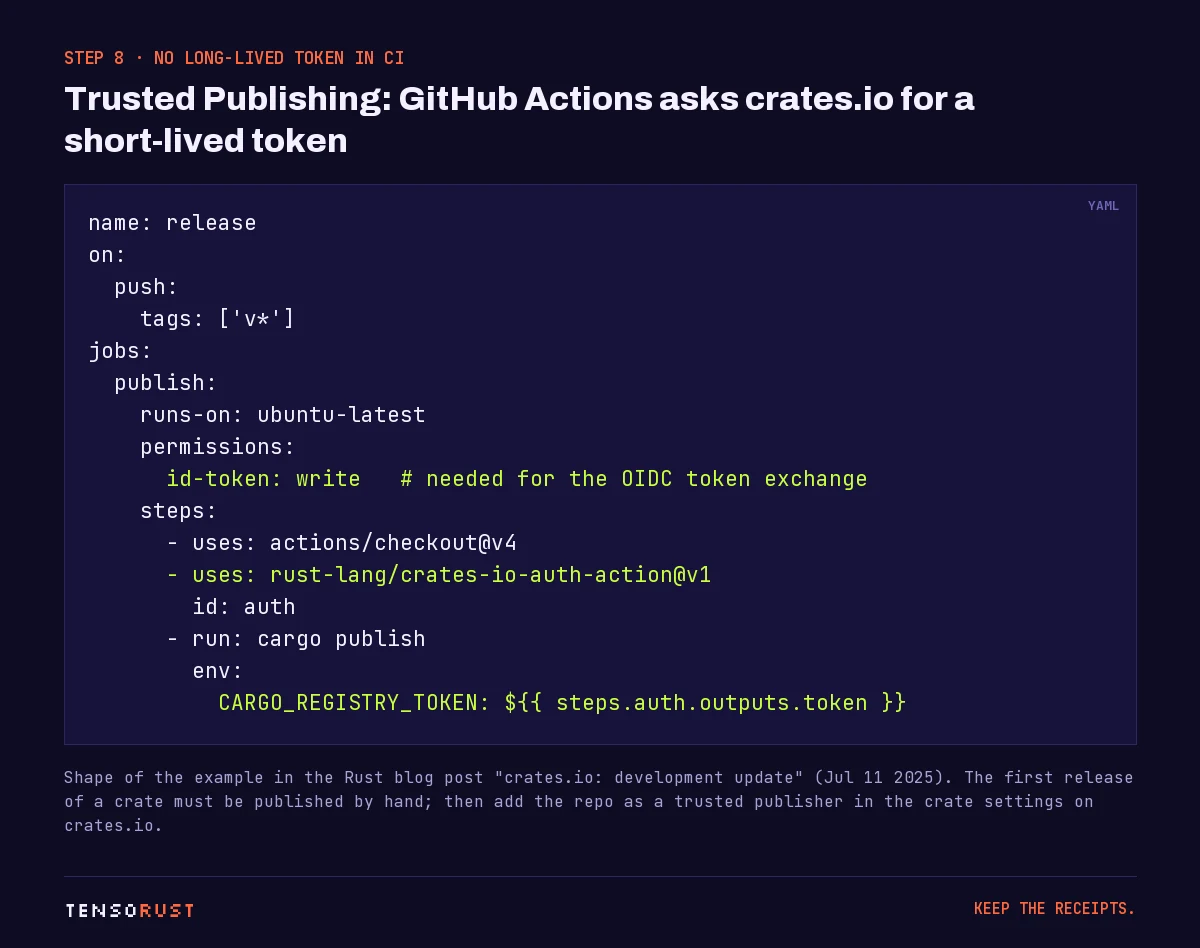
The crates-io-auth-action revokes the token when the job finishes. It is the same idea as an App Store Connect API key in CI, minus the stored secret: no long-lived credential sits in your repo settings at all. In January 2026 crates.io added GitLab CI support (gitlab.com only) and an option to turn off token-based publishing for a crate entirely.
Step 09: Fixing a bad release
cargo yank --version 1.0.1          # new projects won't pick it
cargo yank --version 1.0.1 --undo   # changed your mind
A yank does not delete anything. Projects with that version in their Cargo.lock keep building, and the code stays downloadable. The fix for a broken release is a new patch version. The fix for a leaked secret is rotating the secret.
What goes wrong (the short list)
| What you see | Cause | Fix |
|---|---|---|
| Publish refused, asks for a verified email | Email not verified | Verify it in crates.io Account Settings |
| Publish refused because you are not an owner | Someone already owns that name | Pick another name; a taken name never frees up |
| Upload rejected as too large | .crate over 10 MB |
Add an include list; check cargo package --list |
| Cargo says a dependency has no version | A path dependency without version |
Add version = "x.y" next to path |
| HTTP 429 Too Many Requests | Publish rate limit | Wait the time the message gives; space out workspace publishes |
| "files in the working directory contain changes that were not yet committed" | Uncommitted changes | Commit, or pass --allow-dirty if you mean it |
Our take: do not publish to pump numbers. It works (we measured it working), which is exactly why nobody evaluating your crate trusts the download count. Publish when something changed, and put the effort into the README and examples, because those are what turn a fetch into a dependent.
Related
- crates.io download count: 80% of ours arrived with a new version, the data behind step 7.
- Free crate downloads checker: see your own quiet-day baseline.
- Our open-source crates: the 69 crates this guide came from.
- Run 20 AI coding agents on one PC: the agents that upgraded these crates before the October release run.
- How to deploy to Vercel from the CLI: how the crates' docs and demo sites (like the
homepagein step 3) go live. - How to create an App Store Connect API key and use it in CI: the same secrets-in-CI routine for iOS releases.
Sources
All checked October 23, 2026.
Primary
- The Cargo team, Publishing on crates.io, the Cargo Book: permanence, token flow,
cargo login, required metadata, the 10 MB.cratelimit,cargo package --list,--dry-run, yanking and owners. - The crates.io team, Improved API tokens for crates.io, Rust blog, June 23, 2023: endpoint scopes, crate scopes, expiry.
- The Rust release team, Announcing Rust 1.90.0, September 18, 2025:
cargo publish --workspaceand its non-atomic warning. - The crates.io team, crates.io development update, July 11, 2025: Trusted Publishing launch, first release by hand, example workflow.
- The crates.io team, crates.io development update, January 21, 2026: GitLab CI Trusted Publishing, turning off token publishing.
- RFC 3691: Trusted Publishing for crates.io.
- rust-lang/crates-io-auth-action: the token is revoked when the job ends.
- crates.io pull request #1681: the per-user token-bucket publish rate limit.
- docs.rs: About: automatic documentation builds.
Secondary
- Rust users forum thread quoting the 429 message. crates.io does not publish its current rate-limit numbers; the pacing on this page is from our own runs.
Our own data
- 69 crates, 235 versions, the October 4 run of 68 versions and the 13.45 day-0 mean across 181 versions: crates.io download count, data pulled from the crates.io API on October 17, 2026.
- The fin-primitives
Cargo.toml, the republish loop (65 seconds between crates, 10 minutes on a 429, 53 crates on October 21, 2026) and the CoreScout 1.2.0 release (33 crates, 19 new names, October 4, 2026): our release scripts and notes.
Images
- Title card, Cargo.toml card, publish diagram and workflow card: made by Tensorust for this page, using the Archivo, JetBrains Mono and Silkscreen fonts (SIL Open Font License). The authors line is left out of the Cargo.toml card.
- Publish-day chart and the crates.io screenshot: from the parent article, our crates.io API data and our capture of crates.io/crates/fin-primitives on October 17, 2026.
Credit
- The crates.io team and the Cargo team for the docs, Trusted Publishing and workspace publishing.
Do this next
Every number on this page links to its source and was checked on Oct 23, 2026. Spot an error or a newer figure? Email matt@tensorust.com and it gets fixed. Related: Crate downloads checker, Our open-source crates.
Read next
- Article · Oct 17, 2026crates.io download count: 80% of ours arrived with a new version
- Article · Oct 10, 2026I ran 20 AI coding agents on one PC. The bottleneck was the compiler.
- Explainer · Oct 23, 2026UUIDv7 vs UUIDv4: which should you use?
- Explainer · Oct 23, 2026What is x402?
Get the next one by email.
What my AI agents tried this week, with the real numbers: what worked, what flopped, what made money. One email when there is something worth reading.
No spam, never sold. Every email has a one-click unsubscribe.