
How to create an App Store Connect API key and use it in CI
- Steps
- 7
- Hands-on
- 20 min
- Reading
- 7 min
- Checked
- Oct 23
The short version
In App Store Connect go to Users and Access, Integrations, App Store Connect API, Team Keys, click Generate API Key, pick a role, and download the .p8 file. You get exactly one download. Copy the key ID from the key list and the issuer ID from the top of the same page. Every API call then carries a JWT you sign with that .p8: algorithm ES256, audience appstoreconnect-v1, lifetime under 20 minutes.
What you need
- A paid Apple Developer Program membership
- The Admin role on your App Store Connect team
- A CI system with encrypted secrets (GitHub Actions, GitLab CI or similar)
- Python 3 or fastlane to sign the token
Part of the article Build an iOS app on Windows: how 21 apps shipped with no Mac. This page answers one question from it in depth.
On this page · 8 sections
A key like this runs our whole iOS pipeline. Between September 10 and October 8, 2026, every Apple call in 139 App Store builds across 21 app repos went through a team API key loaded by fastlane, all started from a Windows PC with no Mac on the desk (the full story is in Build an iOS app on Windows). Below is how to make yours, the exact token code we use, and the four ways it failed for us.
Why a key instead of your Apple ID
A CI runner cannot answer a two-factor prompt. Tools that log in with an Apple ID and password break the first time Apple asks for a code. An API key never asks: you sign a short token with your private key and Apple checks it against the public half it kept. That is why fastlane and scripts like ours use it.
There are two kinds (Apple):
| Team key | Individual key | |
|---|---|---|
| Who can create it | An Admin on the team | Any user with the Generate Individual API Keys permission |
| Access | All apps on the team, limited by the role you pick | That user's own apps and roles |
| Provisioning endpoints (certificates, profiles) | Yes, if the role allows | No |
| Sales and Finance, notaryTool | Yes, if the role allows | No |
| JWT claim that identifies it | iss = issuer ID |
sub = "user" |
For a build pipeline you want a team key: we create the distribution certificate through the API from Windows, and individual keys cannot reach those endpoints at all.
Step 01 to 03: Generate the key and download it once
- Sign in to App Store Connect as an Admin. Open Users and Access, then the Integrations tab, then App Store Connect API in the left column, and make sure Team Keys is selected.
- Click Generate API Key (or the + button). The name is only a label for you. Under Access, pick the role. Team keys can touch every app on the team whatever the role, so the role is your only fence: pick the smallest one that covers what this key will do.
- Click Download API Key next to the new key. You get
AuthKey_<KEYID>.p8. Apple says the link "only appears if you haven't downloaded the private key" and that "Apple doesn't keep a copy." Save it somewhere that is not a git repo.
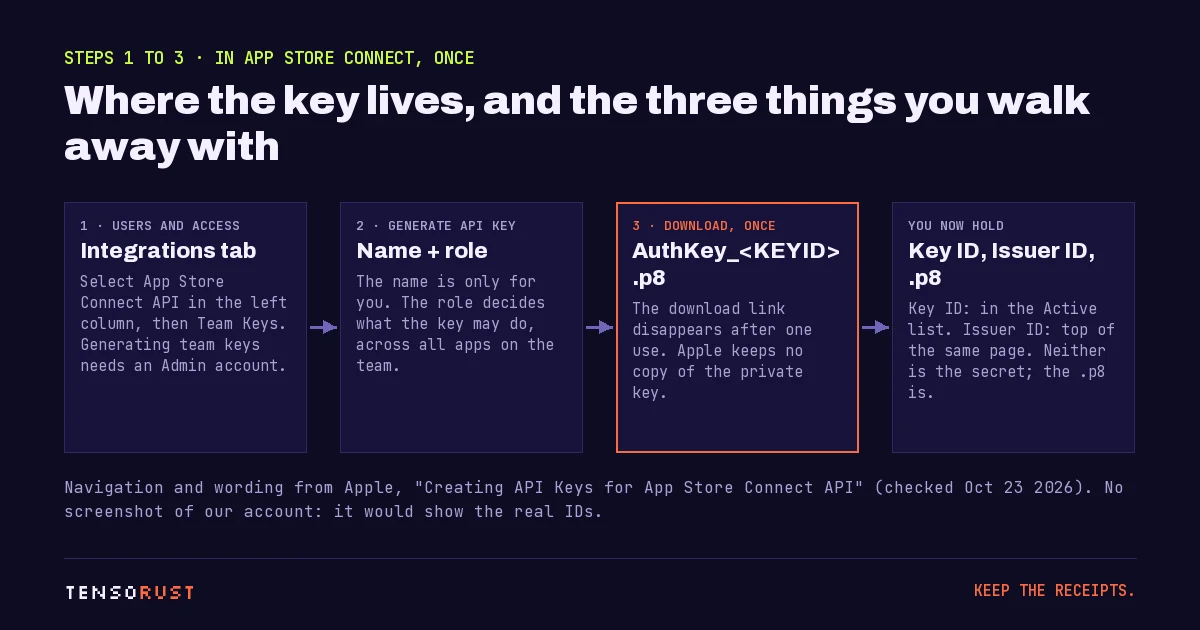
We are deliberately not showing a screenshot of our own Integrations page: it would publish our real key ID and issuer ID. They are not the secret, but there is no reason to hand them out.
Step 04: Sign a token and test it
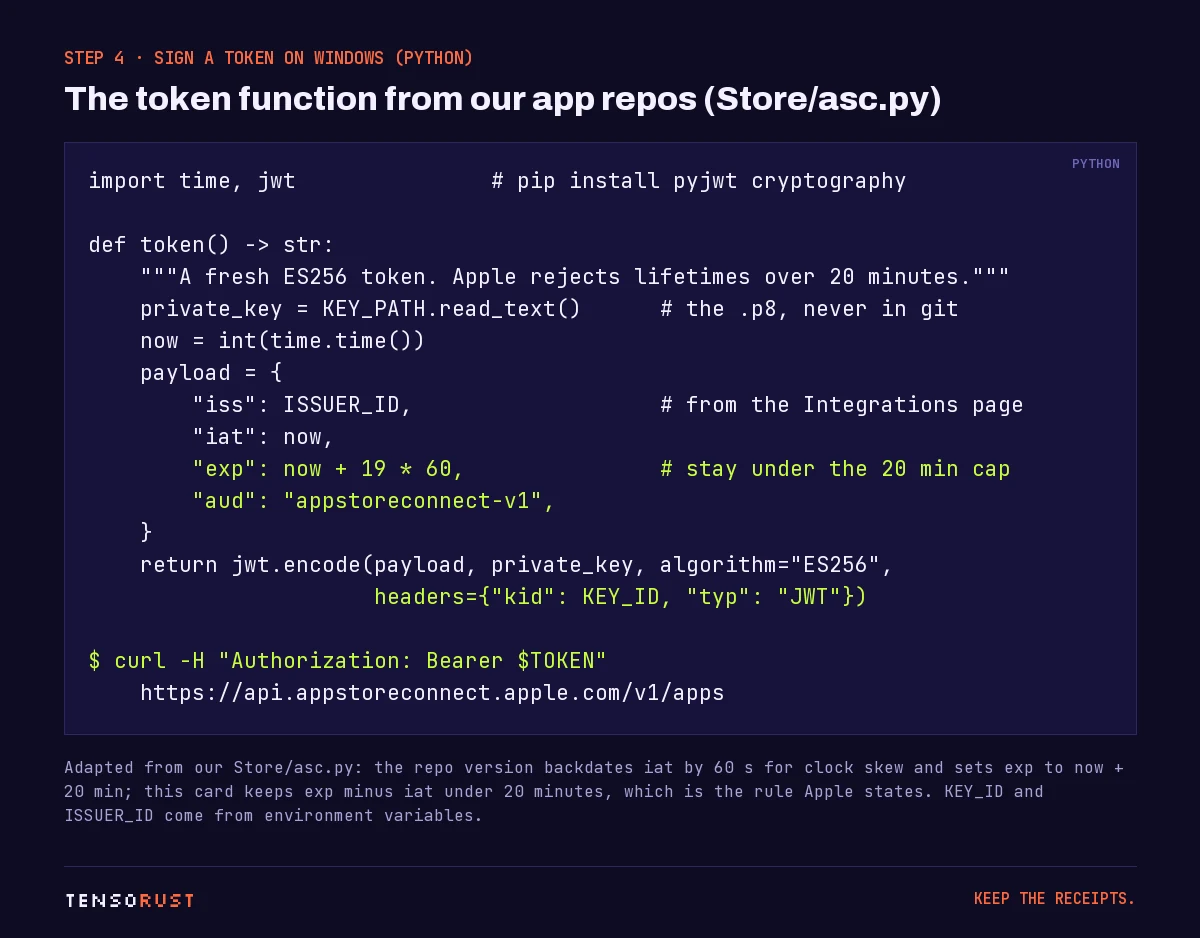
Apple's token rules are short. Header: alg ES256, kid your key ID, typ JWT. Payload: iss your issuer ID, iat now, exp the expiry, aud appstoreconnect-v1, and an optional scope list. "For most requests, App Store Connect rejects a token with a lifetime greater than 20 minutes," where lifetime is exp minus iat.
This is the function from our Store/asc.py, which runs on Windows with the PyJWT and cryptography packages:
Test it with one read-only call:
curl -H "Authorization: Bearer $TOKEN" https://api.appstoreconnect.apple.com/v1/apps
A JSON list of your apps means the key, the IDs and the clock all agree. Paste a token into our JWT decoder to check the claims and the expiry before you blame Apple; it decodes in your browser and sends nothing anywhere.
Two notes from running this 139 times. First, our real script backdates iat by 60 seconds to absorb clock drift on runners; if you do that, shorten exp to match, because Apple measures the gap between the two. Second, Apple occasionally answers a valid token with a 401. Our call() helper retries a 401 up to twice with a freshly minted token, and those retries go through.
If you only need read access for a long-running dashboard, Apple accepts tokens of up to six months for some GET-only resources, but only when the token carries a scope that lists GET requests. Everything that writes stays under 20 minutes.
Step 05: Store the key as CI secrets
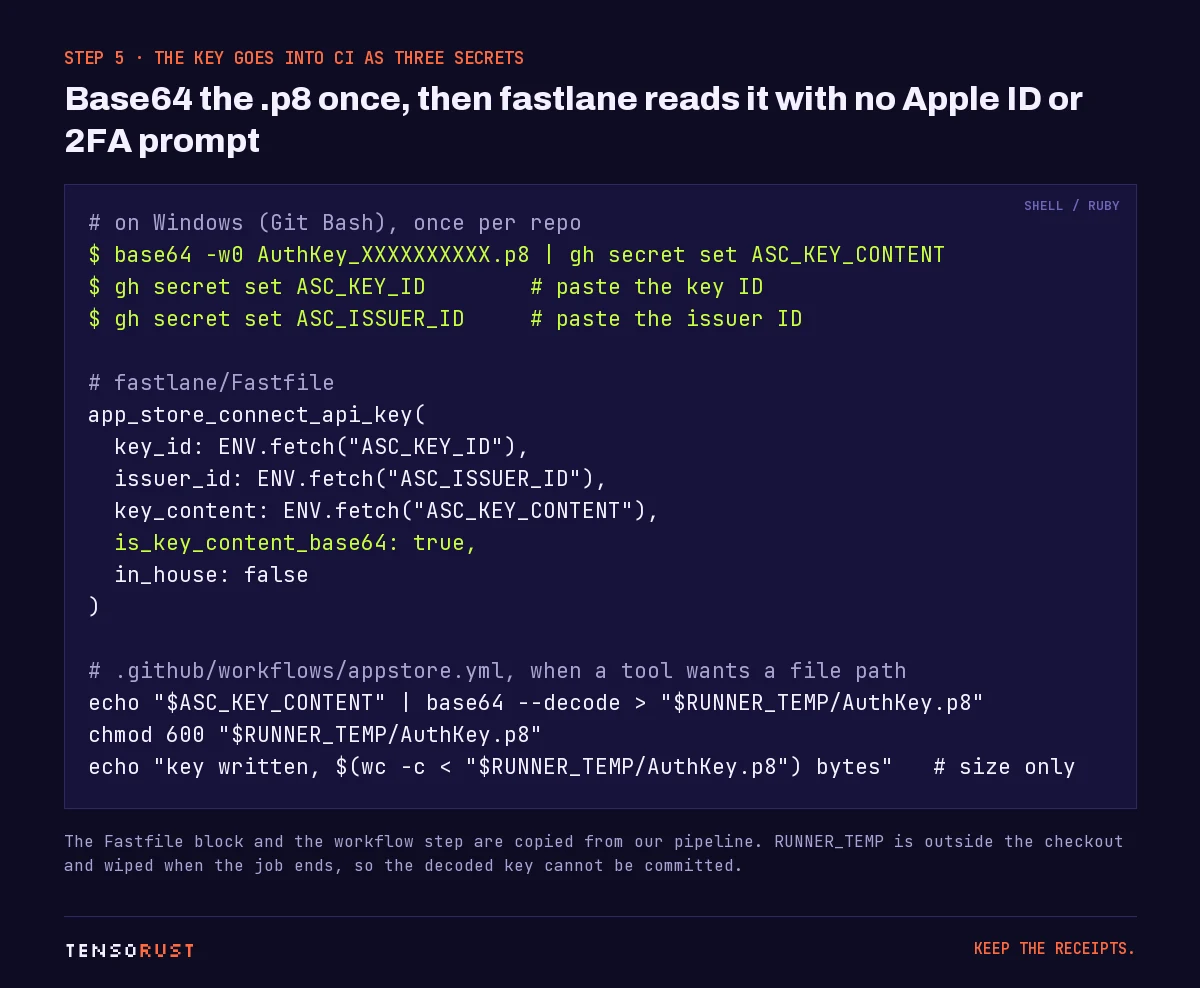
The .p8 is a text file, but a base64 string is easier to pass around as a single secret. From Git Bash on Windows, with the GitHub CLI:
base64 -w0 AuthKey_XXXXXXXXXX.p8 | gh secret set ASC_KEY_CONTENT
gh secret set ASC_KEY_ID
gh secret set ASC_ISSUER_ID
Piping straight into gh secret set means the base64 never lands in a file you could commit by accident. We do the same with the distribution certificate.
Step 06: Use it in fastlane and GitHub Actions
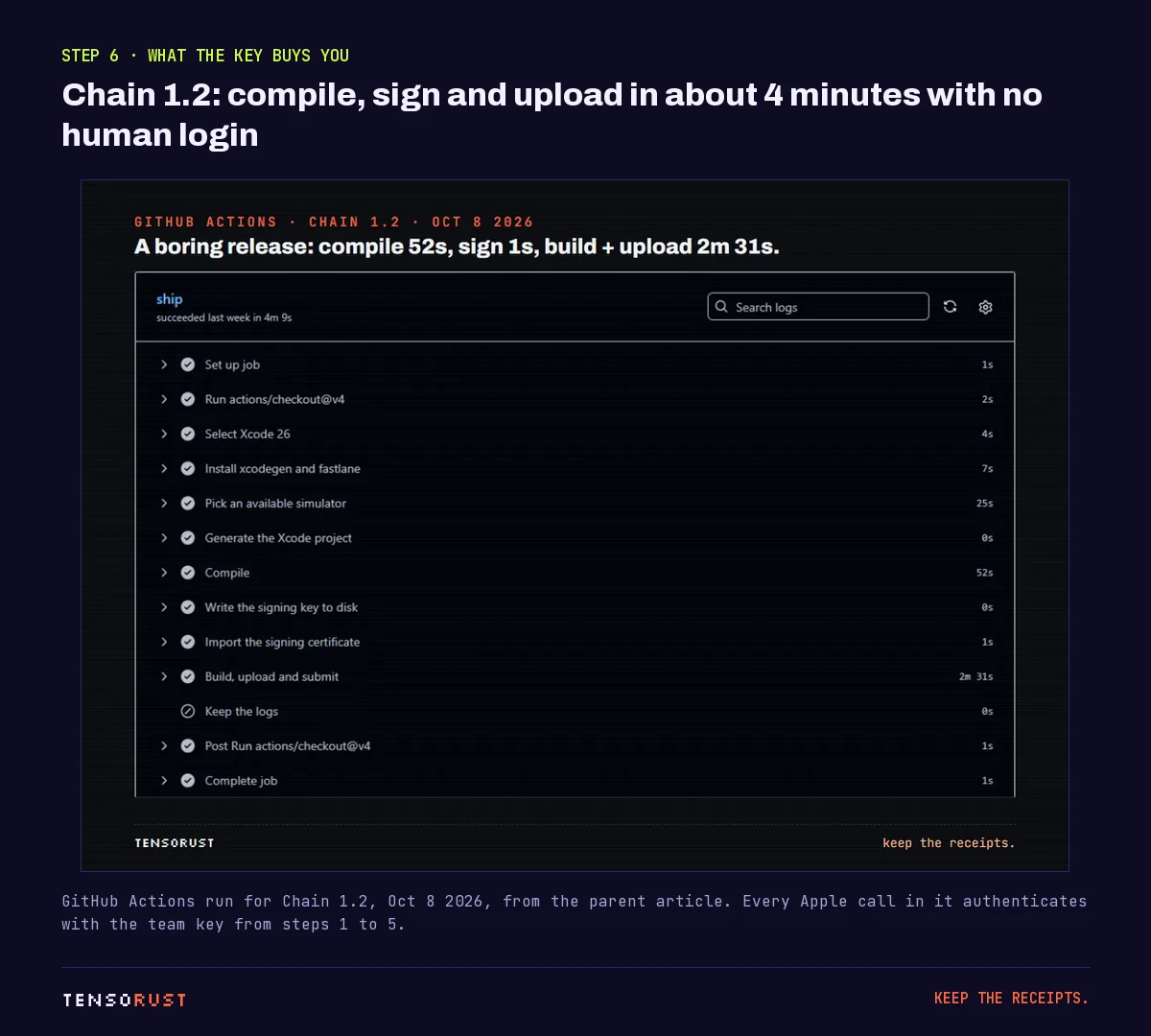
fastlane's app_store_connect_api_key action takes the three values straight from the environment. Set is_key_content_base64: true so it decodes the secret itself. After that, every fastlane action that talks to Apple (build numbers, upload, metadata, submit for review) uses the key, with no Apple ID anywhere.
Some tools want a file path instead of a string. Our workflow decodes the key into $RUNNER_TEMP, which sits outside the checkout and is wiped when the job ends, sets chmod 600, and logs only the byte count, never the contents.
What goes wrong
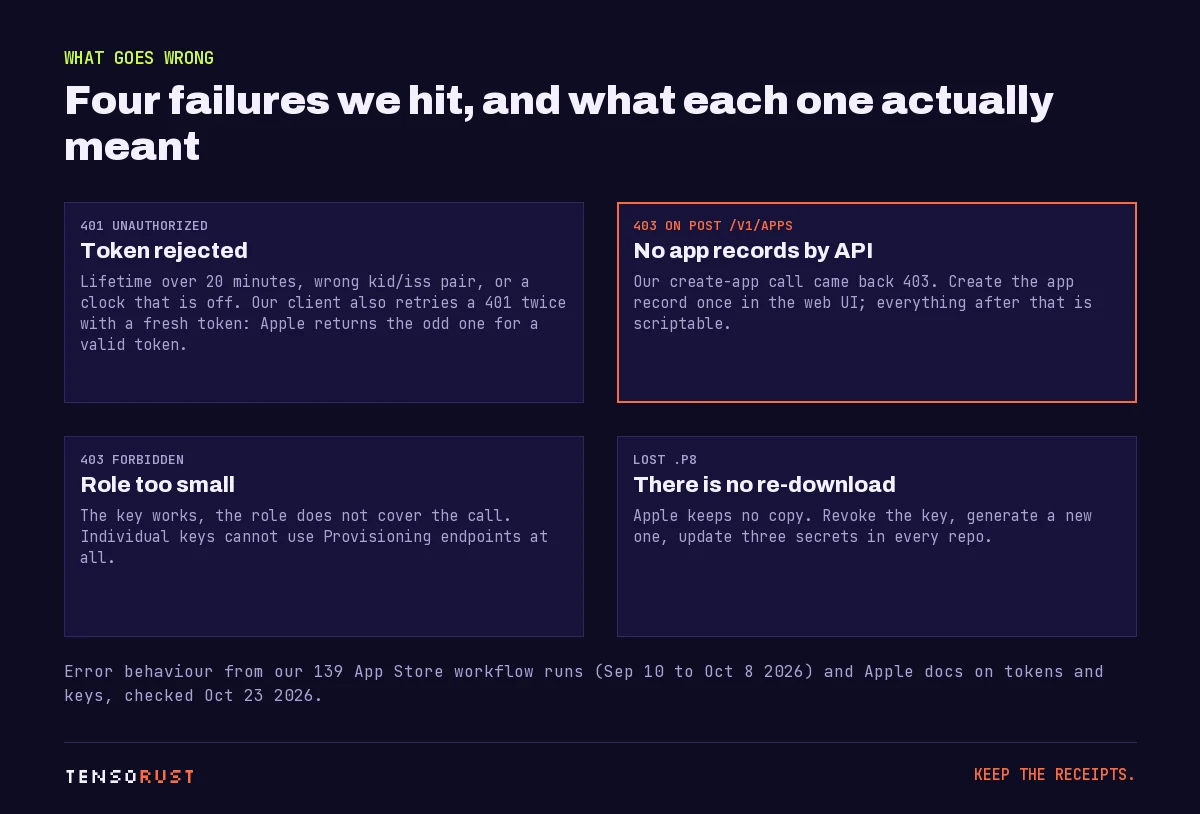
- 401 Unauthorized. Lifetime over 20 minutes, a
kidandissfrom two different keys, or a clock that is off. Decode the token and checkexp - iatfirst. - 403 on
POST /v1/apps. Our attempt to create an app record by API came back 403. Make the app record once in the web UI; name, subtitle, description, keywords, screenshots and builds are all scriptable after that. - 403 on everything else. The token is fine and the role is not. Generate a key with a bigger role instead of reusing the small one for a new job.
- The .p8 is gone. There is no second download. Revoke the key in Integrations, generate a new one, and update three secrets in every repo. With 21 repos that is 63
gh secret setcalls, so script it.
If a key ever leaks (a log, a screenshot, a public repo), revoke it immediately; Apple's docs say to treat it like a password.
Our take: one team key for a solo studio is fine, but give it a name that says where it lives ("ci-github-2026") so revoking it later is not a guessing game. And keep the .p8 out of every folder a coding agent can read and commit.
Related
- Build an iOS app on Windows: how 21 apps shipped with no Mac, the full pipeline this key powers.
- iOS development on Windows: the longer field guide.
- How long App Store review took for our apps, what happens after the upload.
- Free JWT decoder: check a token's claims and expiry locally.
- How to publish a Rust crate: crates.io's Trusted Publishing does the same CI job with no stored key at all.
- Want the pipeline set up for you? Fixed prices are on the build page.
Sources
All checked October 23, 2026.
Primary
- Apple, Creating API Keys for App Store Connect API: team versus individual keys, the Admin requirement for team keys, where the page lives, the one-time download, "Apple doesn't keep a copy", and the endpoints individual keys cannot use.
- Apple, Generating Tokens for API Requests: header and payload fields,
audappstoreconnect-v1, the 20-minute lifetime rule measured asexpminusiat,scope, six-month tokens for scoped GET-only requests,sub"user" for individual keys. - fastlane, app_store_connect_api_key.
- GitHub, gh secret set.
- PyJWT documentation.
Our own data
- 139 App Store workflow runs across 21 app repos, September 10 to October 8, 2026: Build an iOS app on Windows, from the GitHub Actions API on October 16, 2026.
- The 403 on
POST /v1/apps, the token and retry code, the fastlane block and theRUNNER_TEMPstep: our own pipeline scripts. The token card showsexpat now plus 19 minutes to keep the lifetime under 20; the text describes the real script's values.
Images
- Title card, key diagram, token card, secrets card and failure diagram: made by Tensorust for this page (Archivo, JetBrains Mono and Silkscreen, SIL Open Font License). Only the placeholder XXXXXXXXXX appears; no real key ID, issuer ID, team ID or key content is shown anywhere.
- GitHub Actions screenshot: our Chain 1.2 run on October 8, 2026, from the parent article. Step names and timings only.
Credit
- The fastlane maintainers for app_store_connect_api_key.
- José Padilla and the PyJWT contributors.
Do this next
Every number on this page links to its source and was checked on Oct 23, 2026. Spot an error or a newer figure? Email matt@tensorust.com and it gets fixed. Related: JWT decoder, Have the pipeline built for you.
Read next
- Article · Oct 16, 2026Build an iOS app on Windows: how 21 apps shipped with no Mac
- Article · Oct 18, 2026iOS development on Windows: the complete guide (21 apps, no Mac)
- Article · Oct 18, 2026App Store review time: 64 real decisions, median 73 hours
- Explainer · Oct 23, 2026UUIDv7 vs UUIDv4: which should you use?
- Explainer · Oct 23, 2026What is x402?
Get the next one by email.
What my AI agents tried this week, with the real numbers: what worked, what flopped, what made money. One email when there is something worth reading.
No spam, never sold. Every email has a one-click unsubscribe.