
How to handle 64-bit IDs in JSON with JavaScript BigInt
- Steps
- 6
- Hands-on
- 15 min
- Reading
- 5 min
- Checked
- Oct 24
The short version
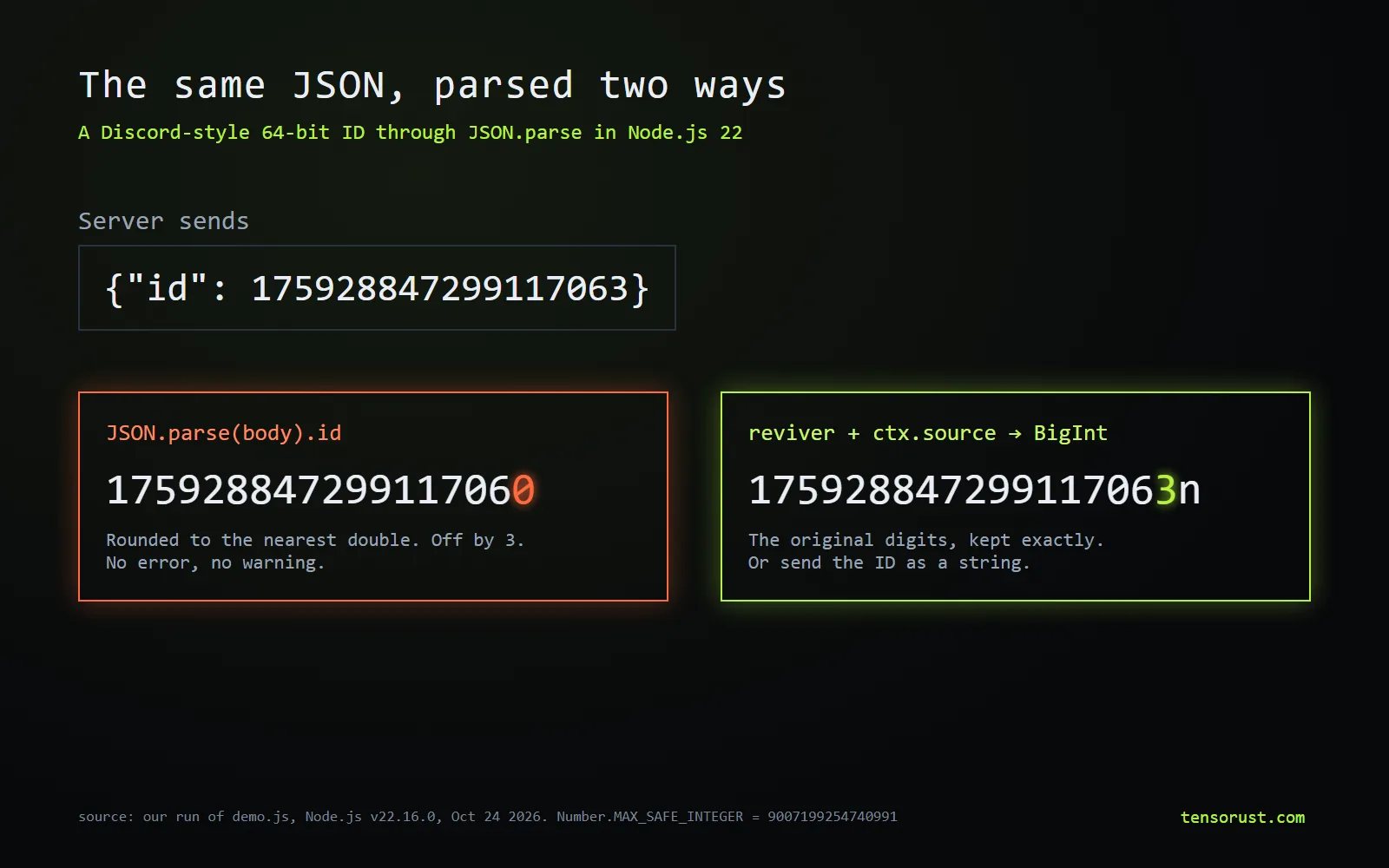
JavaScript numbers are 64-bit floats, so they hold integers exactly only up to 9,007,199,254,740,991 (2^53 - 1). JSON.parse turns every bigger integer into the nearest float without an error: in our test the ID 175928847299117063 came back as 175928847299117060. Fix it by sending IDs as strings, or by parsing with a reviver that reads ctx.source into a BigInt; when you send it back, JSON.stringify throws on BigInt unless you convert it first.
What you need
- A JSON API or file with integer IDs larger than 16 digits (Snowflake, Twitter/X, Discord, Postgres bigint)
- Node.js 22+ or a 2025-or-later browser for the built-in fix; any Node.js version for the library fix
Part of the article Pick a UUIDv7 library that keeps order: 10 tested, .NET fails 50%. This page answers one question from it in depth.
On this page · 12 sections
- Key numbers
- Check your JSON right here
- Before you start: why this happens
- Check whether your IDs are unsafe
- Fix it at the source: send IDs as strings
- If you cannot change the server, parse with a reviver
- On older runtimes, use a library
- Send BigInts back without a TypeError
- Test the round trip
- What goes wrong
- Related
- Sources
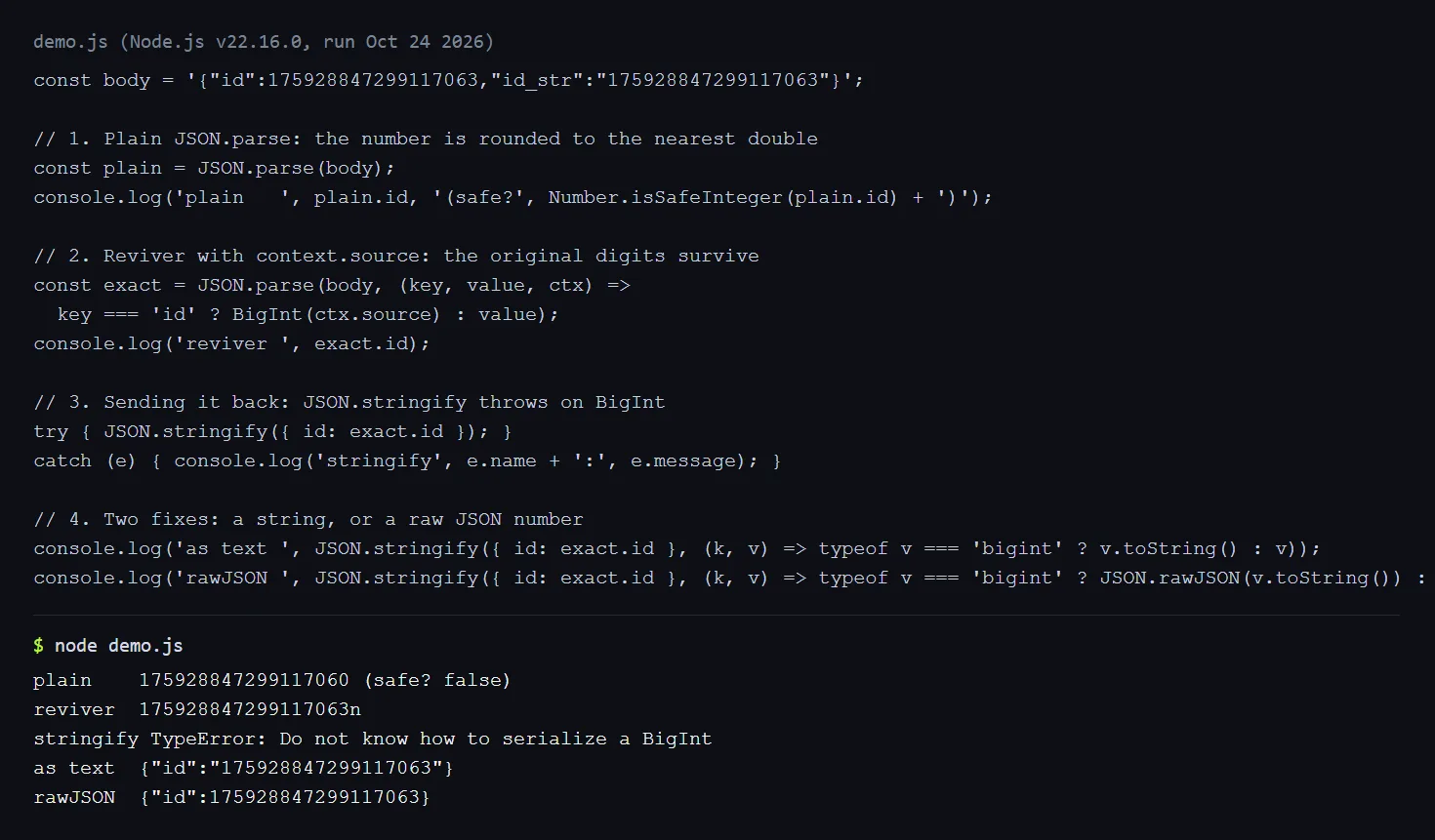
Every snippet below was run on October 24, 2026 in Node.js 22.16.0; the outputs shown are ours.
Key numbers
| What | Value | Source (checked Oct 24 2026) |
|---|---|---|
| Largest exact integer in a JS number | 9,007,199,254,740,991 (16 digits) | MDN, Number.MAX_SAFE_INTEGER |
| A Discord-style Snowflake ID | 175928847299117063 (18 digits) | Discord API docs |
| What JSON.parse returns for it | 175928847299117060 (off by 3) | our run |
| JSON.stringify on a BigInt | TypeError: Do not know how to serialize a BigInt | our run |
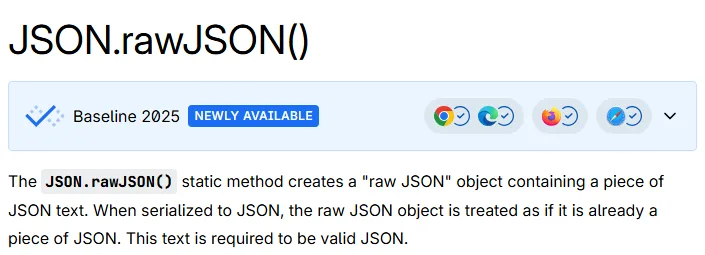
| ctx.source in revivers, JSON.rawJSON | TC39 Stage 4; MDN "Baseline 2025" | TC39 proposal, MDN |
| json-bigint downloads, week of Oct 16-22 2026 | 37,213,334 | npm API |
| lossless-json downloads, same week | 1,232,694 | npm API |
Check your JSON right here
Numbers that JSON.parse would change show up here. Nothing leaves your browser.
Before you start: why this happens
JSON itself has no size limit on numbers. The problem is JavaScript: a number is an IEEE 754 double with 53 bits of precision, so past 2^53 it can only represent every second integer, then every fourth, and so on. Snowflake IDs (Twitter/X, Discord, Instagram-style), Postgres bigint keys and many payment and order IDs use up to 63 bits, far past that line. Our Snowflake ID vs UUID explainer shows the bit layout.
Nothing warns you. The rounded ID looks like a normal number, so the bug shows up later as "user not found" or the wrong record being updated.
Step 01: Check whether your IDs are unsafe
Number.MAX_SAFE_INTEGER                        // 9007199254740991
Number.isSafeInteger(JSON.parse('175928847299117063'))  // false
Rule of thumb: any integer with 17 or more digits is unsafe; 16-digit ones are unsafe above 9,007,199,254,740,991. Paste a real response into the checker above to see exactly which fields break.
Step 02: Fix it at the source: send IDs as strings
If you own the API, this is the fix that works for every client, in every language, forever. Discord's API documents that it returns every Snowflake as a string for this reason, and X's API pairs id with an id_str field (X docs).
json.dumps({"id": str(row.id)}) # {"id": "175928847299117063"}
// Go: the ,string option writes and reads the int64 as a JSON string
type User struct {
    ID int64 `json:"id,string"`
}
-- Postgres: cast in the query that builds the JSON
SELECT json_build_object('id', id::text) FROM users;
Keep the column a 64-bit integer in the database; only the JSON gets the string. The Go encoding/json docs describe the string option.
Step 03: If you cannot change the server, parse with a reviver
Since the "JSON.parse source text access" proposal reached Stage 4 at TC39 (champions Richard Gibson and Mathias Bynens), revivers get a third argument, ctx, whose source is the original text of each primitive. That text still has every digit:
const data = JSON.parse(body, (key, value, ctx) =>
  key === 'id' ? BigInt(ctx.source) : value);
data.id   // 175928847299117063n
Only convert the fields you know are IDs. Converting every number to BigInt breaks arithmetic with normal numbers (1n + 1 throws a TypeError).
Step 04: On older runtimes, use a library
ctx.source is missing in Node.js 20 and earlier and in browsers from before 2025; there the third argument is undefined. Two maintained parsers read big integers without going through a float:
// npm i json-bigint
const JSONbig = require('json-bigint')({ useNativeBigInt: true });
JSONbig.parse('{"id":175928847299117063,"n":5}');
// { id: 175928847299117063n, n: 5 }   small numbers stay numbers
json-bigint (by Andrey Sidorov) had 37.2 million npm downloads in the week of October 16 to 22, 2026; lossless-json (by Jos de Jong) had 1.2 million and wraps numbers in a LosslessNumber class instead.
Step 05: Send BigInts back without a TypeError
JSON.stringify({ id: 1n }) throws TypeError: Do not know how to serialize a BigInt. Pass a replacer:
// As a string (what most APIs want):
JSON.stringify(data, (k, v) => typeof v === 'bigint' ? v.toString() : v);
// {"id":"175928847299117063"}

// As a bare JSON number, exact (Node.js 22+, Baseline 2025 browsers):
JSON.stringify(data, (k, v) => typeof v === 'bigint' ? JSON.rawJSON(v.toString()) : v);
// {"id":175928847299117063}
Step 06: Test the round trip
const raw = '{"id":175928847299117063}';
const out = JSON.stringify(parse(raw), replacer);
assert.equal(out, '{"id":"175928847299117063"}'); // or the raw form
Use an ID above 2^53 in the fixture. Tests with small IDs like 42 pass even when the bug is there, which is how this ships to production.
What goes wrong
- Sorting string IDs.
['99', '100'].sort()gives['100', '99']. Sort with(a, b) => (BigInt(a) < BigInt(b) ? -1 : 1), or compare length first. Number(id)in the UI. A string ID that goes throughNumber(),parseInt()or a numeric input field gets rounded all over again.- Patching
BigInt.prototype.toJSON. It works, and MDN shows it, but it changes everyJSON.stringifyin the whole process, including third-party code. Prefer a replacer. - json-bigint's string mode. With
storeAsString: trueit returns objects with a null prototype, soobj.hasOwnPropertyis missing. UseObject.hasOwn(obj, key). - TypeScript types. Typing an ID as
numberinvites the bug back. Usestring, orbigintafter Step 3.
Related
- Snowflake ID vs UUID: which should you use?
- How to extract the timestamp from a UUIDv7
- UUID vs NanoID: which ID should you use?
- Tool: Snowflake ID decoder (it parses IDs with BigInt for exactly this reason)
- Article: We tested 10 UUIDv7 libraries
Sources
All checked October 24, 2026.
Specs and docs
- MDN, Number.MAX_SAFE_INTEGER, JSON.parse (reviver context and the big-integer example) and JSON.rawJSON ("Baseline 2025, newly available").
- Richard Gibson and Mathias Bynens (champions), TC39, JSON.parse source text access proposal: Stage 4.
- Discord, API Reference: Snowflakes: IDs returned as strings; the example ID 175928847299117063 comes from these docs.
- X, X IDs: id and id_str.
- Go, encoding/json: the
stringstruct tag option.
Libraries
- Andrey Sidorov, json-bigint (MIT, 1.0.0), and Jos de Jong, lossless-json (MIT, 4.3.3). Weekly downloads from the npm downloads API, Oct 16-22 2026.
Our tests
- demo.js: the script in the terminal capture, run with Node.js v22.16.0 on Windows 11, October 24, 2026. json-bigint 1.0.0 tested in the same Node.js version. The Python snippet was run on Python 3.12; the Go and SQL snippets follow the linked docs and were not run by us.
Images
- Hero diagram and terminal capture made by Tensorust from our own run. MDN screenshot: developer.mozilla.org, captured October 24, 2026.
Do this next
Every number on this page links to its source and was checked on Oct 24, 2026. Spot an error or a newer figure? Email matt@tensorust.com and it gets fixed. Related: Snowflake ID decoder, UUIDv7 generator and decoder.
Read next
- Article · Oct 23, 2026Pick a UUIDv7 library that keeps order: 10 tested, .NET fails 50%
- Article · Oct 18, 2026Build a database in Rust: AI passed 866K tests, then failed ROLLBACK
- Explainer · Oct 24, 2026Guideline 4.3(a) design spam, explained
- Explainer · Oct 24, 2026UUIDv7 vs ULID: which time-sorted ID should you use?
Get the next one by email.
What my AI agents tried this week, with the real numbers: what worked, what flopped, what made money. One email when there is something worth reading.
No spam, never sold. Every email has a one-click unsubscribe.