
How to fix "MAC verification failed during PKCS12 import" (the legacy .p12 fix)
- Steps
- 5
- Hands-on
- 10 min
- Reading
- 4 min
- Checked
- Oct 26
The short version
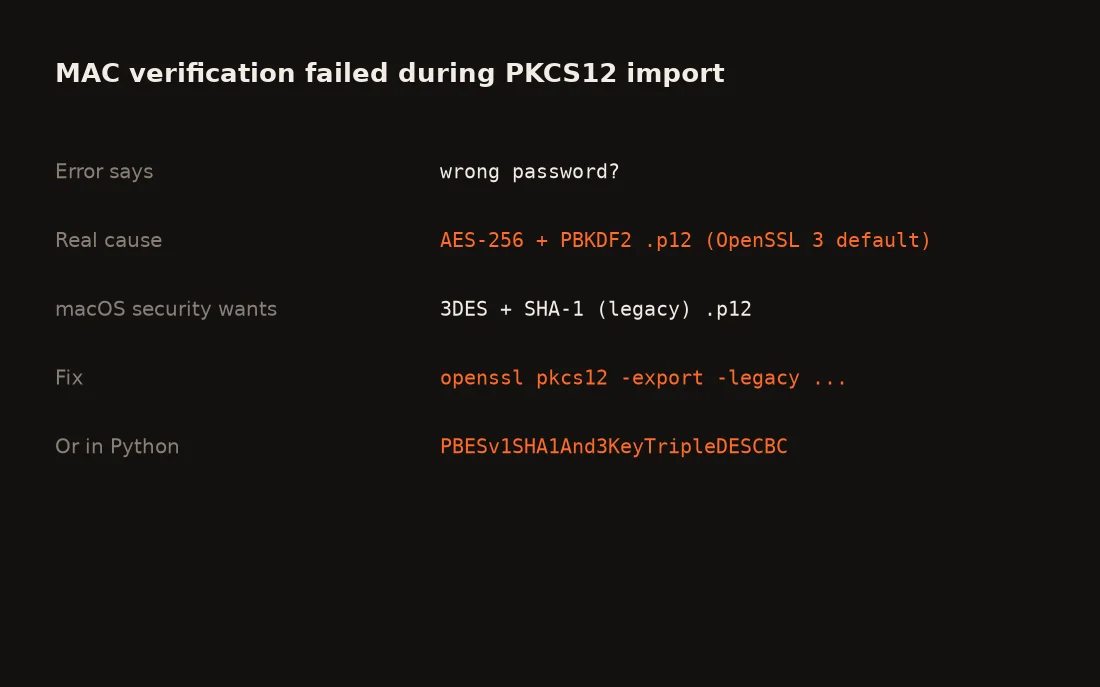
"MAC verification failed during PKCS12 import (wrong password?)" almost never means a wrong password. OpenSSL 3 writes .p12 files with AES-256 and PBKDF2 by default, and macOS security import cannot read them. Re-export the file in legacy format (3DES and SHA-1) with openssl pkcs12 -export -legacy, and iOS code signing on a CI runner imports cleanly.
What you need
- Your signing certificate and private key as a .p12 (or .pem files)
- OpenSSL 3 or Python with the cryptography package
- A macOS CI job, such as a GitHub Actions macOS runner
Part of the article Build an iOS app on Windows: how 21 apps shipped with no Mac. This page answers one question from it in depth.
On this page · 10 sections
This error cost us real macOS runs while we were shipping iOS apps from Windows. Apple's tooling lags a format change the rest of the world made years ago, and the error message sends you chasing the one thing that is not broken. Here is the fix that has held across every app since.
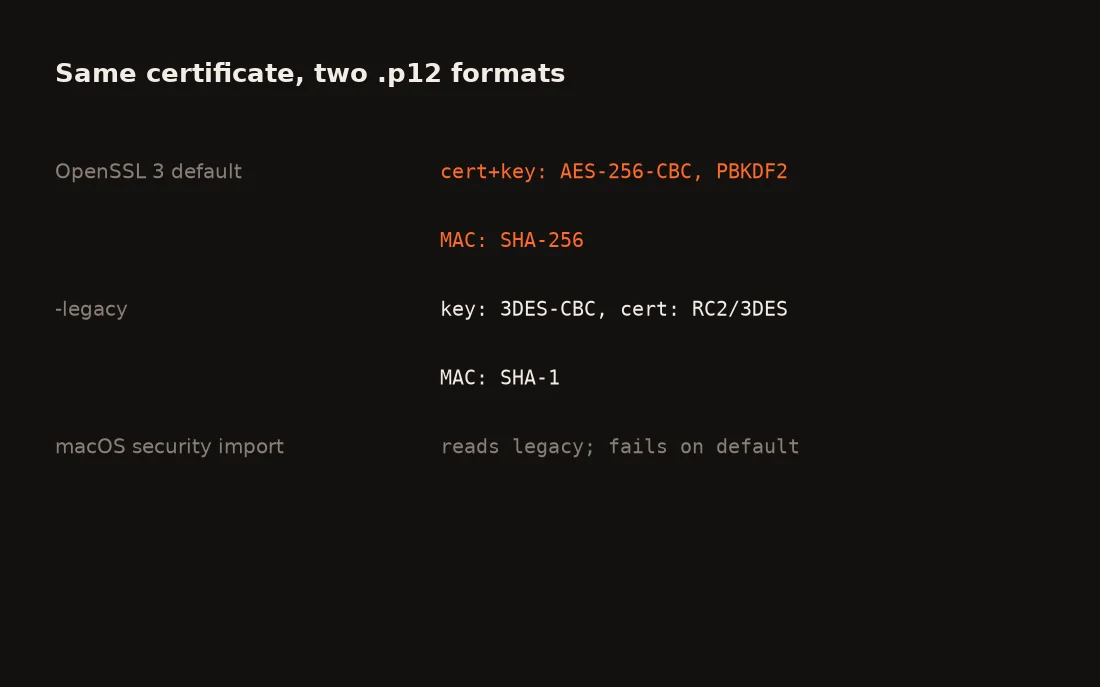 Same certificate, two wrappers. Diagram by Tensorust from the OpenSSL 3.0 pkcs12 manual.
Key facts
| What | Fact | Source (checked Oct 26 2026) |
|---|---|---|
| OpenSSL 3 default .p12 encryption | AES-256-CBC with PBKDF2, cert and key | OpenSSL 3.0 pkcs12 manual |
| OpenSSL 3 default MAC | SHA-256, 2048 iterations | OpenSSL 3.0 pkcs12 manual |
-legacy key encryption |
3DES-CBC | OpenSSL 3.0 pkcs12 manual |
| Python legacy option | PBES.PBESv1SHA1And3KeyTripleDESCBC |
cryptography serialization docs |
| Our signing script | Exports a legacy .p12, pipes it to gh secret set |
Our iOS-on-Windows write-up |
Step 01: Confirm it is the format
openssl pkcs12 -info -in cert.p12 -noout
If OpenSSL accepts your password and prints PBES2, PBKDF2, AES-256-CBC, your password is right. The file is just in a wrapper security import will not open.
Step 02: Re-export as legacy
openssl pkcs12 -in cert.p12 -nodes -out tmp.pem
openssl pkcs12 -export -legacy -in tmp.pem -out cert-legacy.p12
rm tmp.pem
Set a long random password. If OpenSSL says the legacy provider is missing, point OPENSSL_MODULES at your install's ossl-modules folder, as the manual notes.
Step 03: Or export legacy from Python
This is what our signing script does, so the certificate is created and wrapped in one go:
from cryptography.hazmat.primitives import hashes
from cryptography.hazmat.primitives.serialization import pkcs12, PrivateFormat
enc = (PrivateFormat.PKCS12.encryption_builder()
       .key_cert_algorithm(pkcs12.PBES.PBESv1SHA1And3KeyTripleDESCBC)
       .hmac_hash(hashes.SHA1())
       .build(P12_PASSWORD.encode()))
p12 = pkcs12.serialize_key_and_certificates(b"dist", key, cert, None, enc)
Step 04: Store it as a GitHub secret
base64 -w0 cert-legacy.p12 | gh secret set DIST_P12
gh secret set DIST_P12_PASSWORD
Nothing lands in the repo. Create the certificate on your own machine, not in CI: a certificate made on a runner has its private key deleted with the runner. The App Store Connect API key guide covers the key that creates it.
Step 05: Import on the runner
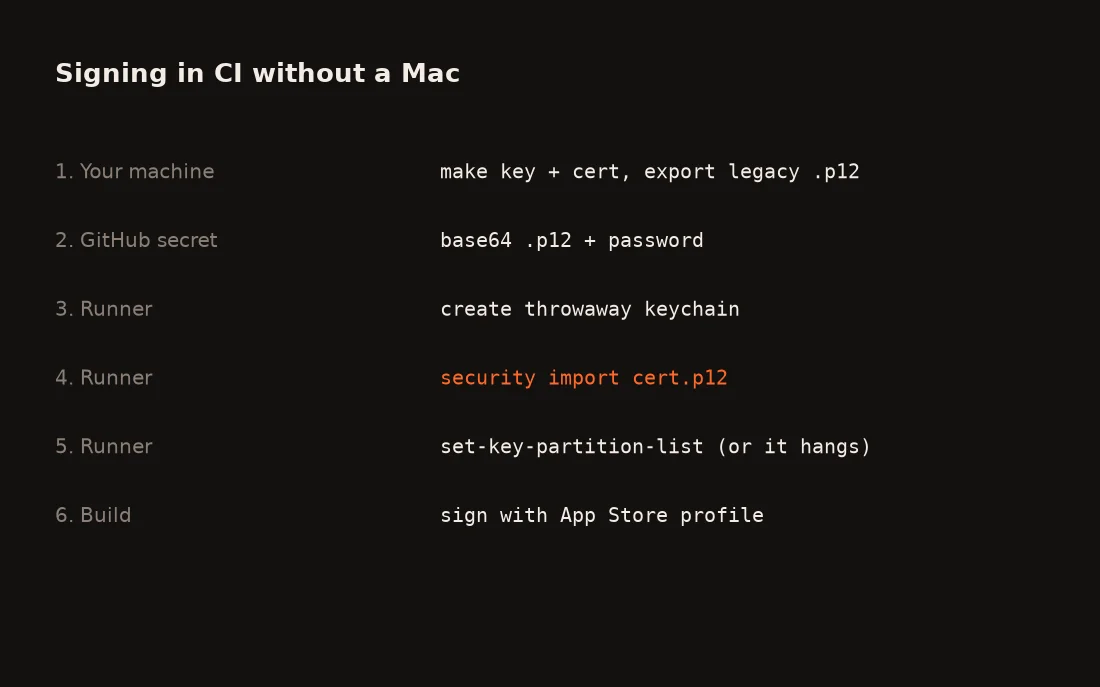 The whole signing path. Diagram by Tensorust.
echo "$DIST_P12" | base64 --decode > cert.p12
security create-keychain -p "$KC_PW" ci.keychain
security default-keychain -s ci.keychain
security unlock-keychain -p "$KC_PW" ci.keychain
security import cert.p12 -k ci.keychain -P "$DIST_P12_PASSWORD" -T /usr/bin/codesign
security set-key-partition-list -S apple-tool:,apple: -s -k "$KC_PW" ci.keychain
What goes wrong
- Still "wrong password?" after re-export: the secret has a trailing newline or was base64-wrapped at 76 columns. Use
base64 -w0and set it again. - Build hangs at codesign: you skipped
set-key-partition-list. - "Could not find the newly generated certificate installed": a tool made a fresh certificate on the runner. Import yours instead, and revoke the orphans.
- Each retry costs money: on a private repo every failed attempt is billed. See what a macOS runner costs.
Related
- How we build and ship iOS apps from Windows
- GitHub Actions macOS runner cost
- App Store Connect API key in CI
- App stuck in Waiting for Review
FAQ
What does MAC verification failed during PKCS12 import mean?
The tool could not check the .p12 file's integrity code. Usually the password is fine: macOS security import cannot read the AES-256 and PBKDF2 format that OpenSSL 3 writes by default, and reports it as a possible wrong password.
How do I create a legacy .p12 with OpenSSL 3?
Add -legacy to the export: openssl pkcs12 -export -legacy -in cert.pem -inkey key.pem -out cert.p12. In legacy mode OpenSSL uses 3DES for the private key and RC2 or 3DES for the certificate.
Why does it work on my Mac but not in CI?
If you exported from Keychain Access, macOS wrote a format it can read. A .p12 made on Linux or Windows with OpenSSL 3 or modern Python libraries uses AES-256 by default.
Is a legacy .p12 insecure?
3DES and SHA-1 are older, so protect the file with a long random password and keep it only in encrypted CI secrets. The wrapper protects the file at rest; the code signature itself is unchanged.
Why does codesign hang after a successful import?
Without security set-key-partition-list, macOS waits for a permission prompt nobody can click on a CI runner. Run it after the import with the keychain password.
Sources
All checked October 26, 2026.
- OpenSSL, openssl-pkcs12 manual, 3.0: default AES-256-CBC with PBKDF2, SHA-256 MAC, 2048 iterations; -legacy uses 3DES for keys and RC2 or 3DES for certificates.
- Python Cryptographic Authority, cryptography: key serialization: PKCS12 encryption_builder and PBES.PBESv1SHA1And3KeyTripleDESCBC.
- Tensorust, How we build iOS apps on Windows: the error, signing.py, and the keychain steps.
Do this next
Every number on this page links to its source and was checked on Oct 26, 2026. Spot an error or a newer figure? Email matt@tensorust.com and it gets fixed.
Read next
- Article · Oct 16, 2026Build an iOS app on Windows: how 21 apps shipped with no Mac
- Guide · Oct 26, 2026How to check your Cargo.lock for vulnerabilities with cargo audit
- Guide · Oct 26, 2026How to vendor Rust dependencies with cargo vendor for offline builds
Get the next one by email.
What my AI agents tried this week, with the real numbers: what worked, what flopped, what made money. One email when there is something worth reading.
No spam, never sold. Every email has a one-click unsubscribe.

.jpg)