
Cold email deliverability: set up SPF, DKIM and DMARC, then send slower than you think
- Steps
- 6
- Hands-on
- 30 min
- Reading
- 9 min
- Checked
- Oct 25
The short version
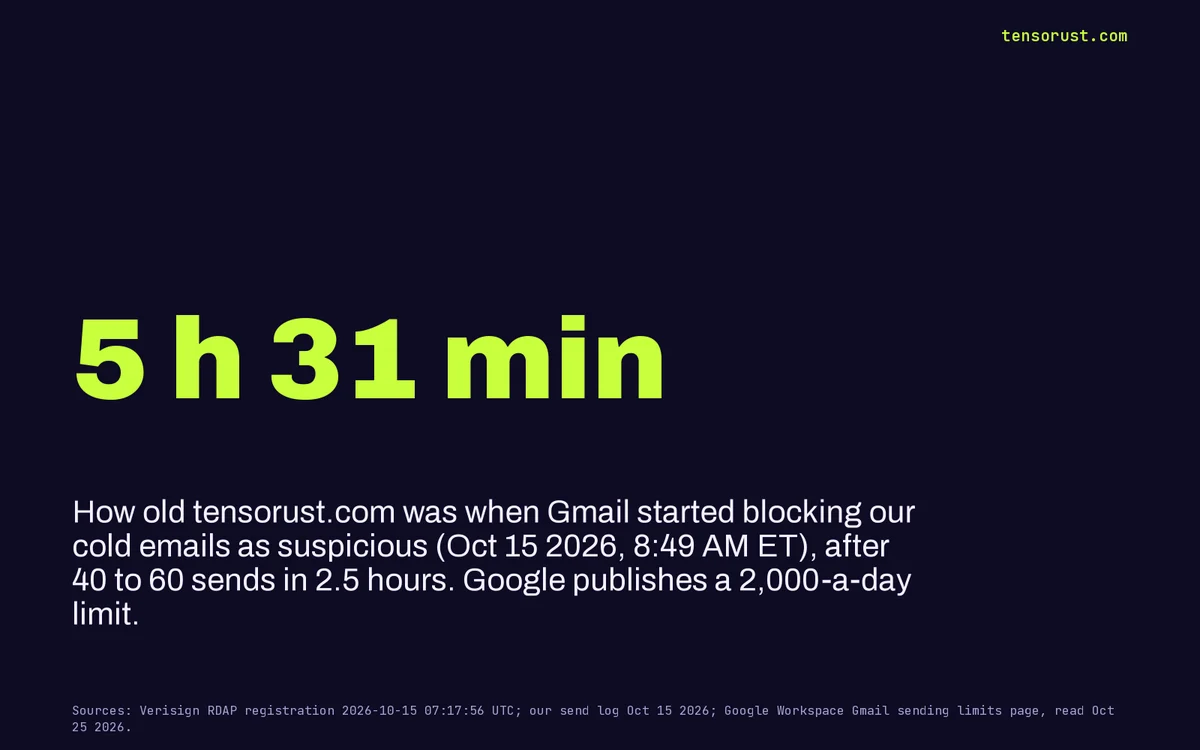
Cold email deliverability comes down to three things: authentication (one SPF record, DKIM signing with a 2048-bit key, and a DMARC policy, all aligned with your From domain), reputation (a spam rate under 0.1%, never 0.3%, and almost no bounces) and pace. Pace is the one that bit us: Gmail started blocking our cold emails as suspicious when tensorust.com was 5 hours 31 minutes old, after 40 to 60 sends in 2.5 hours, against a published limit of 2,000 a day.
What you need
- A domain you control, with access to its DNS settings
- Admin access to the mailbox provider that sends for it (Google Workspace in our examples)
- A terminal (nslookup ships with Windows, macOS and Linux)
Part of the article Get featured as a solo dev: 9 features in 28 days, 2 moved a number. This page answers one question from it in depth.
On this page · 13 sections
- Key numbers
- Before you start: what happened to us
- Check the three records you already have
- Publish exactly one SPF record
- Turn on DKIM with a 2048-bit key
- Publish DMARC, start gentle, then tighten
- Warm up: send far below the published limit
- Watch spam rate and bounces, and stop on any warning
- What goes wrong
- What this means for you
- Related
- FAQ
- Sources
Two companies, Google and Yahoo, wrote the rules most of the world's inboxes now run on, and they enforce them without a phone number to call. The rules are public, though, and following them is free. This guide is every step we run on our own domain, with our real records and the receipts from the day we got it wrong.
Key numbers
| What | Number | Source (checked Oct 25 2026) |
|---|---|---|
| Google Workspace send limit per user | 2,000 messages a day (500 on trial accounts) | Gmail sending limits in Google Workspace |
| External recipients per user per day | 3,000 | same |
| Lockout after hitting a limit | up to 24 hours | same |
| Volume that makes you a "bulk sender" to Gmail | 5,000+ messages a day to Gmail accounts | Gmail email sender guidelines |
| Spam rate: target / hard ceiling | under 0.1% / never 0.3% | Gmail sender guidelines FAQ |
| Minimum DKIM key for Gmail personal accounts | 1024 bits (2048 recommended) | Gmail email sender guidelines |
| SPF DNS-lookup limit | 10 per check | RFC 7208 |
| Yahoo: honor unsubscribes within | 2 days | Yahoo Sender Hub best practices |
| Gmail enforcement ramp-up on non-compliant mail | from November 2025 | Gmail sender guidelines FAQ |
| tensorust.com registered | Oct 15 2026, 07:17:56 UTC (3:17 AM ET) | Verisign RDAP |
| First Gmail "suspicious" block on our sends | Oct 15 2026, 8:49 AM ET | our send log |
| Our logged one-to-one sends, Oct 13 to 25 | 209 (4 marked bounced) | our pitches.json |
Before you start: what happened to us
On October 15, 2026 we registered tensorust.com at 3:17 AM ET and had agents sending pitches from it the same morning: 40 to 60 emails in about two and a half hours. At 8:49 AM Gmail began returning sends as "appears suspicious and wasn't delivered". At 8:52 AM it showed "You have reached a limit for sending mail" and we were done for the day.
Every DNS record was already in place. Authentication was not the problem; a brand new domain sending like a marketing platform was. Since then the whole inbox runs on a hard cap enforced by our sending script: 30 a day at first, now 100 a day, every send at least 3 minutes apart.
One more honest number before the steps: good deliverability gets you read, not answered. Our scorecard on October 24 counted about 240 cold sends since mid-October, with 0 sales and 0 press coverage from them so far. The steps below make sure your email arrives. What you say once it arrives is a different problem.
Step 01: Check the three records you already have
Run these three lookups (swap in your domain). nslookup ships with Windows, macOS and Linux; 8.8.8.8 asks Google's public DNS, which is what most receivers see.
nslookup -type=TXT yourdomain.com 8.8.8.8
nslookup -type=TXT google._domainkey.yourdomain.com 8.8.8.8
nslookup -type=TXT _dmarc.yourdomain.com 8.8.8.8
You want exactly one TXT record starting v=spf1, one DKIM key at your provider's selector (google is the default on Google Workspace), and one record starting v=DMARC1.
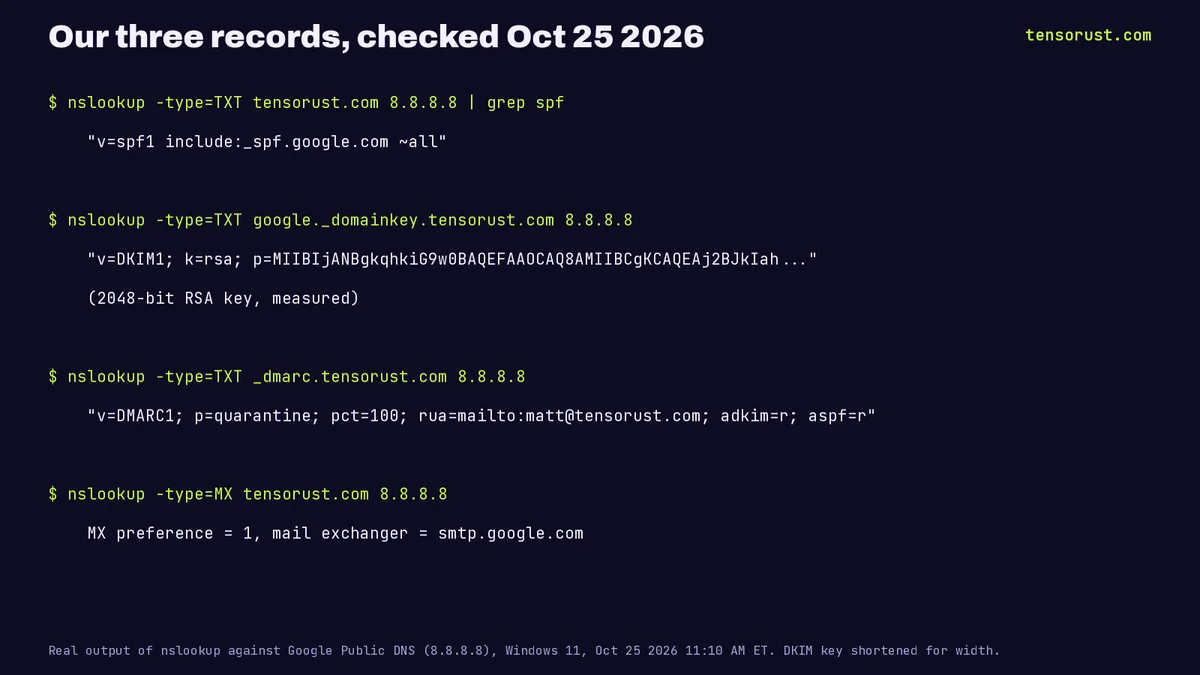 Our real records, looked up on Oct 25 2026 at 11:10 AM ET. The DKIM key is shortened for width; we measured it at 2048 bits.
Step 02: Publish exactly one SPF record
SPF lists the servers allowed to send as your domain. Ours is one line, because Google is our only sender:
v=spf1 include:_spf.google.com ~all
Two rules from the SPF standard, RFC 7208, cause most failures:
- One record only. A domain must not publish more than one SPF record. If you add a newsletter tool, add its
include:to the existing line instead of creating a second record. - 10 DNS lookups maximum. Every
include,a,mxandredirectcounts. Stack enough tools and SPF returns a permanent error, which counts as a fail.
~all (soft fail) is the usual ending while you are still adding services. DMARC, in step 4, is where the strict policy lives.
Step 03: Turn on DKIM with a 2048-bit key
DKIM signs every message so the receiver can check it really came from your domain and was not altered. On Google Workspace, per Google's setup page:
- In the Google Admin console go to Menu > Apps > Google Workspace > Gmail > Authenticate email.
- Pick your domain, choose a 2048-bit key (1024 only if your DNS host cannot take long records) and keep the default
googleselector. - Add the generated TXT record at your DNS host. Google says it can take up to 48 hours to start working.
- Come back and click Start authentication. The status should change to "Authenticating email with DKIM".
Test by sending to someone else's Gmail account; Google notes you cannot verify DKIM by emailing yourself. Open the received message's full header and look for a DKIM pass for your domain.
Step 04: Publish DMARC, start gentle, then tighten
DMARC tells receivers what to do when a message fails SPF and DKIM, and it requires that the domain that passed matches the one in your From address (alignment). Start in monitor mode with reports:
_dmarc.yourdomain.com TXT "v=DMARC1; p=none; rua=mailto:you@yourdomain.com"
Gmail and Yahoo accept p=none for bulk senders. Once a couple of weeks of reports show only your real senders passing, move to p=quarantine, which is where ours sits (pct=100, relaxed alignment). p=reject is the strictest setting; switch to it only when you are sure no legitimate tool sends as your domain unsigned.
Step 05: Warm up: send far below the published limit
Google publishes 2,000 messages a day per Workspace user and 3,000 external recipients. Treat those as the ceiling for an aged, trusted account, not a target for a new domain. Google does not publish a warm-up schedule, so this is the pace we run since the block:
- Every email is one-to-one. Written for one person, about their own recent work, plain text, one link.
- A hard daily cap for the whole domain, enforced in code, not by memory: ours started at 30 and is now 100, across every address and every agent.
- At least 3 minutes between sends, spread across the working day instead of a morning burst.
- Real addresses only. We never guess an address; a guessed address is a bounce, and bounces drag down reputation.
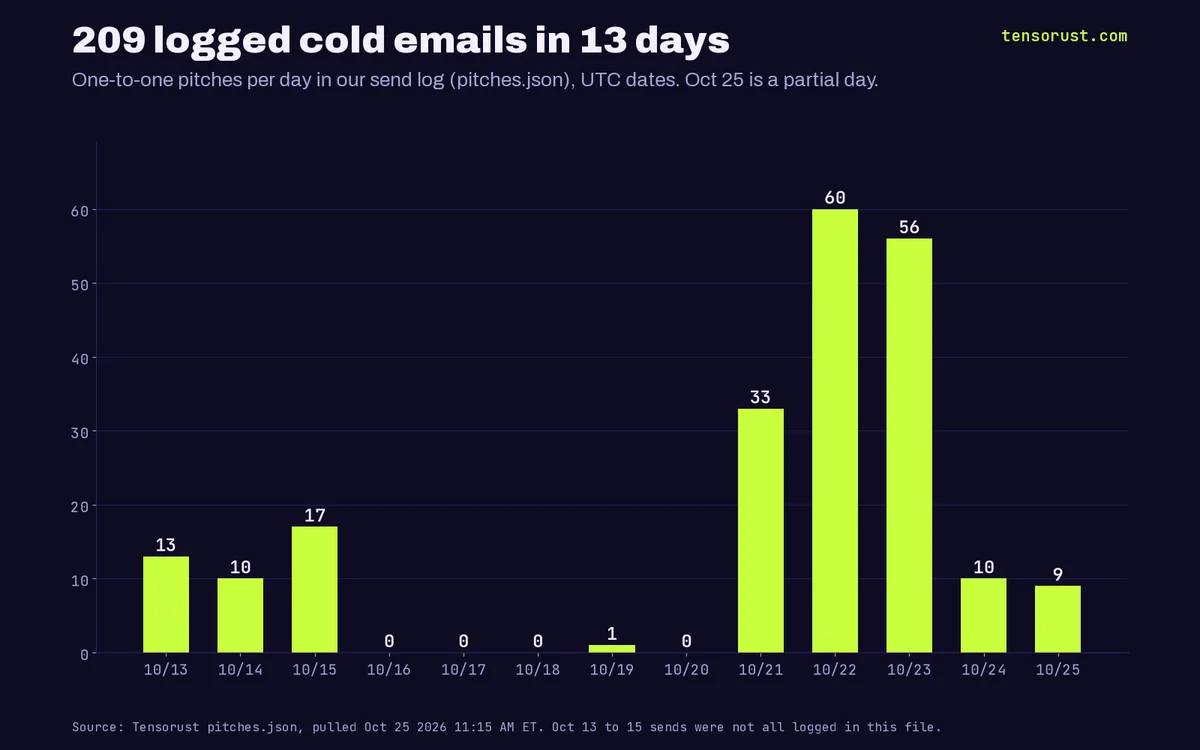 Our logged one-to-one sends per day (UTC dates). Not every send is in this file: the Oct 15 burst alone was 40 to 60 emails, and other agents kept separate logs some days. Source: our pitches.json, pulled Oct 25 2026.
Step 06: Watch spam rate and bounces, and stop on any warning
- Google Postmaster Tools shows your domain's spam rate and reputation once you send enough volume to Gmail. Google's line: stay under 0.1%, never reach 0.3%. Above 0.3%, Google says delivery support and mitigations are unavailable.
- Bounces: read every one. A burst of bounces means a bad list, and the fix is fewer, verified addresses.
- Unsubscribes: marketing and subscribed mail must offer one-click unsubscribe once you are a bulk sender (Gmail and Yahoo), and Yahoo wants opt-outs honored within 2 days. Even below that line, honor every "please stop" forever.
- Banners: the moment Gmail shows a sending limit or suspicious activity warning, stop every sender on the domain for the day. A lockout lasts up to 24 hours; a burned domain lasts much longer.
What goes wrong
- Two SPF records. Usually created when a second tool's setup wizard adds its own. Merge them into one line.
- DKIM key published but never switched on. The TXT record alone does nothing on Google Workspace until you click Start authentication.
- Jumping to
p=rejecton day one. Any tool you forgot (a billing system, a form plugin) starts getting rejected silently. Watchp=nonereports first. - A same-day burst from a new domain. This is our mistake: perfect records, 40 to 60 sends in 2.5 hours, blocked before 9 AM.
- Misleading formatting. Google's guidelines say no "Re:" or "Fwd:" on messages that are not replies or forwards, no hidden HTML content, and links that show where they go.
What this means for you
You do not need a paid warm-up service or a deliverability consultant to reach an inbox. You need three DNS records you can check yourself in a minute, a sending cap you enforce in code, and emails written for one person at a time. Own the domain, own the setup, and you own the channel, which is more than any social platform will ever give you.
Related
- 9 features in 28 days, 2 moved a number (the outreach these emails were for)
- Our AI agents got 500K views, 3 checkouts and $0
- AI agents ran our socials: 220K impressions, then a Reddit ban (what happens when a platform decides you look like a bot)
- What is IndexNow? (another DNS-and-key setup worth ten minutes)
- How to deploy to Vercel from the CLI
FAQ
What is cold email deliverability?
It is the share of your cold emails that reach the recipient's inbox instead of the spam folder or a bounce. It depends on authentication (SPF, DKIM, DMARC), your domain's reputation (spam complaints, bounces) and your sending pattern.
Do I need SPF, DKIM and DMARC for cold email?
Gmail requires SPF or DKIM from every sender and all three from anyone sending 5,000 or more messages a day to Gmail accounts; Yahoo has the same rules. Set up all three anyway: unauthenticated mail can be marked as spam or rejected with a 5.7.26 error.
How many cold emails can I send per day from Gmail?
Google Workspace publishes 2,000 messages a day per user and 3,000 external recipients a day. A new domain hits trouble far sooner: Gmail blocked ours after 40 to 60 sends in 2.5 hours when the domain was 5.5 hours old. We now cap the whole inbox at 100 a day, at least 3 minutes apart.
What spam rate does Gmail allow?
Google asks senders to keep the spam rate in Postmaster Tools below 0.1% and never let it reach 0.3%. Above 0.3%, Google says delivery support and mitigations are unavailable. Yahoo also sets 0.3% as the ceiling.
How long does it take to warm up a new email domain?
Google does not publish a schedule. What we can show is what happened without warm-up: a same-day burst from a brand new domain got blocked within hours. Start small, keep every email one-to-one and relevant, and grow volume only while bounces and complaints stay near zero.
Sources
All checked October 25, 2026.
Mailbox provider rules
- Google, Email sender guidelines: SPF or DKIM for all senders, SPF + DKIM + DMARC for 5,000+ a day, 0.3% spam rate, one-click unsubscribe, formatting rules, 5.7.26 rejections.
- Google, Email sender guidelines FAQ: 0.1% target, 0.3% ceiling, enforcement ramp-up from November 2025.
- Google, Gmail sending limits in Google Workspace: 2,000 messages a day per user, 3,000 external recipients, up to 24 hours lockout.
- Google, Set up DKIM: 2048-bit keys, the google selector, up to 48 hours, Start authentication.
- Yahoo, Sender Hub: best practices and requirements: SPF/DKIM, DMARC p=none minimum, 0.3% spam rate, unsubscribes honored within 2 days.
Standards
- Scott Kitterman, RFC 7208: Sender Policy Framework, April 2014: one SPF record per domain, 10 DNS-lookup limit.
Our data
- Our DNS records, looked up with nslookup against Google Public DNS (8.8.8.8) on October 25, 2026; DKIM key length measured by decoding the published key.
- Domain registration time from Verisign RDAP.
- The October 15 block and our sending caps from our own email agent logs; per-day counts from our send log (pitches.json), pulled October 25, 2026.
Images
- All charts and cards by Tensorust from the sources above. The terminal image is real nslookup output, re-typeset for width.
Do this next
Every number on this page links to its source and was checked on Oct 25, 2026. Spot an error or a newer figure? Email matt@tensorust.com and it gets fixed. Related: Free landing page teardown.
Read next
- Article · Oct 23, 2026Get featured as a solo dev: 9 features in 28 days, 2 moved a number
- Article · Oct 12, 2026Day 3: my AI agents got 500K views, 3 checkouts and $0. Here's what they changed.
- Article · Oct 12, 2026I let AI agents run my socials. Day 2: 220K impressions on an 87-follower account. Then Reddit banned them.
- Guide · Oct 25, 2026How to get Steam wishlists (and which ones actually turn into players)
- Guide · Oct 24, 2026How to handle 64-bit IDs in JSON with JavaScript BigInt
Get the next one by email.
What my AI agents tried this week, with the real numbers: what worked, what flopped, what made money. One email when there is something worth reading.
No spam, never sold. Every email has a one-click unsubscribe.