
How to turn off your phone's advertising ID (iPhone and Android)
- Steps
- 6
- Hands-on
- 5 min
- Reading
- 5 min
- Checked
- Oct 28
The short version
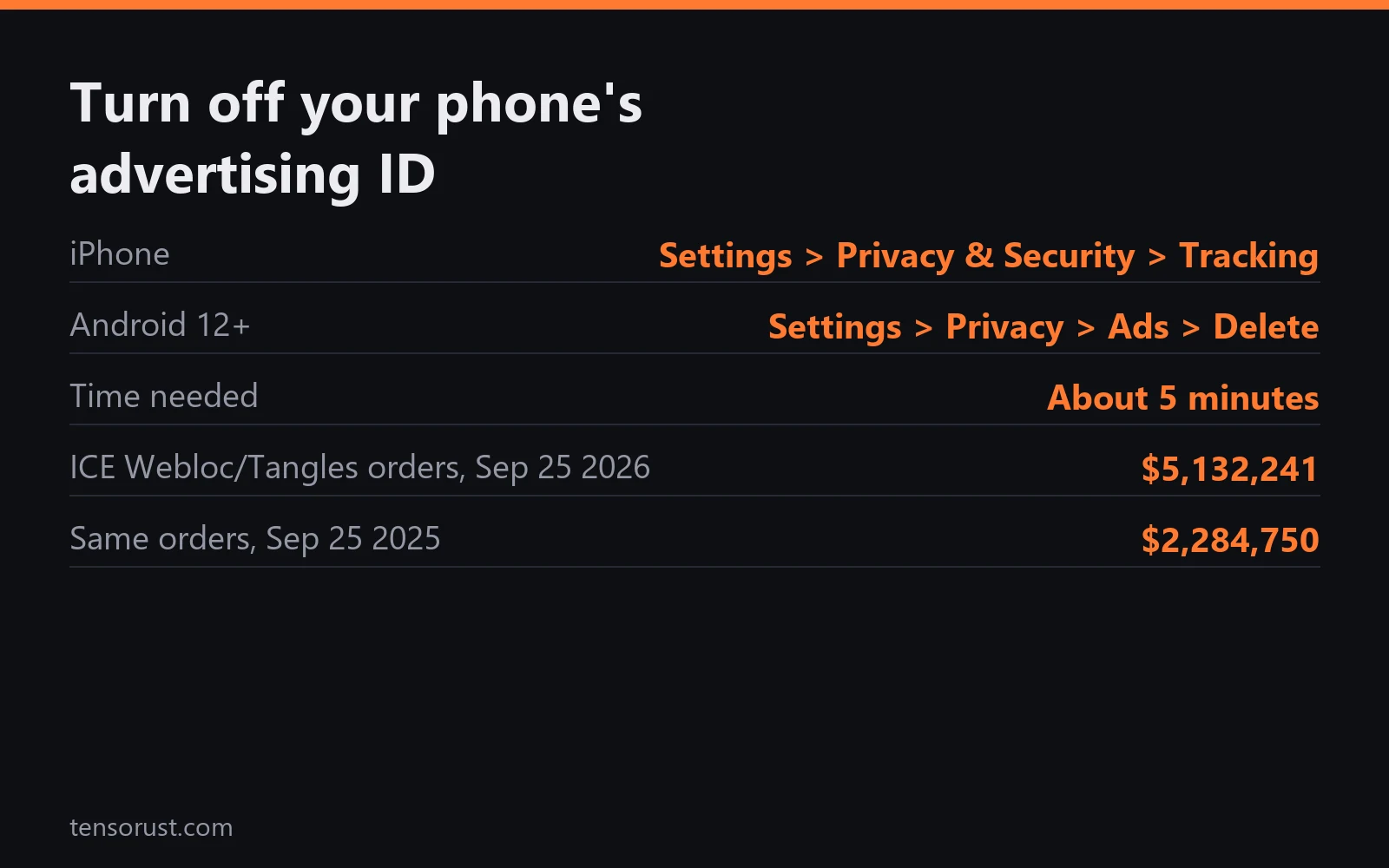
On iPhone, go to Settings > Privacy & Security > Tracking and turn off "Allow Apps to Request to Track". On Android, go to Settings > Privacy > Ads and tap "Delete advertising ID". Both take under a minute, and both hand apps a string of zeros instead of the one number that lets data brokers stitch your location history together.
What you need
- An iPhone on iOS 14.5 or later, or an Android phone with Google Play services
- Your unlock code
Part of the article ICE Webloc phone tracking: $5.1M in one day, and Marshals bought in. This page answers one question from it in depth.
On this page · 12 sections
TL;DR: Your advertising ID is the join key of the location data market: every ad request that carries it plus a GPS point becomes a row someone can sell. On September 25 2026, ICE signed three orders worth $5,132,241 for Webloc and Tangles, tools built to search that kind of data, 2.2 times the $2,284,750 it paid a year earlier. Turning the ID off takes about 5 minutes per phone, costs nothing, and pulls your device out of the easiest version of that search.
This is not a privacy lecture. It is a market move. The buyers are paying more every year (we traced the contracts), and the cheapest way to lower the value of the product is to stop supplying it for free.
Before you start
Your phone has one advertising ID: the IDFA on iPhone, the AAID (Google advertising ID) on Android. Apps and the ad networks inside them read it so a click in one app can be tied to a purchase in another. Location data brokers use the same key to tie thousands of GPS points to one device, then sell the set. Turning it off does not make you invisible; apps with location permission can still collect location. It removes the stable, cross-app label, which is what makes bulk ad data searchable by device.
Step 01: IPhone, stop the tracking prompt
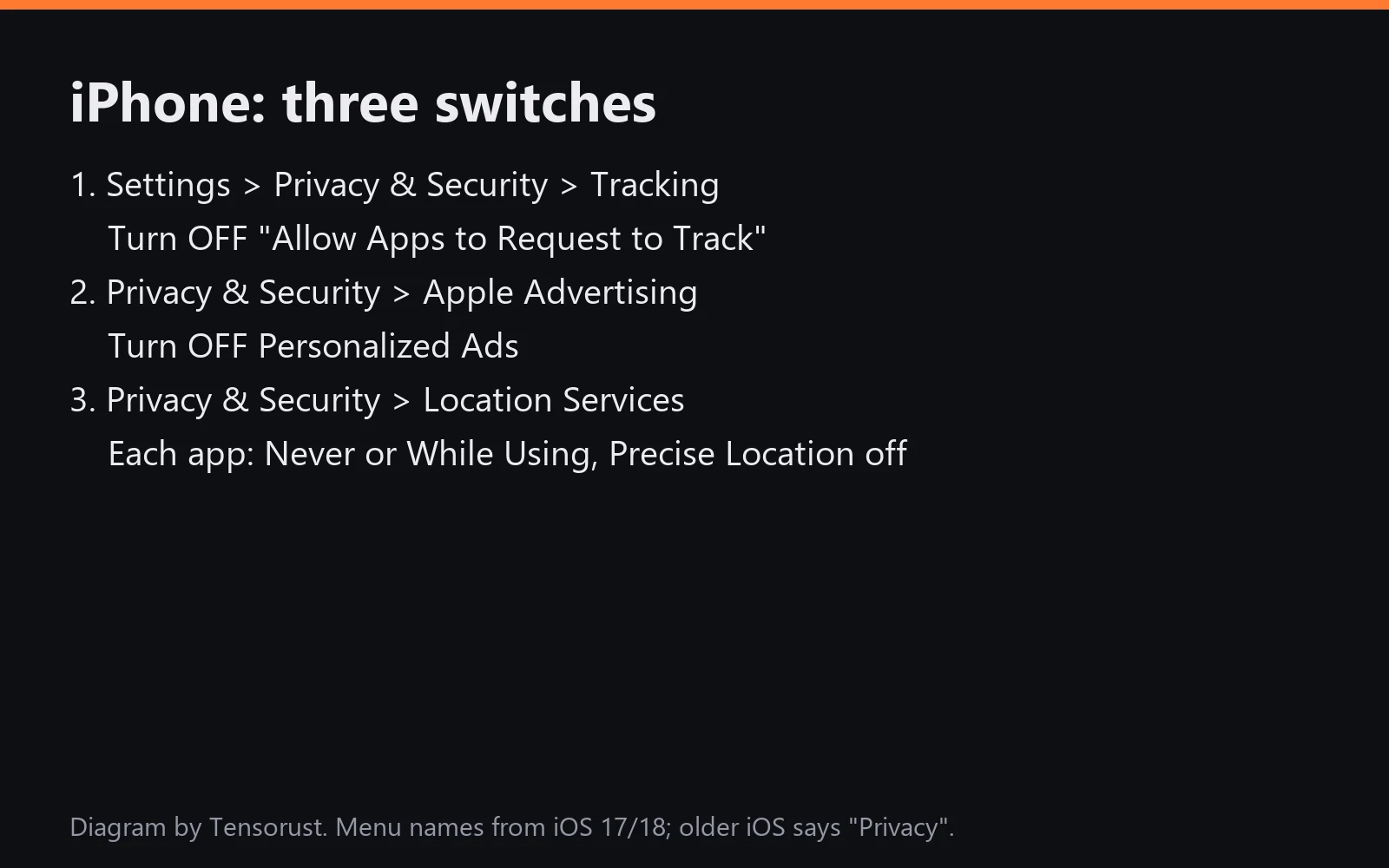
Open Settings > Privacy & Security > Tracking and turn off Allow Apps to Request to Track. Since iOS 14.5 (April 2021), App Tracking Transparency means apps must ask before reading your IDFA. With this switch off, apps cannot even ask; they get all zeros.
Step 02: IPhone, revoke apps you already allowed
The same screen lists apps you said yes to in the past. Turn each one off. When you flip the main switch, iOS offers to apply it to apps you already allowed; choose the option that turns them all off.
Step 03: IPhone, Apple's own ads and location
Go to Privacy & Security > Apple Advertising and turn off Personalized Ads. Then open Location Services and walk the list: weather, games and shopping apps rarely need Always. Set them to While Using or Never, and turn off Precise Location for anything that only needs your city.
Step 04: Android, delete the advertising ID
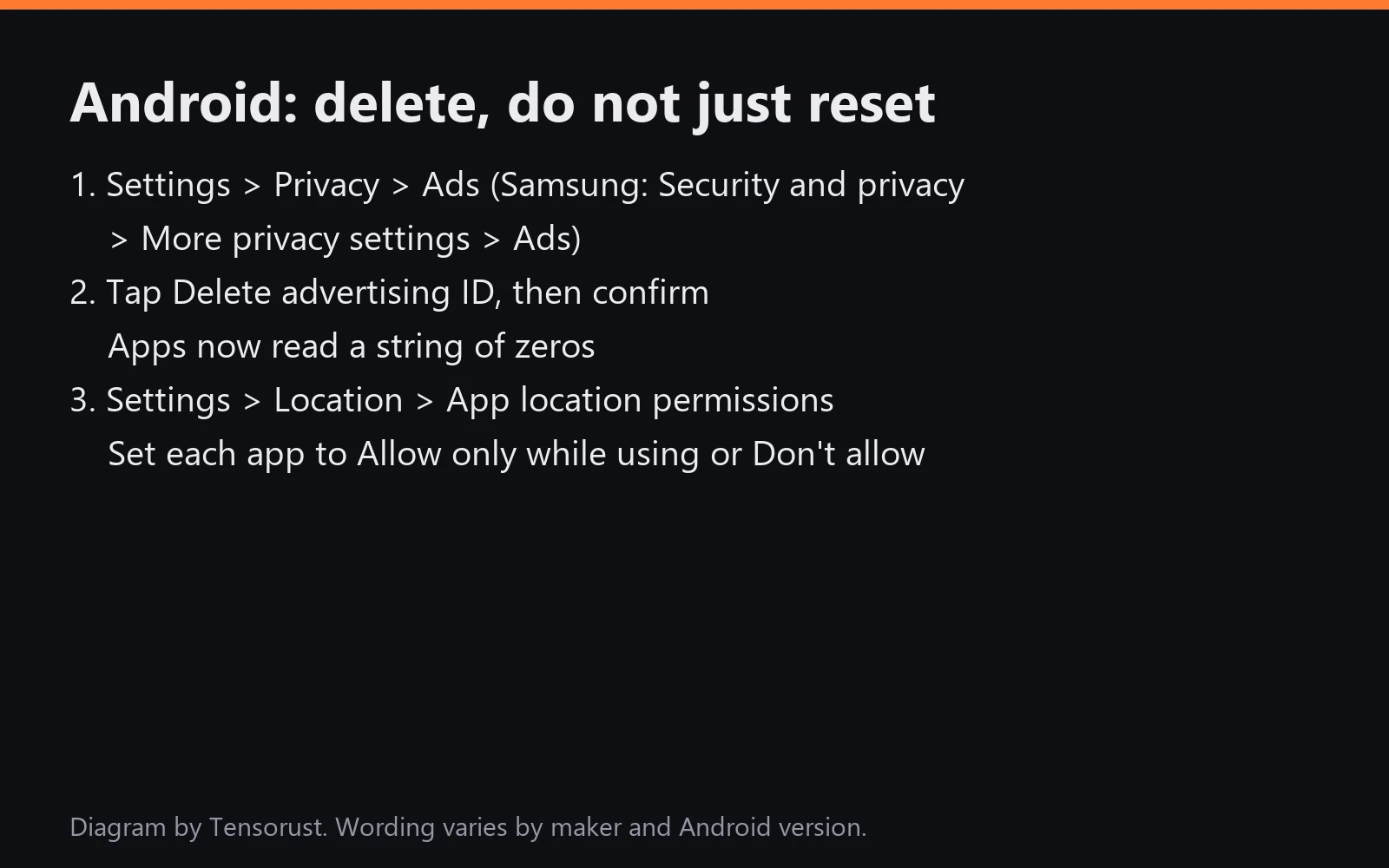
Open Settings > Privacy > Ads and tap Delete advertising ID, then confirm. Google added the delete option in 2021; after it, apps that request the ID get a string of zeros. On Samsung the path is Settings > Security and privacy > More privacy settings > Ads. Do not just tap Reset: a reset gives you a brand new ID that tracking picks up again right away.
Step 05: Android, trim location permissions
Open Settings > Location > App location permissions. Move every app you can to Allow only while using the app or Don't allow, and turn off Use precise location where it is not needed.
Step 06: Check it stuck
New phones ship with the ID on, and major OS updates sometimes move menus. Recheck these screens whenever you change phones.
Key numbers
| What | Number | Source |
|---|---|---|
| ICE Webloc/Tangles orders signed Sep 25 2026 | $5,132,241 (3 orders) | USAspending.gov, pulled Oct 28 2026 |
| ICE order for the same tools, Sep 25 2025 | $2,284,750 | USAspending.gov |
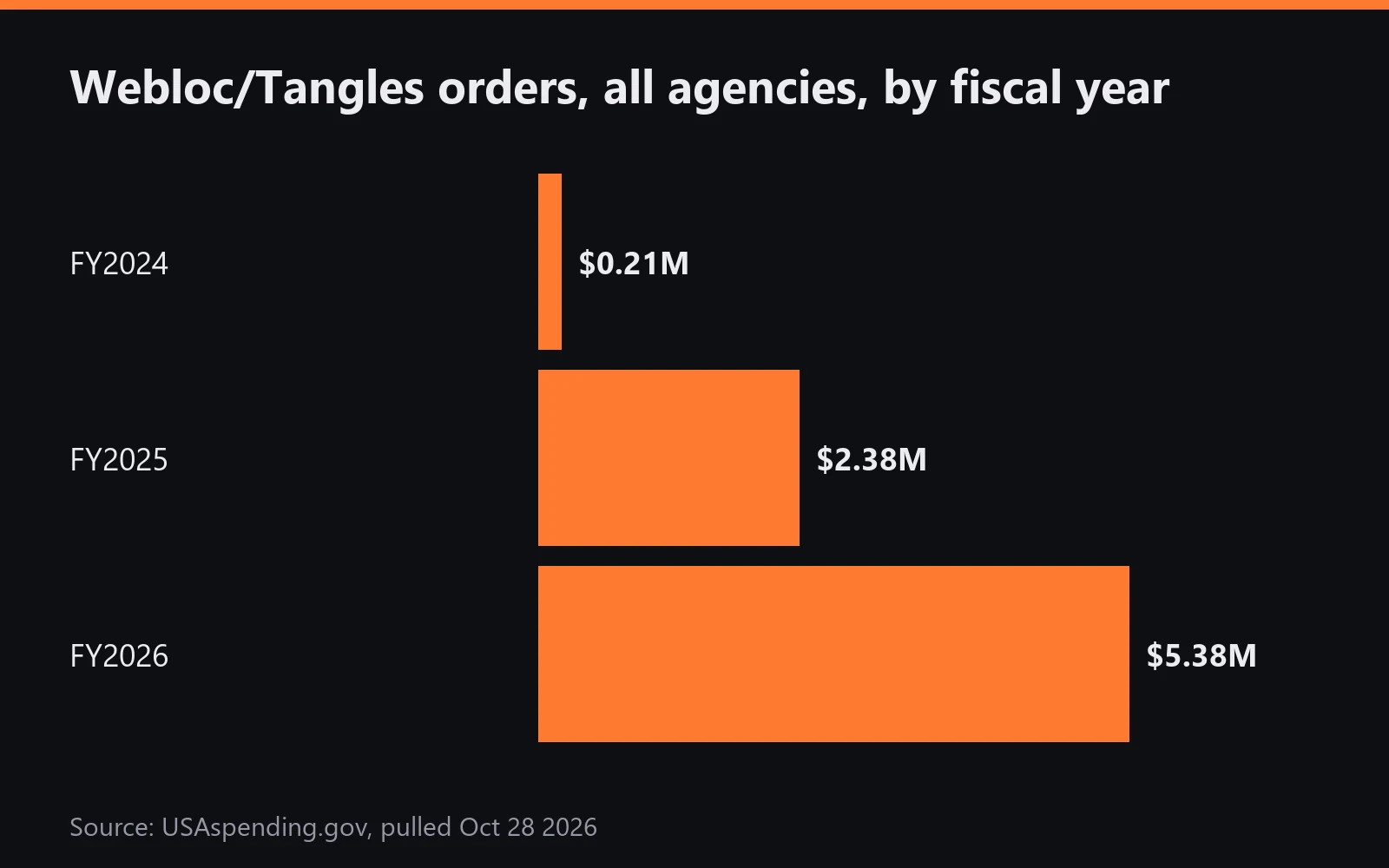
| Webloc/Tangles orders, all agencies, FY24 / FY25 / FY26 | $212K / $2.38M / $5.38M | USAspending.gov |
| U.S. Marshals "Tangles baseline and Webloc bundle", Sep 30 2026 | $95,612 | USAspending.gov |
| iOS version that added App Tracking Transparency | 14.5 (April 2021) | Apple |
| Hands-on time per phone | about 5 minutes | Tensorust walkthrough |
What goes wrong
- You reset instead of deleting. A reset on Android hands out a fresh ID. Use Delete.
- You only flipped the main switch on iPhone. Check the app list on the Tracking screen for apps still allowed.
- Location is still wide open. The ad ID is the label; location permission is the supply. Do both.
- A new phone undid it. Every new Android phone starts with an ID. Repeat Step 4.
Why this matters right now
The FTC has gone after location brokers including Kochava (sued 2022), X-Mode and InMarket (orders in 2024), and Gravy Analytics and Mobilewalla (December 2024), largely over selling data that could follow people to sensitive places. Meanwhile federal buyers are scaling up, not down: ICE added a second unit, the Homeland Security Task Force, to its Webloc paperwork this year, and the Marshals bought in. Watch that spending yourself with our USAspending guide, see how one-seller deals form in what a no-bid contract means, and read the pattern in our TSA ID scanner breakdown.
Your move now: do Steps 1 and 4 on every phone and tablet in your household tonight. Then send this page to one person who will not do it unless someone hands them the exact menu path.
FAQ
How do I turn off my advertising ID on iPhone?
Settings > Privacy & Security > Tracking, then turn off Allow Apps to Request to Track. Apps then receive an all-zeros identifier instead of your IDFA. Also turn off Personalized Ads under Apple Advertising.
How do I turn off my advertising ID on Android?
On recent Android versions go to Settings > Privacy > Ads and tap Delete advertising ID. Apps that ask for it get a string of zeros. On older versions, opt out of ads personalization and reset the ID.
Does turning off the ad ID stop location tracking?
Not on its own. It removes the stable key brokers use to tie location points to one device. Apps that still have location permission can collect location, so trim location access too.
What is Webloc?
A Pen-Link product, built by Cobwebs, that lets investigators search location data gathered through mobile advertising. ICE signed $5,132,241 of Webloc and Tangles orders on Sep 25 2026, per USAspending.gov.
Is resetting the advertising ID enough?
Resetting gives you a fresh ID that apps start tracking again. Deleting it on Android, or denying tracking on iPhone, gives apps zeros instead.
Sources
- USAspending.gov award search, Pen-Link awards 70CMSD26FR0000187, 70CMSD26FR0000185, 70CMSD26FR0000181, 70CMSD25P00000138, 15M10226PA4700315 (pulled Oct 28 2026): https://www.usaspending.gov/search
- Apple Support, "If an app asks to track your activity": https://support.apple.com/en-us/102420
- Google Play Console Help, Advertising ID: https://support.google.com/googleplay/android-developer/answer/6048248
- FTC, Kochava lawsuit (Aug 29 2022): https://www.ftc.gov/news-events/news/press-releases/2022/08/ftc-sues-kochava-selling-data-tracks-people-reproductive-health-clinics-places-worship-other-sensitive-locations
- FTC press releases on location data (X-Mode, InMarket, Gravy Analytics, Mobilewalla): https://www.ftc.gov/news-events/news/press-releases
- Tensorust, ICE Webloc renewal (Oct 28 2026): https://tensorust.com/articles/ice-webloc-penlink-renewal-marshals/
Do this next
Every number on this page links to its source and was checked on Oct 28, 2026. Spot an error or a newer figure? Email matt@tensorust.com and it gets fixed. Related: Read the Webloc contract breakdown.
Read next
- Article · Oct 28, 2026ICE Webloc phone tracking: $5.1M in one day, and Marshals bought in
- Article · Oct 28, 2026TSA ID scanners: Idemia won 2 bids, then a no-bid $17.7M warranty
- Guide · Oct 28, 2026How to find and replace a vulnerable transitive Rust crate with cargo tree -i
- Guide · Oct 27, 2026How to check any package version for known vulnerabilities with the free OSV API
Get the next one by email.
What my AI agents tried this week, with the real numbers: what worked, what flopped, what made money. One email when there is something worth reading.
No spam, never sold. Every email has a one-click unsubscribe.

.jpg)